css3 animation實現逐幀動畫
編輯:CSS特效代碼
css3裡面的animation屬性非常強大,但是自己用的比較少,最近有次面試就剛好被問到了,趁現在有時間就對animation做一個小總結。同時實現一個逐幀動畫的demo作為練習
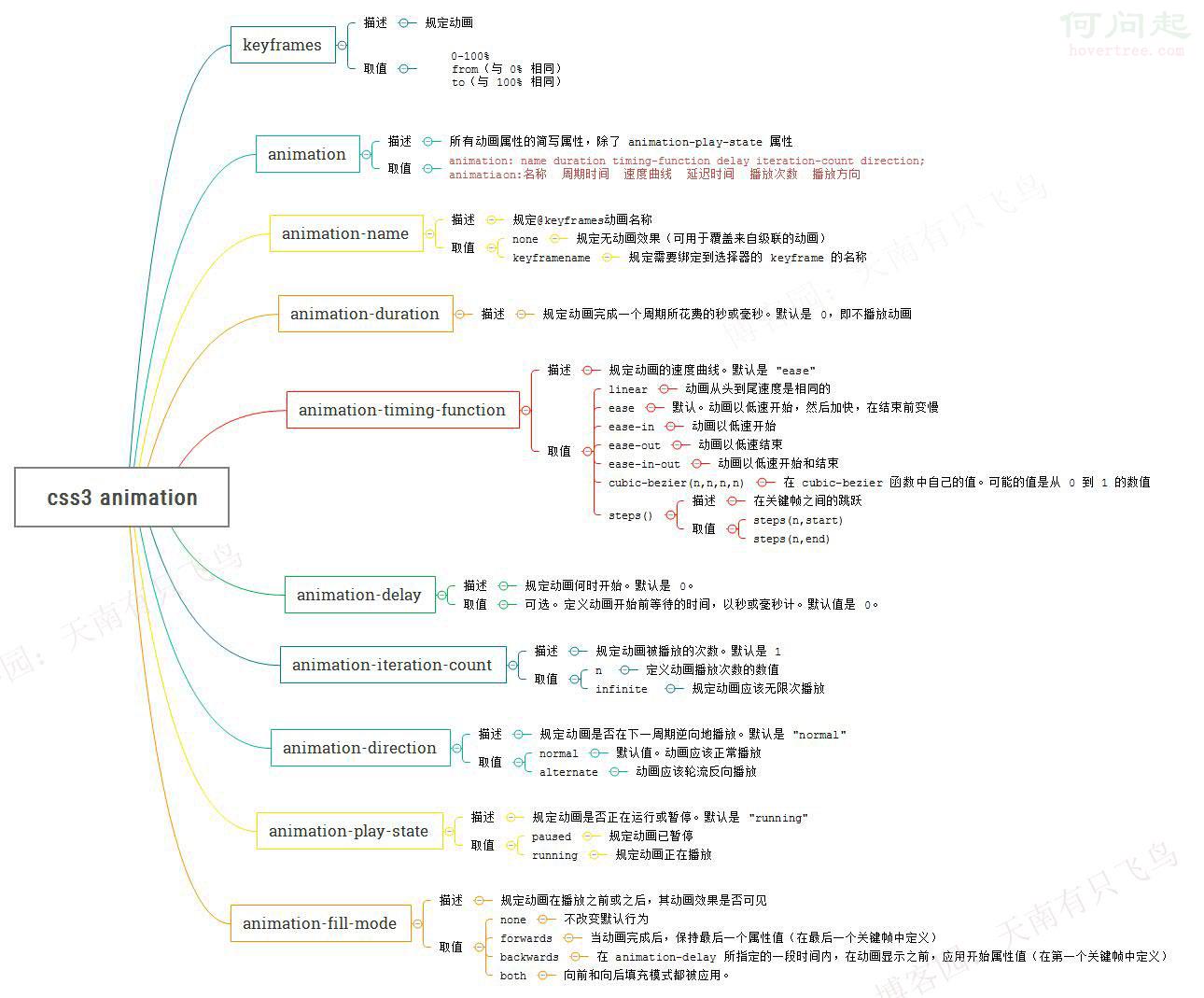
animation屬性一覽
因為animation屬性比較多,然後在w3c上看有點蛋疼,干脆也做了一份導圖,以後想查看,就一目了然了
使用animation實現逐幀動畫
熟悉了animation的屬性之後,得找個簡單的小項目實現下,逐幀動畫好有意思,先跑一個滿足下自己
思路很簡單,就是給元素一個雪碧圖的背景,然後添加的幀動畫更改background-position,關鍵代碼:
@keyframes run{
    from{
        background-position: 0 0;
    }
    to{
        background-position: -1540px 0 ;
    }
}
div{
    width:140px;
    height:140px;
    background: url(run.png) ;
    animation-name:run;
    animation-duration:1s;
    animation-iteration-count:infinite;
}
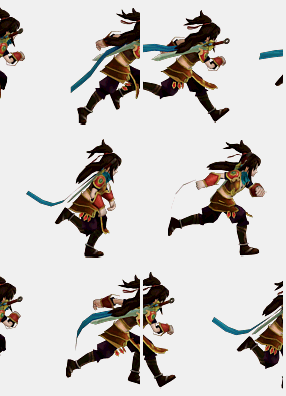
但是跑起來後我們發現,每幀動畫之間幀動畫都是滑動,並不是我們要的效果,為什麼呢?
原來animation默認以ease方式過渡,它會在每個關鍵幀之間插入補間動畫,所以動畫效果是連貫性的
知道原因就好辦了,解決思路就是:
@keyframes run{
    0%, 8%{  /*動作一*/  }
    9.2%, 17.2%{  /*動作二*/  }
    ...
}
step1:動作之間停留8幀,0%設置動作一,動作一結束在8%
step2:動作之間過渡1.2幀,9.2%設置動作二,動作二結束在17.2%
完整代碼:


 <!DOCTYPE html>
 <html lang="en">
 <head>
     <meta charset="UTF-8">
     <title>css3逐幀動畫</title>
     <style>
     @keyframes run{
     0%, 8%{  background-position: 0 0;  }
     9.2%, 17.2%{  background-position: -140px 0;  }
     18.4%, 26.4%{  background-position: -280px 0 ;  }
     27.6%, 35.6%{  background-position: -420px 0 ;  }
     36.8%, 44.8%{  background-position: -560px 0 ;  }
     46%, 54%{  background-position: -700px 0 ;  }
     55.2%, 63.2%{  background-position: -840px 0 ;  }
     64.4%, 72.4%{  background-position: -980px 0 ;  }
     73.6%, 81.6%{  background-position: -1120px 0 ;  }
     82.8%, 90.8%{  background-position: -1400px 0 ;  }
     92%, 100%{  background-position: -1540px 0 ;  }
     }
     @-webkit-keyframes run{
     0%, 8%{  background-position: 0 0;  }
     9.2%, 17.2%{  background-position: -140px 0;  }
     18.4%, 26.4%{  background-position: -280px 0 ;  }
     27.6%, 35.6%{  background-position: -420px 0 ;  }
     36.8%, 44.8%{  background-position: -560px 0 ;  }
     46%, 54%{  background-position: -700px 0 ;  }
     55.2%, 63.2%{  background-position: -840px 0 ;  }
     64.4%, 72.4%{  background-position: -980px 0 ;  }
     73.6%, 81.6%{  background-position: -1120px 0 ;  }
     82.8%, 90.8%{  background-position: -1400px 0 ;  }
     92%, 100%{  background-position: -1540px 0 ;  }
     }
     div{
         width:140px;
         height:140px;
         background: url(http://hovertree.com/hvtimg/bjafab/2ttynnpi.png) ;
         animation:run 1s infinite;
             -webkit-animation:run 1s infinite;
         animation-fill-mode : backwards;
             -webkit-animation-fill-mode : backwards;
     }
     </style>
 </head>
 <body>
     <div></div>
 </body>
 </html>
View Code
還有另外一個實現方法,就是利用steps(),就是幀之間的階躍動畫,這個在w3c裡面沒有寫,先貼個圖
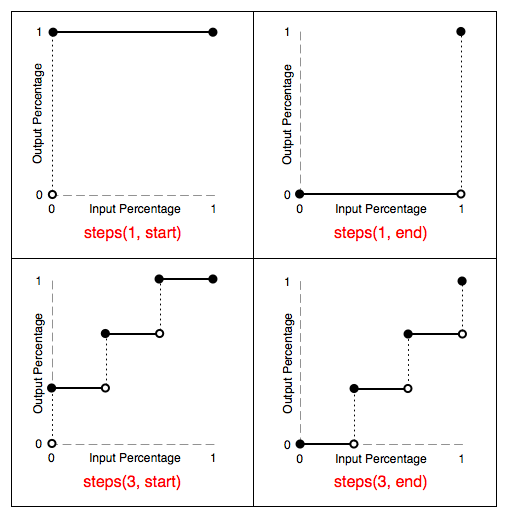
由上圖可知:
steps(1,start):動畫一開始就跳到 100% 直到這一幀(不是整個周期)結束
steps(1,end):保持 0% 的樣式直到這一幀(不是整個周期)結束
另外也可以直接設置
animation-timing-function:step-start/step-end
step-start效果等同於steps(1,start),step-end效果等同於steps(1,end)
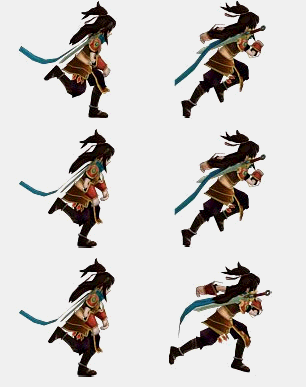
最終效果,因為錄制的問題可能有點卡頓,有興趣的同學可以直接復制代碼去跑下:
完整代碼:
 <!DOCTYPE html>
     <html lang="en">
     <head>
         <meta charset="UTF-8">
         <title>css3逐幀動畫</title>
         <style>
         @keyframes run{
             0%{
                 background-position: 0 0;
             }
             8.333%{
                 background-position: -140px 0;
             }
             16.666%{
                 background-position: -280px 0 ;
             }
             25.0%{
                 background-position: -420px 0 ;
             }
             33.333%{
                 background-position: -560px 0 ;
             }
             41.666%{
                 background-position: -700px 0 ;
             }
             50.0%{
                 background-position: -840px 0 ;
             }
             58.333%{
                 background-position: -980px 0 ;
             }
             66.666%{
                 background-position: -1120px 0 ;
             }
             75.0%{
                 background-position: -1260px 0 ;
             }
             83.333%{
                 background-position: -1400px 0 ;
             }
             91.666%{
                 background-position: -1540px 0 ;
             }
             100%{
                 background-position: 0 0 ;
             }
         }
         @-webkit-keyframes run{
             0%{
                 background-position: 0 0;
             }
             8.333%{
                 background-position: -140px 0;
             }
             16.666%{
                 background-position: -280px 0 ;
             }
             25.0%{
                 background-position: -420px 0 ;
             }
             33.333%{
                 background-position: -560px 0 ;
             }
             41.666%{
                 background-position: -700px 0 ;
             }
             50.0%{
                 background-position: -840px 0 ;
             }
             58.333%{
                 background-position: -980px 0 ;
             }
             66.666%{
                 background-position: -1120px 0 ;
             }
             75.0%{
                 background-position: -1260px 0 ;
             }
             83.333%{
                 background-position: -1400px 0 ;
             }
             91.666%{
                 background-position: -1540px 0 ;
             }
             100%{
                 background-position: 0 0 ;
             }
         }
         div{
             width:140px;
             height:140px;
             background: url(http://hovertree.com/hvtimg/bjafab/2ttynnpi.png) ;
             animation:run 1s steps(1, start) infinite;
                 -webkit-animation:run 1s steps(1, start) infinite;
         }
         </style>
     </head>
     <body>
         <div></div>
     </body>
View Code
小編推薦
熱門推薦