面試題:如何用css讓一個容器水平垂直居中?
編輯:CSS特效代碼
<!DOCTYPE html>
<html>
    <head>
        <meta charset="UTF-8">
        <title>demo</title>
    </head>
    <body>
        <style type="text/css">
            .div1{  width: 100px; height: 100px; border: 1px solid #000000;}
            .div2{ width:40px ; height: 40px; background-color: green;}
        </style>

        <div class="div1">
            <div class="div2">

            </div>
        </div>

    </body>
</html>
問題:如何讓class為div2的內部容器上下左右居中?
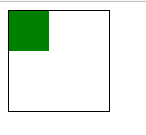
前來面試的朋友大多數回答都不那麼正確,筆者在這裡給大家做一個詳細的介紹
1. 我們可以使用margin來達到這個效果
.div2{ width:40px ; height: 40px; background-color: green; margin-top: 30px; margin-left: 30px;}
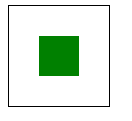
--------我們需要將div2的margin-left、margin-top值設置為父容器寬度的二分之一 減去 自身寬度的二分之一 這裡的父容器是div1
它的寬度是100px ; div2的寬度是40px 由此得出 margin-top: 30px; margin-left: 30px; div2也就居中了; 效果如下圖
2.利用絕對定位 position:absolute 配合margin的auto屬性 來達到居中的效果 我們可以將css修改為
.div1{  width: 100px; height: 100px; border: 1px solid #000000; position: relative;}
.div2{ width:40px ; height: 40px; background-color: green; position: absolute; margin: auto; left: 0; top: 0; right: 0; bottom: 0;}
--------將div2設置為相對div1的絕對定位,margin設為四邊auto left、top、bottom、right設為0 浏覽器會對絕對定位的容器margin:auto自動識別,
最後得到類似於margin:0 auto的效果;
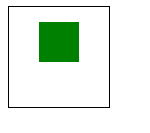
而我們也可以將left、top、bottom、right設為你想要的值 讓div2可以在div1中的任意位置,只是定位的原點被margin:auto移動在div2的左上角;例如:
.div2{ width:40px ; height: 40px; background-color: green; position: absolute; margin: auto; left: 0; top: -30px; right: 0; bottom: 0;}
此時div2的位置在垂直居中的-30px的地方;
總結:在我們的網頁中,經常會遇到這樣的需求 彈窗的居中,圖片的居中,很多童鞋采用js算法動態設置left、top ; 而這一步是沒有必要的;
最後謝謝大家;也感謝大家指正
小編推薦
熱門推薦