margin負值使用之八大絕技
編輯:CSS詳解
相信關於margin負值的使用,每個人都有自己的一套方法。在這裡,整理了一下平時常用的一些margin負值制作的效果,與大家分享!
先來看一下margin負值的原理解析圖:
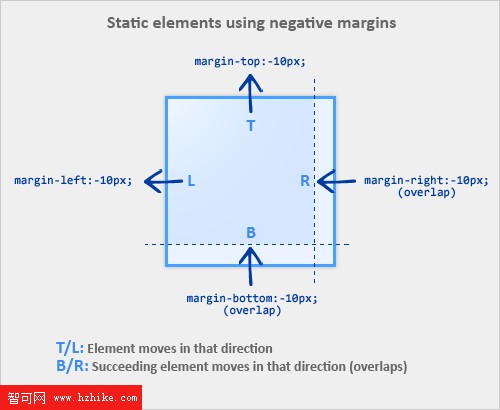
當給一個元素設置margin 負值(top/left),該元素將在該方向上產生位移。例如:
/* 元素向上位移10px */
.demo {margin-top:-10px;}
二、當給一個元素設置margin負值(bottom/right),這個元素並不會像你所預想的產生位移,而是將任何緊隨其後的元素“拉”過來,覆蓋在自己的上邊。例如:
/* 所有緊隨元素demo之後的元素向上位移10px */
.demo {margin-bottom:-10px;}
注:如果元素沒有設置寬度,那麼給該元素設置margin負值(left/right)將會在兩個方向增大其寬度,看起來就好像給該元素添加了padding。
【案例解析】
一、三欄顯示(無需浮動及額外標簽);
列表過長時,我們一般都會考慮通過浮動來使之顯示為多列,其實換個思路也可以實現。
<!doctype html>
<html lang="en">
<head>
    <meta charset="UTF-8">
    <title>negative margin 之列表三欄顯示</title>
    <style>
    *{margin:0;padding:0;font-size: 14px;}
    .goback{clear:both;height:30px;line-height:30px;text-align: center;}

    ul {list-style:none;}
    li {width:100px;overflow:hidden;white-space:nowrap;text-overflow:ellipsis;line-height:1.3em;}
    .col2 {margin-left:120px;}
    .col3 {margin-left:240px;}
    .top {margin-top:-2.6em;}
    </style>
</head>
<body>
    <ul>
        <li class="col1">10家國企年招待費超29億 被指僅用於吃喝</li>
        <li class="col1">媒體稱中國豪車市場因政府嚴控公車快速萎縮</li>
        <li class="col2 top">菲發言人笑答射殺台漁民事件</li>
        <li class="col2">情婦打越洋電話提供證據</li>
        <li class="col3 top">雷政富涉嫌受賄罪被檢察機關提起公訴</li>
        <li class="col3">日稱沖繩久米島附近海域發現疑似中國海軍潛艇</li>
    </ul>
</body>
</Html>
二、疊加效果;
最常見的選項卡,當前項選中狀態;
<!doctype html>
<html lang="en">
<head>
    <meta charset="UTF-8">
    <title>negative margin 之疊加</title>
    <style>
    *{list-style:none;margin:0;padding:0;font-size: 12px;}
    .clearfix:after {
    clear: both;
    display: block;
    height: 0;
    line-height: 0;
    visibility: hidden;
    content: "";
}
    .clearfix {*zoom:1;}
    .goback{clear:both;height:30px;line-height:30px;text-align: center;}

    .demo{width:400px;}
    .tab{
    border-bottom:1px solid #66CC66;
    }
    .tab li{
    float:left;
    display:inline;
    margin-left:8px;
    }
    .tab li a{
    background-color:#CCFFCC;
    border:1px solid #66CC66;
    color:#666;
    display:block;
    margin-bottom:-1px;
    padding:0 5px;
    line-height:20px;
    float:left;
    font-weight:bold;
    text-decoration:none;
    }
    .tab li .current,
    .tab li a:hover{
    background-color:#fff;
    border-bottom:1px solid #fff;
    _position:relative;
    }
    .cont{padding:10px;border:1px solid #6c6;border-top:0;}
    </style>
</head>
<body>
    <div class="demo">
        <div id="demo2">
                    <ul class="tab clearfix">
                        <li><a href="#" class="current">Tab One</a></li>
                        <li><a href="#">Tab Two</a></li>
                        <li><a href="#">Tab Three</a></li>
                        <li><a href="#">Tab Four</a></li>
                    </ul>
                </div>
        <div class="cont">荒涼的曠野,一群暴虐的劫匪正在鞭撻一位美麗的姑娘瑪麗亞(蘿蕾丹娜·卡波萊特 Loredana Cappelletti飾)。幸得迪亞戈(弗蘭科·尼羅 Franco Nero飾)的解救。他神秘而冷峻,拖著一副棺材漫步在泥濘的荒野上。迪亞戈帶著瑪麗亞來到荒涼的小鎮,人們對他的到來充滿好奇,更對這副棺材裡隱藏的秘密而惶惶不安。</div>
    </div>
</body>
</Html>
三、兩列流式布局;
固定寬度的布局so easy,配合浮動輕松搞定兩列自適應布局,三列同理。
<!doctype html>
<html lang="en">
<head>
    <meta charset="UTF-8">
    <title>negative margin 之兩列自適應布局</title>
    <style>
    *{list-style:none;margin:0;padding:0;font-size: 12px;}
    .goback{clear:both;height:30px;line-height:30px;text-align: center;}

    .layout{width:960px;margin:0 auto;background:#f5f5f5;}
    .main{float:left;width:100%;height:300px;margin:0 -200px 0 0;background:#ccc;}
    .main-wrap{margin:0 210px 0 0;}
    .aside{float:left;width:200px;height:300px;background:#f5f5f5;}
    </style>
</head>
<body>
    <div class="layout">
        <div class="main">
            <div class="main-wrap">main</div>
        </div>
        <div class="aside">aside</div>
    </div>
</body>
</Html>
四、去除多余的外邊距;
圖文混排,每行最後一個元素的margin值如何處理?單獨設置類名消0?通過父層來裁切?使用margin負值吧!
<!doctype html>
<html lang="en">
<head>
    <meta charset="UTF-8">
    <title>negative margin 之去除多余外邊距</title>
    <style>
    *{list-style:none;margin:0;padding:0;font-size: 12px;}
    .clearfix:after {
    clear: both;
    display: block;
    height: 0;
    line-height: 0;
    visibility: hidden;
    content: "";
}
    .clearfix {*zoom:1;}
    .goback{clear:both;height:30px;line-height:30px;text-align: center;}

    .demo{width:320px;margin:0 auto;padding:10px 0;*overflow:hidden;background:green;}
    .figure-list{margin:0 -10px 0 0;}
    .figure-list li{float:left;width:100px;height:100px;margin:0 10px 10px 0;background:#f5f5f5;}
    </style>
</head>
<body>
    <div class="demo">
        <ul class="figure-list clearfix">
            <li>item-1</li>
            <li>item-2</li>
            <li>item-3</li>
            <li>item-4</li>
            <li>item-5</li>
            <li>item-6</li>
        </ul>
    </div>
</body>
</Html>
- 上一頁:關於提高浏覽器渲染頁面速度的建議
- 下一頁:純css寫出tips的幾種方法
相關文章
- margin-left設置左邊距 CSS左外邊距設置
- margin-right css右外邊距 右外邊間隔
- 解決wx.onMenuShareTimeline出現的問題
- js 自帶的 map() 方法全面了解
- Lavarel框架中使用ajax提交表單的方法
- 完美解決ajax跨域請求下parsererror的錯誤
- Servlet 與 Ajax 交互一直報status=parsererror的解決辦法
- jQuery插件HighCharts實現氣泡圖效果示例【附demo源碼】
- jQuery插件HighCharts實現的2D堆條狀圖效果示例【附demo源碼下載】
- jQuery插件HighCharts繪制的2D堆柱狀圖效果示例【附demo源碼下載】
小編推薦
熱門推薦