有些 CSS 屬性我們用了幾百次,卻從沒想過它還有別的用途或隱藏行為。以下幾點多數人都會中。
1. color 並非只能用來設定文字顏色
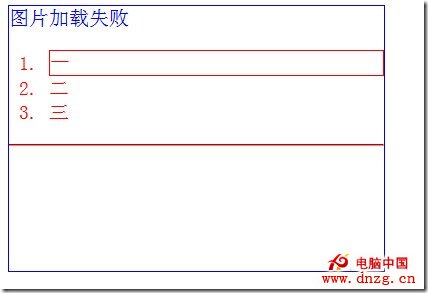
color 除了文字,還能替頁面上許多東西上色:圖片載入失敗時 alt 文字的顏色、清單項目的邊框、無序清單前面的圓點、有序清單前面的數字,以及 hr 元素。
<html>
<head>
<meta http-equiv="content-type" content="text/html;charset=utf-8">
<style type="text/css">
#div1
{
width: 375px;
height: 265px;
border: 1px solid blue;
}
</style>
</head>
<body>
<div id="div1">
<img src="test.jpg" alt="圖片加載失敗" style="color:blue">
<ol style="color:red;">
<li style="border: 1px solid">一</li>
<li>二</li>
<li>三</li>
</ol>
<hr style="color:red" />
</div>
</body>
</html>
2. visibility 有第三個值:collapse
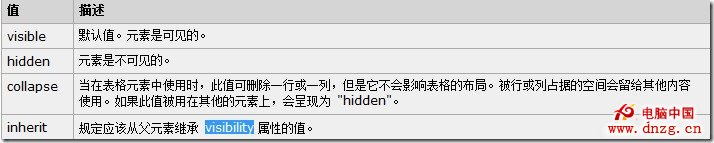
大多數時候我們只把 visibility 設成 visible(所有元素的預設值)或 hidden。後者相當於 display:none,但元素仍佔用頁面空間。其實還有第三個值 collapse,主要作用在表格列與列群組上,效果接近「隱藏並移除佔位」。
3. background 簡寫多了三個屬性值
CSS2.1 時期 background 簡寫包含五個值:background-color、background-image、background-repeat、background-attachment、background-position。CSS3 又補上三個,總共八個:
background: [background-color] [background-image] [background-repeat]
            [background-attachment] [background-position]
            / [background-size] [background-origin] [background-clip];
注意那個斜線,用法與 font、border-radius 簡寫中的斜線類似:在支援的瀏覽器裡,斜線後面接著寫 background-size。實際寫起來像這樣:
.example {
  background: aquamarine url(img.png) no-repeat scroll
              center center / 50% content-box content-box;
}
4. clip 只在絕對定位的元素上生效
img
{
width: 200px;
height: 200px;
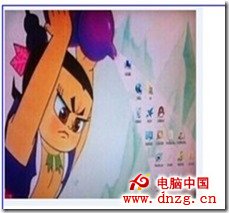
clip: rect(0px 50px 200px 0px)
}
搭配 <img src="bei.jpg" alt="圖片加載失敗" style="color:blue"> 時,你會發現完全沒有裁切效果。
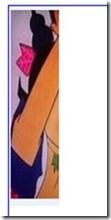
加上絕對定位後就正常了:
img
{
width: 200px;
height: 200px;
position: absolute;
clip: rect(0px 50px 200px 0px)
}
5. 垂直方向的百分比是對寬度計算,不是高度
百分比寬度相對父容器寬度計算,這大家都知道。但 padding-top、padding-bottom、margin-top、margin-bottom 這些垂直方向的屬性,用百分比設定時依據的仍然是父容器的寬度,而不是高度。給圖片加上:
padding-top: 10%;
從實際效果與估算距離就能驗證,它是照寬度算的。
6. border-width 有預定義關鍵字
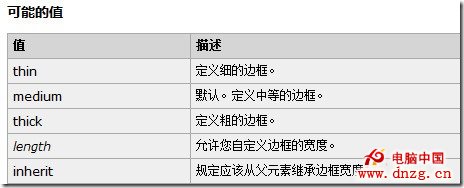
除了 5px、1em 這類標準數值,border-width 還接受 medium、thin、thick 三個關鍵字。而且如果你完全不指定 border-width,它的預設值就是 medium。
7. table 的 empty-cells 屬性
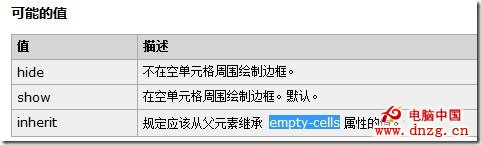
empty-cells 的瀏覽器支援相當好,連 IE8 都支援:
table { empty-cells: hide; }
顧名思義,它告訴瀏覽器:當某個表格儲存格裡沒有內容時,就把它隱藏起來。要注意的是,empty-cells 只在「分離邊框」模式下有效,也就是必須搭配 border-collapse:separate;。
8. font-style 的 oblique 值
font-style 我們平常只見到 normal 與 italic,但其實還有第三個值 oblique,它會產生機械傾斜的效果,而不是使用真正的義大利體字型。
9. word-wrap 與 overflow-wrap 是等效的
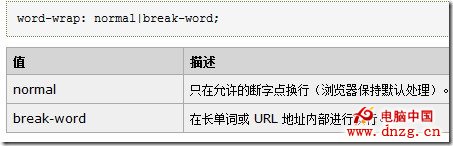
word-wrap 並不常用,但在特定場景非常好用,最典型的就是讓頁面上的長網址換行而不是撐破版面:
<div style="width:250px;height:250px;border:1px solid red;word-wrap:break-word">
My father was a self-taught mandolin player.
He was one of the best string instrument players in our town.
He could not read music, but if he heard a tune a few times,
he could play it. When he was younger,
</div>
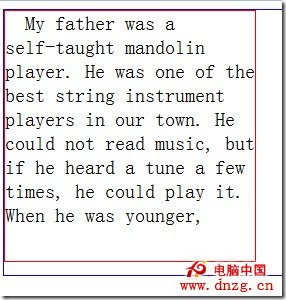
長單字沒有被裁開,而是整字換到下一行。把 word-wrap 換成 overflow-wrap,效果完全相同——兩者是同一個屬性的不同名稱。
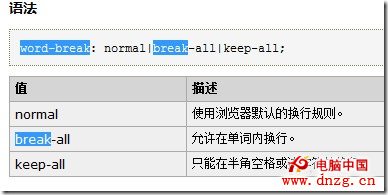
但要注意 word-break 不一樣,它會直接把長單字切開:
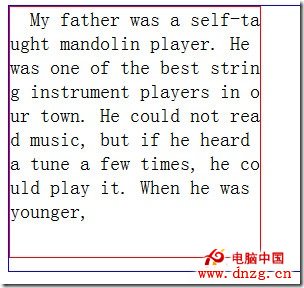
<div style="width:250px;height:250px;border:1px solid red;word-break:break-all">
My father was a self-taught mandolin player.
He was one of the best string instrument players in our town.
He could not read music, but if he heard a tune a few times,
he could play it. When he was younger,
</div>
word-wrap 可取值:
word-break 可取值:
- 上一篇文章: 瀏覽器如何決定 CSS 優先級:計算規則與 !important 的正確用法
- 下一篇文章: :link、:visited、:focus、:hover、:active 的順序為什麼不能亂寫