CSS 讓多個 DIV 依指定順序重疊的實作教學
編輯:CSS詳解
要讓兩個以上的方塊疊在一起,而且順序完全照自己的意思排,靠的是絕對定位加上 z-index。
需要的三個關鍵樣式
重疊本身:z-index 決定前後;position: relative 與 position: absolute 讓元素可定位;left/right/top/bottom 決定具體位置。
輔助觀察:寬高用 width、height,再給每層不同 background 顏色,重疊關係才看得清楚。
案例一:不指定順序
<!DOCTYPE html>
<html>
<head>
<meta charset="utf-8" />
<title>DIV 重疊:未排序</title>
<style>
.div-relative {
  position: relative; color: #000;
  border: 1px solid #000;
  width: 500px; height: 400px;
}
.div-a {
  position: absolute; left: 30px; top: 30px;
  background: #F00; width: 200px; height: 100px;
}
.div-b {
  position: absolute; left: 50px; top: 60px;
  background: #FF0; width: 400px; height: 200px;
}
.div-c {
  position: absolute; left: 80px; top: 80px;
  background: #00F; width: 300px; height: 300px;
}
</style>
</head>
<body>
<div class="div-relative">
  <div class="div-a">紅色</div>
  <div class="div-b">黃色</div>
  <div class="div-c">藍色</div>
</div>
</body>
</html>
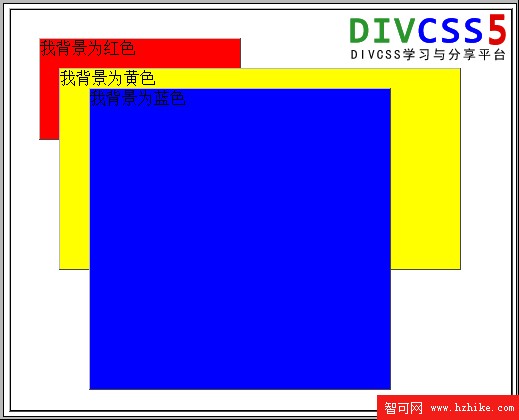
父層用 position: relative 建立定位基準,子層用 position: absolute 就能在父層內任意擺放。此時的堆疊順序完全由原始碼決定:後寫的在上面。所以藍色的 div-c 壓在最上層,黃色居中,紅色在最底。
案例二:用 z-index 顛覆順序
不改動任何 HTML,只替三個 class 加上 z-index:
.div-a { position: absolute; left: 30px; top: 30px; z-index: 100; background: #F00; width: 200px; height: 100px; }
.div-b { position: absolute; left: 50px; top: 60px; z-index: 80;  background: #FF0; width: 400px; height: 200px; }
.div-c { position: absolute; left: 80px; top: 80px; z-index: 70;  background: #00F; width: 300px; height: 300px; }
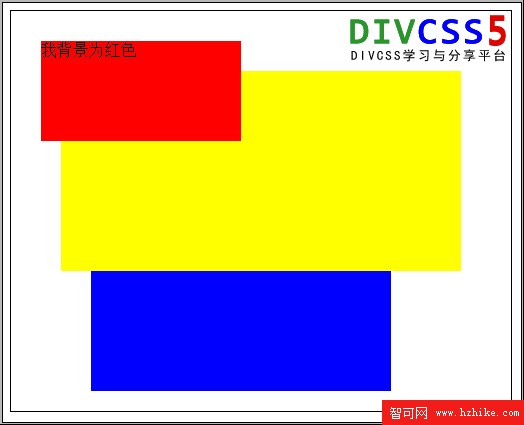
紅色(100)躍升最上層,藍色(70)退到最底,黃色維持中間。這正是 z-index 的價值:視覺順序與原始碼順序解耦,語意結構可以照邏輯寫,畫面則照設計排。
實務提醒
z-index 的值取正整數,越大越靠前,但請留整數間距(例如 10、20、30)以便日後插入新層。另外別忘了:z-index 只在元素已定位時才有效,且父層若建立了自己的層疊上下文,子層再高也跳不出來。
- 上一篇文章: CSS color 屬性詳解:網頁文字顏色的設定方式
- 下一篇文章: 純 CSS 製作的清新型側邊導航選單(適合個人中心)