做完 CSS calendar 之後,我一直想再試著用 CSS 做一個表格範式:既要符合親和力規則,視覺上也要過得去。
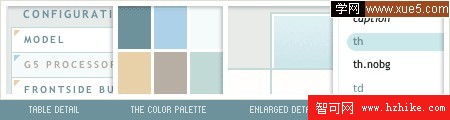
圖:顏色的選擇與搭配
用表格承載表格類資料本來就是最合適的選擇,而且每一格都能獨立定義樣式,調整整體風格非常自由。下面記錄整個做法。
前置準備
先在 Photoshop 裡把效果圖做出來,反覆調整配色與小圖標,滿意之後再切出三張標題背景圖。如果你對配色沒什麼把握,可以借用線上工具幫忙挑,例如 snook.ca 的顏色對比檢測工具,或 veerle.duoh.com 上的調色討論。
HTML 結構
<table id="mytable" cellspacing="0" summary="The technical specifications of the Apple PowerMac G5 series">
<caption>Table 1: Power Mac G5 tech specs</caption>
<tr>
<th scope="col" abbr="Configurations" class="nobg">Configurations</th>
<th scope="col" abbr="Dual 1.8GHz">Dual 1.8GHz</th>
<th scope="col" abbr="Dual 2GHz">Dual 2GHz</th>
<th scope="col" abbr="Dual 2.5GHz">Dual 2.5GHz</th>
</tr>
<tr>
<th scope="row" class="spec">Model</th>
<td>M9454LL/A</td>
<td>M9455LL/A</td>
<td>M9457LL/A</td>
</tr>
...
</table>
這裡刻意用了 scope 屬性,目的是讓表格在沒有視覺效果的環境(例如螢幕閱讀器)中依然能被正確理解。scope 定義的是該標題儲存格所對應的資料是屬於同一「欄」(scope="col")還是同一「列」(scope="row")。
CSS 部分
先處理上方標題列,用背景圖把它和資料區分開:
th {
font: bold 11px "Trebuchet MS", Verdana, Arial, Helvetica, sans-serif;
color: #6D929B;
border-right: 1px solid #C1DAD7;
border-bottom: 1px solid #C1DAD7;
border-top: 1px solid #C1DAD7;
letter-spacing: 2px;
text-transform: uppercase;
text-align: left;
padding: 6px 6px 6px 12px;
background: #CAE8EA url(images/bg_header.jpg) no-repeat;
}
th.nobg {
border-top: 0;
border-left: 0;
border-right: 1px solid #C1DAD7;
background: none;
}
左上角那一格用 .nobg 取消邊框與背景,讓它跟整體留白融合。
接著定義左側的列標題:
th.spec {
border-left: 1px solid #C1DAD7;
border-top: 0;
background: #fff url(images/bullet1.gif) no-repeat;
font: bold 10px "Trebuchet MS", Verdana, Arial, Helvetica, sans-serif;
}
th.specalt {
border-left: 1px solid #C1DAD7;
border-top: 0;
background: #f5fafa url(images/bullet2.gif) no-repeat;
font: bold 10px "Trebuchet MS", Verdana, Arial, Helvetica, sans-serif;
color: #B4AA9D;
}
.spec 與 .specalt 交替使用,讓左欄產生隔行變化的節奏。
最後是一般資料格:
td {
border-right: 1px solid #C1DAD7;
border-bottom: 1px solid #C1DAD7;
background: #fff;
padding: 6px 6px 6px 12px;
color: #6D929B;
}
td.alt {
background: #F5FAFA;
color: #B4AA9D;
}
td 與 td.alt 同樣是為了做出斑馬紋效果。至此整個表格就完成了。
這個頁面已通過 W3C Strict 驗證,在 IE、Firefox、Opera 等主流瀏覽器上顯示正常。資料量很大時,隔行變色也可以交給 JavaScript 動態加上 alternate class,不必一列一列手寫。
- 上一篇文章: CSS 實戰常用技巧 18 則
- 下一篇文章: CSS 語法手冊(一):字體屬性