浮動之後父層塌陷?用 overflow 讓高度自動撐開
編輯:布局實例
做網頁時大概都遇過:某個容器內的子元素設了 float,容器自己的高度卻不跟著內容長,導緀外框塌成一條線。
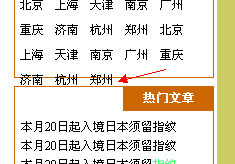
如上圖的城市導航,列表項目浮動之後,外框高度完全沒有把內容包住。
解法:在父元素加上兩行
overflow: auto;
zoom: 1;
overflow: auto 讓容器建立新的 BFC,高度因此得以包含浮動子元素;zoom: 1 則是為了觸發 IE6 的 hasLayout,若不想用 zoom,也可以改用 height: 1% 達到同樣效果。
完整示範
<!DOCTYPE html PUBLIC "-//W3C//DTD XHTML 1.0 Transitional//EN"
"https://www.w3.org/TR/xhtml1/DTD/xhtml1-transitional.dtd">
<html xmlns="https://www.w3.org/1999/xhtml">
<head>
<meta http-equiv="Content-Type" content="text/html; charset=utf-8" />
<title>float 浮動之後的問題</title>
<style>
* { padding: 0; margin: 0; }
body { font-size: 12px; line-height: 150%; }
ul { list-style: none; }
.container { width: 700px; margin: 0 auto; }
.header, .footer { height: 60px; background: #99CC66; margin-bottom: 6px; font-size: 18px; font-weight: bold; }
.main {}
.left { float: left; width: 200px; }
.sidepanel { border: 1px solid #CC6600; margin-bottom: 8px; }
.sidepanel h2 { font-size: 12px; background: #CC6600; height: 24px; line-height: 24px; text-indent: 20px; color: #fff; }
.city { padding: 6px 0px; overflow: auto; zoom: 1; }
.city li { float: left; width: 35px; text-align: center; }
.right { margin-left: 200px; background: #CCCC66; height: 240px; }
.hotinfo { padding: 6px; }
.clearfloat { clear: both; height: 0; font-size: 1px; line-height: 0px; }
</style>
</head>
<body>
<div class="container">
  <div class="header">header</div>
  <div class="main">
    <div class="left">
      <div class="sidepanel">
        <h2>城市導航</h2>
        <ul class="city">
          <li>北京</li><li>上海</li><li>天津</li><li>南京</li>
          <li>廣州</li><li>重慶</li><li>濟南</li><li>杭州</li>
          <li>鄭州</li><li>北京</li><li>上海</li><li>天津</li>
          <li>南京</li><li>廣州</li><li>重慶</li><li>濟南</li>
          <li>杭州</li><li>鄭州</li>
        </ul>
      </div>
      <div class="sidepanel">
        <h2>熱門文章</h2>
        <ul class="hotinfo">
          <li>本月20日起入境日本須留指紋</li>
          <li>本月20日起入境日本須留指紋</li>
          <li>本月20日起入境日本須留<font color="#43FF73">指紋</font></li>
        </ul>
      </div>
    </div>
    <div class="right">右側內容</div>
  </div>
  <br class="clearfloat" /><!-- 用於清除浮動的元素 -->
  <div class="footer">footer</div>
</div>
</body>
</html>
關鍵在 .city 這條規則:列表項目浮動後,如果 ul 沒有建立 BFC,它的可視高度就是 0,外框自然跟著塌陷。加上 overflow: auto; zoom: 1; 之後,容器會把浮動內容納入自身高度計算,版面就恢復正常。同份程式碼也保留了 .clearfloat 這個傳統清除元素,兩種手法並存,可依瀏覽器支援度自行取捨。
- 上一篇文章: DIV+CSS 實作視窗垂直與水平居中
- 下一篇文章: display:inline 與 float:left 到底差在哪