CSS border-right 右邊框樣式設定
編輯:布局基本知識
border-right 屬於 border 的單邊細分屬性,只作用在元素右側。從命名就能理解:border(邊框)+ right(右)。
一、它能控制什麼
右邊框的粗細、顏色與樣式(實線、虛線)都能獨立設定,不影響其他三邊。
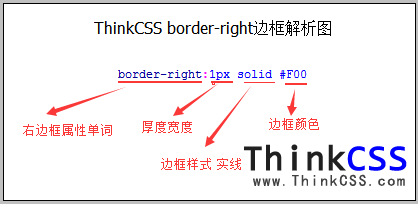
二、基本寫法
.a { border-right: 1px solid #F00; }   /* 紅色 1px 實線 */
.b { border-right: 2px dashed #00F; }  /* 藍色 2px 虛線 */
三、實作範例
為了看清楚右邊框,範例為外層設了 200px 寬度,內層文字右側加上虛線:
<!DOCTYPE html>
<html>
<head>
<meta http-equiv="Content-Type" content="text/html; charset=utf-8" />
<title>border-right 範例</title>
<style>
.a { border-right: 1px solid #F00; width: 200px; }
.b { border-right: 2px dashed #00F; padding-right: 5px; }
</style>
</head>
<body>
<div class="a">
範例內容 <span class="b">右邊框</span> 測試文字
</div>
</body>
</html>
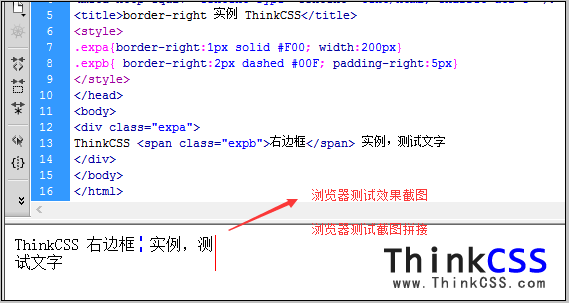
注意內層的 padding-right: 5px:若不加內距,文字會直接貼著邊框,視覺上很擁擠。這是加邊框時幾乎必備的搭配。
四、右邊框的經典用途:多欄分隔
.sidebar {
border-right: 1px solid #EEE;
padding-right: 24px;
}
左側欄加一條右邊框,就能和右側內容區做出清楚的視覺分界,這是傳統兩欄版型最簡單的做法。
另一個常見用法是「相鄰項目之間加分隔線,但最後一項不要」:
.item:not(:last-child) { border-right: 1px solid #EEE; }
五、重點提醒
1、顏色值別忘了「#」前綴。
2、邊框會撐大元素寬度,精準版型請搭配 box-sizing: border-box。
3、其他三邊對應 border-left、border-top、border-bottom,語法完全一致。
- 上一篇文章: CSS 邊框顏色設定:border-color 用法與範例
- 下一篇文章: CSS 字體顏色設定完整教學:從行內到外部樣式