說起 SVG,我對它是又愛又恨。恨的是剛接觸時傻呼呼地想全部用程式碼手寫——其實在網頁上互動時,真正用到的也就那麼幾個特性,其他標籤知道有這回事即可。說白了它是一種圖片格式,本來該用畫的。
而網站上最常見的 SVG 互動效果,大概就是描邊動畫了。以下就來實作它。
先看效果

思路:使用 SVG 的 path 標籤,搭配 stroke-dasharray 與 stroke-dashoffset 兩個屬性。至於用什麼方式驅動動畫,我用的是 CSS3 的 animation。
第一步:認識 SVG 的 path
path 就是「路徑」。要做描邊動畫,得先有一條路線才能描。
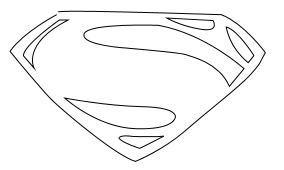
流程是這樣:找一張圖放進 AI,用鋼筆沿著輪廓勾勒路徑,把原圖刪掉只留下路徑,另存為 SVG,再把檔案拖進編輯器,就會看到一堆程式碼——我們只需要保留其中的 path。(不會用 AI 的話,正好有個理由去跟設計師多聊幾句。)
第二步:理解兩個 stroke 屬性
stroke-dasharray:把線條切分成虛線。下圖是設為 10 的效果,線條變成了虛線;數值越大,每一段實線越長。
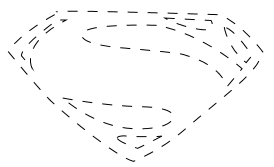
stroke-dashoffset:設定線條的偏移量,線段會往後位移對應的距離。動畫的原理就在這裡:只要讓偏移量從「等於線條總長」逐步變成 0,線條看起來就像被「畫」出來一樣。
第三步:用 @keyframes 驅動描邊
@keyframes describe{
    from{
        stroke-dashoffset: 1000;
        opacity: 1;
    }
    to{
        stroke-dashoffset: 0;
        opacity: 0;
    }
}

有點快,但意思到了。最後再疊一個淡入動畫讓背景圖片浮現,就是最終效果:

完整程式碼(可直接複製執行):


<!DOCTYPE html>
<html lang="en">
<head>
<meta charset="UTF-8">
<title>super</title>
<script src="vivus.js"></script>
<style>
.super_logo{
    position: absolute;
    opacity: 0;
    animation: fadeIn 1s ease-in forwards;
    -webkit-animation: fadeIn 1s ease-in forwards;
}
#super{
    position: absolute;
    z-index: 1;
    stroke-dasharray: 800;
    stroke-dashoffset: 1000;
    animation: describe 2s forwards;
    -webkit-animation: describe 2s forwards;
}
@keyframes fadeIn{
    from{ opacity: 0; }
    80%{ opacity: 0.5; }
    to{ opacity: 1; }
}
@-webkit-keyframes fadeIn{
    from{ opacity: 0; }
    80%{ opacity: 0.5; }
    to{ opacity: 1; }
}
@keyframes describe{
    from{ stroke-dashoffset: 1000; opacity: 1; }
    to{ stroke-dashoffset: 0; opacity: 0; }
}
@-webkit-keyframes describe{
    from{ stroke-dashoffset: 1000; opacity: 1; }
    to{ stroke-dashoffset: 0; opacity: 0; }
}
</style>
</head>
<body style="background:#0f1a3a;">
<img src="https://images2015.cnblogs.com/blog/754767/201606/754767-20160606165217980-1558570494.gif" alt="super" class="super_logo">
<svg id="super" x="0px" y="0px" width="293px" height="200px" viewBox="0 0 293 200">
    <path fill="none" data-duration="60" stroke="#ffffff" stroke-width="1" d="M67.667,39.667c0,0-33.334,17.333-46.667,36.667 c0,0,33.007,40.458,43.331,50.018c19.419,17.982,65.002,55.316,82.169,59.982c0,0,27.834-11.334,49.834-30.667S249,113,261,100 s9.334-12.333,15.334-22.333c0,0-21.333-29.333-44-38c0,0-162.001-5.334-163.334-2.667"/>
    <path fill="none" data-duration="60" stroke="#ffffff" stroke-width="1" d="M169.667,50.333c0,0-71.334-2.667-74.667,8.667s42,14,42,14 s55.333,4.667,60,6.667s32.668,7.254,43.334,31.627L255,93.667C255,93.667,217,59,169.667,50.333z"/>
    <path fill="none" data-duration="60" stroke="#ffffff" stroke-width="1" d="M75.667,123c0,0,42,8,78,8.667s32.667,10.667,32.667,10.667 S185.333,155,146.5,153.667S75.667,123,75.667,123z"/>
    <path fill="none" data-duration="60" stroke="#ffffff" stroke-width="1" d="M45,93c0,0-12.667-24,34-48h-8.667c0,0-35.455,24.559-36,35.677L45,93 z"/>
    <path fill="none" data-duration="60" stroke="#ffffff" stroke-width="1" d="M174.912,161c0,0-24.745,12.999-24.745,12.333 s-15.25-4.249-20.583-10.416"/>
    <path fill="none" data-duration="60" stroke="#ffffff" stroke-width="1" d="M130,162.667c0,0,1.75-3.083,13.667-1.25c0,0,30,0.836,30.75-0.582"/>
    <path fill="none" data-duration="60" stroke="#ffffff" stroke-width="1" d="M177.75,43L224,45.5c0,0,7.5,12.125-13,8.625S177.75,43,177.75,43z"/>
    <path fill="none" data-duration="60" stroke="#ffffff" stroke-width="1" d="M237.25,52c0,0,2.75,20.375,21.875,35.625l5.75-6.948 C264.875,80.677,249.273,55.266,237.25,52z"/>
</svg>
</body>
</html>
懶人方案:vivus.js
如果不想手算 dasharray,可以直接用外掛。Vivus 是一款專門執行 SVG 路徑動畫的輕量 JavaScript 函式庫。
- GitHub:https://github.com/maxwellito/vivus
- 中文介紹:https://www.htmleaf.com/html5/SVG/201501261279.html
Demo:
<!DOCTYPE html>
<html lang="en">
<head>
<meta charset="UTF-8">
<title>super</title>
<script src="vivus.js"></script>
<style>
.super_logo{ position: absolute; }
#super{ position: absolute; z-index: 1; }
</style>
</head>
<body style="background:#0f1a3a;">
<img src="super.gif" alt="super" class="super_logo">
<svg id="super" x="0px" y="0px" width="293px" height="200px" viewBox="0 0 293 200">
    <path fill="none" data-duration="60" stroke="#ffffff" stroke-width="1" d="M67.667,39.667c0,0-33.334,17.333-46.667,36.667 c0,0,33.007,40.458,43.331,50.018c19.419,17.982,65.002,55.316,82.169,59.982c0,0,27.834-11.334,49.834-30.667S249,113,261,100 s9.334-12.333,15.334-22.333c0,0-21.333-29.333-44-38c0,0-162.001-5.334-163.334-2.667"/>
    <path fill="none" data-duration="60" stroke="#ffffff" stroke-width="1" d="M169.667,50.333c0,0-71.334-2.667-74.667,8.667s42,14,42,14 s55.333,4.667,60,6.667s32.668,7.254,43.334,31.627L255,93.667C255,93.667,217,59,169.667,50.333z"/>
    <path fill="none" data-duration="60" stroke="#ffffff" stroke-width="1" d="M75.667,123c0,0,42,8,78,8.667s32.667,10.667,32.667,10.667 S185.333,155,146.5,153.667S75.667,123,75.667,123z"/>
    <path fill="none" data-duration="60" stroke="#ffffff" stroke-width="1" d="M45,93c0,0-12.667-24,34-48h-8.667c0,0-35.455,24.559-36,35.677L45,93 z"/>
    <path fill="none" data-duration="60" stroke="#ffffff" stroke-width="1" d="M174.912,161c0,0-24.745,12.999-24.745,12.333 s-15.25-4.249-20.583-10.416"/>
    <path fill="none" data-duration="60" stroke="#ffffff" stroke-width="1" d="M130,162.667c0,0,1.75-3.083,13.667-1.25c0,0,30,0.836,30.75-0.582"/>
    <path fill="none" data-duration="60" stroke="#ffffff" stroke-width="1" d="M177.75,43L224,45.5c0,0,7.5,12.125-13,8.625S177.75,43,177.75,43z"/>
    <path fill="none" data-duration="60" stroke="#ffffff" stroke-width="1" d="M237.25,52c0,0,2.75,20.375,21.875,35.625l5.75-6.948 C264.875,80.677,249.273,55.266,237.25,52z"/>
</svg>
<script>
window.onload = function(){
    var toPlay = new Vivus('super', {
        type: 'delayed',      // 逐段延遲播放
        duration: 50,         // 動畫總時長
        start: 'autostart',   // 載入後自動開始
        forceRender: false,
        dashGap: 20
    });
    var oSuper = document.getElementById('super');
    oSuper.addEventListener('click', function(){
        toPlay.reset().play();   // 點擊重播
    });
};
</script>
</body>
</html>
最後補一個實務上的坑:stroke-dasharray 的值必須大於或等於路徑總長度,否則會出現一截線預先露出來。若不知道實際長度,可以在 JS 中用 path.getTotalLength() 動態取得,再寫回樣式,這樣換任何圖形都不用重算。
- 上一篇文章: DIV 與 SPAN 的差別:塊級元素與行內元素一次講清
- 下一篇文章: 前端知識整理:置中、延遲載入、去重、冒泡與閉包