圖片列表要怎麼讓人想點?一個常用手法是滑過時浮出一層半透明遮罩,裡頭放個「+」或說明文字。這支特效把這個效果做成六種變體,從四個方向滑入到圖示邊框動畫都有。
效果預覽:https://hovertree.com/texiao/jquery/39/
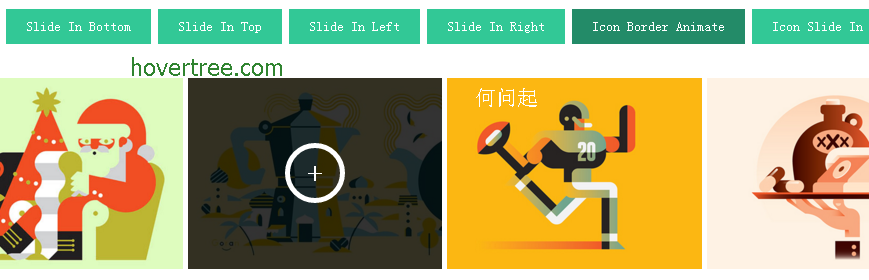
六種效果
- Slide In Bottom:遮罩由下往上滑出
- Slide In Top:由上往下滑出
- Slide In Left:由左往右
- Slide In Right:由右往左
- Icon Border Animate:圖示外框轉一圈
- Icon Slide In:圖示滑入
六頁各自獨立(index.html 到 index6.html),共用同一份 css/style.css,差別只在 class。這意味著你只要挑一個方向,把對應 class 抄過去就行。
結構:圖與遮罩並列
每格都是 .img 包一張 <img> 和一個 .overlay,遮罩裡放 <a class="expand">+</a> 與隱藏狀態的 <a class="close-overlay hidden">x</a>。.img 需要 position:relative 搭配 overflow:hidden,遮罩用絕對定位鋪滿,再靠 transform:translateY() 之類的位移藏在畫面外,滑過時歸零。
最值得注意的是那個分支判斷
腳本開頭先用 Modernizr 判斷裝置能力,再分成兩條路:
if (Modernizr.touch) {
    // 觸控裝置:顯示關閉鈕,點一下加 hover、點 x 移除
    $(".close-overlay").removeClass("hidden");
    $(".img").click(function(e){
        if (!$(this).hasClass("hover")) { $(this).addClass("hover"); }
    });
    $(".close-overlay").click(function(e){
        e.preventDefault();
        e.stopPropagation();
        $(this).closest(".img").removeClass("hover");
    });
} else {
    // 滑鼠裝置:mouseenter / mouseleave
    $(".img").mouseenter(function(){ $(this).addClass("hover"); })
             .mouseleave(function(){ $(this).removeClass("hover"); });
}
手機沒有 hover,硬套滑鼠事件的結果就是「點一下永遠不會收起來」。這裡的處理很到位:觸控版改成點擊開、點關閉鈕收,並且用 e.stopPropagation() 阻止事件冒泡到外層 .img,否則關閉的瞬間又會被外層的點擊重新打開。$(this).closest(".img") 則是從關閉鈕往回找到所屬的格子,比 parent() 更耐改。
載入順序
樣式依序載入 normalize.css(統一預設樣式)、default.css、base.css,最後才是必要的 style.css;腳本用 jQuery 2.2.1 加 modernizr.js。原始碼中還留了一段 <!--[if IE]> 的 html5shiv 條件式註解,這是照顧舊版 IE 的歷史產物,現在可以直接刪掉。
- 上一篇文章: 綠色清新學工系統登入頁模板
- 下一篇文章: CSS3 飛機穿越雲層:層層推進的飛行感