關於display: box 和 box-flex
編輯:HTML5教程
這兩天做手機項目,使用到這個css3新屬性。現在還不為所有浏覽器支持,所以使用的時候要加上前綴。使用方法見下面:
html代碼:
<div class="s-indLine">
            <div class="s-indNav s-indIntro">
                <span class="s-icon"></span>
                <p>品牌介紹</p>
            </div>
            <div class="s-indNav s-indInfo">
                <span class="s-icon"></span>
                <p>優惠信息</p>
            </div>
        </div>
        <div class="s-indLine">
            <div class="s-indNav s-indShop">
                <span class="s-icon"></span>
                <p>門店查找</p>
            </div>
            <div class="s-indNav s-indGoods">
                <span class="s-icon"></span>
                <p>熱賣商品</p>
            </div>
        </div>
css代碼:
.s-indLine{
    display: -webkit-box;
    display: -moz-box;
    display: box;
    margin-bottom: 10px;
    -moz-box-orient:horizontal;
    -webkit-box-orient:horizontal;
    box-orient:horizontal;
}
.s-indLine .s-indNav{
    -webkit-box-flex: 5;
    -moz-box-flex: 5;
    box-flex: 5;
    -webkit-box-sizing: border-box;
    -moz-box-sizing: border-box;
    box-sizing: border-box;
    border-radius: 10px;
    color: #ffffff;
    text-align: center;
    height: 105px;
    padding: 15px 0px;
    font-size: 1.5rem;
}
.s-indLine .s-indNav:first-child{
    margin-right: 10px;
}
.s-indIntro{
    background: #4eb566;
}
.s-indInfo{
    background: #ffa422;
}
.s-indShop{
    background: #7788f2;
}
.s-indGoods{
    background: #ef604d;
}
.s-indLine .s-indNav .s-icon, .s-groupNav .s-icon{
    width: 50px;
    height: 50px;
    display: inline-block;
    background-repeat: no-repeat;
    background-size: 100% 100%;
    background-position: center;
}
.s-indIntro .s-icon{
    background-image: url("group.png");
}
.s-indInfo .s-icon{
    background-image: url("group.png");
}
.s-indShop .s-icon{
    background-image: url("group.png");
}
.s-indGoods .s-icon{
    background-image: url("group.png");
}
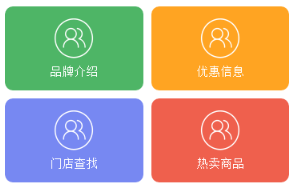
可以不給子元素設置box-flex值,直接使用width代替,也可以設置margin 和 padding 值。得到的效果圖如下:
在chrome或者手機其他的以-webkit為內核的浏覽器上調試時,上面的代碼是沒有問題的,但是在火狐下面,會出現問題,如下圖所示:
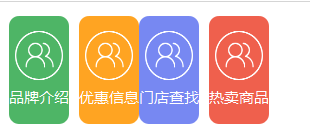
這地方解決辦法,必須給父元素添加width樣式,例如 width: 100%; 即可。
此外在火狐上還有一個問題,上面說到可以給子元素不設置box-flex,而是設置width,但是在火狐上不能識別width,而是必須設置box-flex。
小編推薦
熱門推薦