HTML5 Canvas 實作太陽系公轉動畫
編輯:HTML5教程
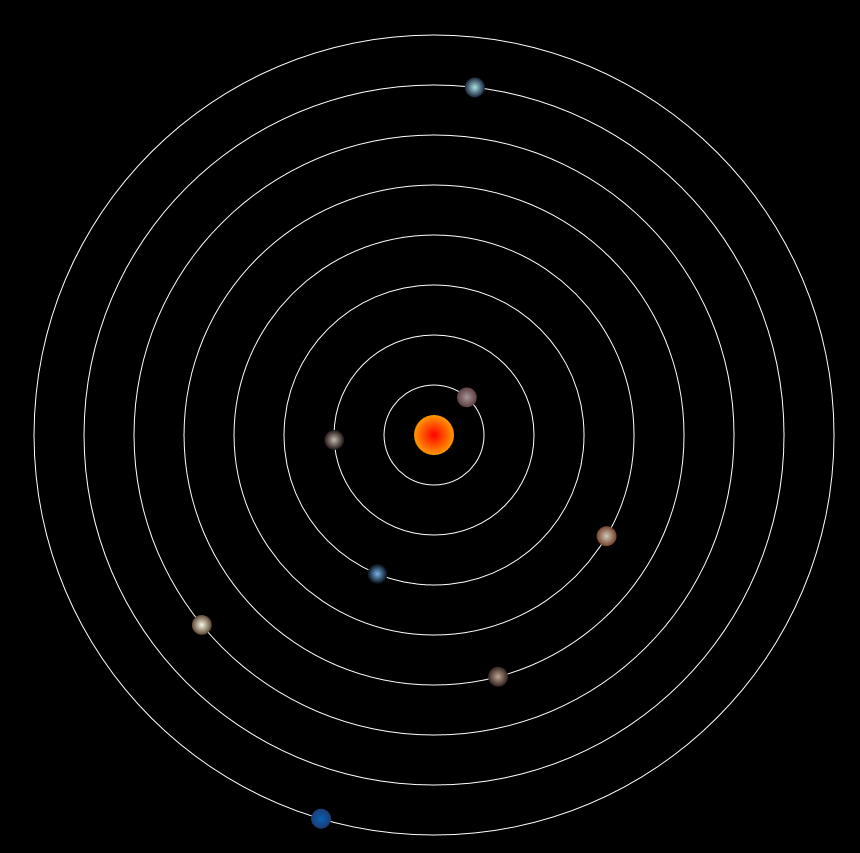
Canvas 搭配 setInterval 或 requestAnimationFrame,就能做出持續運轉的動畫。太陽系是很好玩的練習題:每顆行星用不同的公轉週期繞行,用放射狀漸層上色,再靠旋轉矩陣讓它們「轉起來」。
八大行星的參數
| 星球 | 變數名 | 公轉週期 | 亮色 | 暗色 |
|---|---|---|---|---|
| 水星 | Mercury | 87.70 | #a69697 | #5c3e40 |
| 金星 | Venus | 224.70 | #c4bbac | #1f1315 |
| 地球 | Earth | 365.2422 | #78b1e8 | #050c12 |
| 火星 | Mars | 686.98 | #cec9b6 | #76422d |
| 木星 | Jupiter | 4332.589 | #c0a48e | #322222 |
| 土星 | Saturn | 10759.95 | #f7f9e3 | #5c4553 |
| 天王星 | Uranus | 30799.095 | #a7e1e5 | #19243a |
| 海王星 | Neptune | 60152.95 | #0661b2 | #1E3b73 |
畫布與軌道
<canvas id="canvas" width="1000" height="1000" style="background-color: #000;"></canvas>

var canvas = document.getElementById("canvas");
var cxt = canvas.getContext("2d");

// 用同心圓畫出八條軌道
function DrawTrack() {
    for (var i = 0; i < 8; i++) {
        cxt.beginPath();
        cxt.arc(500, 500, (i + 1) * 50, 0, 360, false);
        cxt.closePath();
        cxt.strokeStyle = "#fff";
        cxt.stroke();
    }
}
把星球設計成一個可重複使用的物件
function DrawStart(x, y, radius, cycle, sColor, eColor) {
    this.x = x;             // 座標
    this.y = y;
    this.radius = radius;   // 半徑
    this.sColor = sColor;   // 漸層起始色
    this.eColor = eColor;   // 漸層結束色
    this.color = null;
    this.time = 0;
    this.cycle = cycle;     // 公轉週期

    this.draw = function () {
        cxt.save();
        cxt.translate(500, 500);                       // 把原點搬到太陽位置
        cxt.rotate(this.time * 360 / this.cycle * Math.PI / 180);
        cxt.beginPath();
        cxt.arc(this.x, this.y, this.radius, 0, 360, false);
        cxt.closePath();
        this.color = cxt.createRadialGradient(this.x, this.y, 0, this.x, this.y, this.radius);
        this.color.addColorStop(0, this.sColor);
        this.color.addColorStop(1, this.eColor);
        cxt.fillStyle = this.color;
        cxt.fill();
        cxt.restore();
        this.time += 1;
    };
}
關鍵在 translate(500, 500):把座標原點移到畫布中心的太陽上,之後每顆星球只要用相同的角度旋轉、再畫自己在 Y 軸上的圓,視覺上就變成繞行。save() 與 restore() 成對出現,確保每次旋轉不會污染下一顆星球的座標系。
建立星球實例
function Sun()     { DrawStart.call(this, 0, 0,    20, 0,        "#f00", "#f90"); }
function Mercury() { DrawStart.call(this, 0, -50,  10, 87.70,    "#A69697", "#5c3e40"); }
function Venus()   { DrawStart.call(this, 0, -100, 10, 224.71,   "#c4bbac", "#1f1315"); }
function Earth()   { DrawStart.call(this, 0, -150, 10, 365.224,  "#78b1e8", "#050c12"); }
function Mars()    { DrawStart.call(this, 0, -200, 10, 686.98,   "#cec9b6", "#76422d"); }
function Jupiter() { DrawStart.call(this, 0, -250, 10, 4332.589, "#c0a48e", "#322222"); }
function Saturn()  { DrawStart.call(this, 0, -300, 10, 10759.5,  "#f7f9e3", "#5c4553"); }
function Uranus()  { DrawStart.call(this, 0, -350, 10, 30799.95, "#a7e1e5", "#19243a"); }
function Neptune() { DrawStart.call(this, 0, -400, 10, 60152.95, "#0661b2", "#1E3b73"); }

var s  = new Sun();
var m  = new Mercury();
var v  = new Venus();
var e  = new Earth();
var ma = new Mars();
var j  = new Jupiter();
var sa = new Saturn();
var ur = new Uranus();
var ne = new Neptune();
動畫迴圈
setInterval(function () {
    cxt.clearRect(0, 0, 1000, 1000);   // 每幀先清空,否則會留下殘影
    DrawTrack();
    s.draw();  m.draw();  v.draw();  e.draw();  ma.draw();
    j.draw();  sa.draw(); ur.draw(); ne.draw();
}, 10);
想讓動畫更順,可以把 setInterval 換成 requestAnimationFrame,讓瀏覽器依螢幕更新頻率安排繪 frame,比較省資源。另外此例的週期是「相對比例」,模擬的是八大行星速度差異的感覺,並非真實的時間縮放。
- 上一篇文章: HTML5 Canvas 畫三角形:空心與實心的差別就在 stroke 和 fill
- 下一篇文章: HTML5 Canvas 文字特效:fillText 與 strokeText 一次搞懂