動手做一個HTML5音樂播放器:告別外掛的純原生音訊方案
編輯:HTML5詳解
如今 HTML 已經是相當熱門的技術,各種 HTML5 應用程式、遊戲、應用商店如雨後春筍般展開。各大主流瀏覽器也紛紛開始支援 HTML5 標準,為的是打贏新一輪的瀏覽器大戰。
不知你有沒有發現,現在用較新版本的 Chrome 就能直接打開 .mp3 格式的音樂。可以自己試試看:
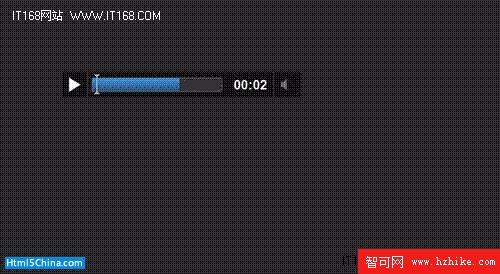
這就是用 Chrome 直接打開 mp3 檔案的樣子。其實,許多新版瀏覽器都開始支援 HTML5 中的 audio 標籤,讓部分格式的串流媒體得以擺脫對外掛的依賴。下面我就以這個標籤做一個簡易的音樂播放器。
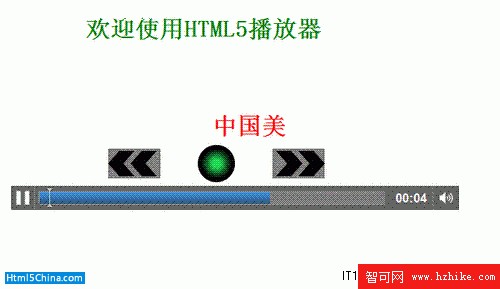
這些控制元件可以透過一些內建的 JavaScript 函式與屬性來控制,也方便進行二次開發。例如 load()、play()、pause() 等控制音訊播放的函式,以及 paused、ended、currentTime、startTime 等屬性。
這個簡易播放器具備播放/暫停、快進、快退等功能,並結合 Canvas 物件繪製操作圖形:
<%@language='Javascript' %>
<Html>
<head>
<title>PlayMusic</title>
<style type="text/CSS">
div.s{position:absolute;left:100px;top:200px;width:600px;}
audio{width:600px;position:absolute;left:0px;top:100px;}
canvas{position:absolute;left:0px;top:40px;}
marquee{position:absolute;left:250px;top:180px;}
h1{color:Red;}
h1.a{color:Green;position:absolute;left:200px;top:50px;}
</style>
</head>
<body>
<h1 class="a">歡迎使用Html5播放器</h1>
<%
var name = Request.QueryString("name");
if (name == "")
name = "";
name1 ="save_music\" + name + ".mp3";
//Response.Write(name);
%>
<marquee behavior=scroll scrolldelay=200 scrollamount=30 width="300" ><h1><%=name %></h1></marquee>
<div class="s">
<canvas width="600" height="60" id="MusicCanvas" onclick="dealclick()"></canvas>
<audio id="music" src=<%=name1 %> controls>
您的瀏覽器不支持Html5中的audio標籤
</audio>
</div>
</body>
</Html>
<script type="text/Javascript">
var c = document.getElementById("MusicCanvas");
var cccon = c.getContext("2d");
var toggle = document.getElementById("music");
draWPS();
drawQuick();

function draWPS() //flag=1表示播放命令,flag=0表示暫停
{
con.save();
con.beginPath();
var g = con.createRadialGradIEnt(275, 30, 0, 275, 30, 25); //創建漸變顏色
if (toggle.paused) //暫停狀態
{
g.addColorStop(0.2, "#1FD856"); //
g.addColorStop(0.8, "black"); //
toggle.play();
}
else //播放狀態
{
g.addColorStop(0.2, "red"); //黃
g.addColorStop(0.8, "black"); //
toggle.pause();
}
con.fillStyle = g;
con.arc(275, 30, 25, 0, Math.PI * 2, true);
con.fill();
con.closePath();
con.restore();
}
function drawQuick() //
{
con.save();
con.beginPath();
con.fillStyle ="grey";
con.fillRect(130, 10, 70, 40);
con.fillStyle ="black";
con.moveTo(130, 30);con.lineTo(145, 13);con.lineTo(165, 13);con.lineTo(150,30);con.lineTo(165, 47);con.lineTo(145, 47);con.lineTo(130, 30);
con.fill();
con.moveTo(160, 30); con.lineTo(175, 13); con.lineTo(195, 13); con.lineTo(180, 30); con.lineTo(195, 47); con.lineTo(175, 47); con.lineTo(160, 30);
con.fill();
con.closePath();
con.beginPath();
con.fillStyle ="grey";
var x = 350;
con.fillRect(x, 10, 70, 40);
x += 70;
con.fillStyle ="black";
con.moveTo(x, 30); con.lineTo(x - 15, 13); con.lineTo(x - 35, 13); con.lineTo(x - 20, 30); con.lineTo(x - 35, 47); con.lineTo(x - 15, 47); con.lineTo(x, 30);
x -= 30;
con.moveTo(x, 30); con.lineTo(x - 15, 13); con.lineTo(x - 35, 13); con.lineTo(x - 20, 30); con.lineTo(x - 35, 47); con.lineTo(x - 15, 47); con.lineTo(x, 30);
con.fill();
con.fill();
con.closePath();
con.restore();
}
function dealclick() //處理敲擊事件
{
var x = event.clIEntX;
var y = event.clIEntY;
var flag = getPos(x, y);
if(flag==0)
return;
switch (flag) //
{
case 1: draWPS(); break;
case 2: quickOrslow(0); break;
case 3: quickOrslow(1); break;
}
}
function getPos(x, y) //
{
var px=100;
var py=240;
x-=px;
y-=py;
if (x >= 275 && x <= 325 && y >= 15 && y<= 65)
return 1;
if (x >= 130 && x <= 200 && y >= 20 && y <= 60)
return 2;
if (x >= 350 && x <= 420 && y >= 20 && y <= 60)
return 3;
return 0;
}
function quickOrslow(flag) //
{
var total = toggle.duration;
var s = Math.ceil(total*0.05);
if (flag == 1) //kuaijin
{
if (toggle.ended == true)
return;
var now = toggle.currentTime;
if (total - now <= s)
return;
else
toggle.currentTime = now + s;
}
else //後退
{
var n = toggle.currentTime;
if (n < s)
return;
else
toggle.currentTime = n - s;
}
}
</script>
以上就是全部原始碼,其中摻雜了一些 ASP 語句(用來傳遞歌曲名稱),可以暫時不去理會。
draWPS() 負責控制播放與暫停,quickOrSlow() 則負責控制快退。當然,這個播放器相當簡陋,但只要經過一番加工美化,還是可以做出相當出色的播放器,而且完全不必依賴外掛。
熱門推薦
用 HTML5 placeholder 搭配 CSS3,打造免 JavaScript 的提示文字輸入框
Canvas 畫一條線:lineTo 與 stroke 的最小完整範例
HTML5 向下相容實作:用 document.createElement 讓舊 IE 認得新標籤
HTML5 適合行動應用的 12 大特性:從離線緩存到跨平台開發
HTML5 預加載(prefetch):用瀏覽器空檔換取秒開體驗
CSS 中文字體名稱的 Unicode 轉編碼:告別兼容性頭痛
HTML5 技術教學:動畫在手機上的螢幕適配實務
HTML5 入門技巧(三):本地儲存、Header 與 Footer
加載進度頁面的設置方法