HTML5 的結構與語義(三):aside、figure、dialog 三個塊級元素
編輯:HTML5詳解
除了結構性元素,HTML5 還新增了三個純語義性的塊級元素:aside、figure、dialog。前兩個我在文章與書裡經常使用;第三個較少用,主要針對書面文本。
aside:主線之外的補充內容
aside 代表說明、提示、邊欄、引用、附加註解等——也就是敘述主線之外的內容。
過去在 developerWorks 的文章裡,這類邊欄是用一層又一層的 table 拼出來的:
<table align="right" border="0" cellpadding="0" cellspacing="0" width="40%">
<tbody><tr><td width="10">
<img alt="" src="//www.ibm.com/i/c.gif" height="1" width="10"></td>
<td>
<table border="1" cellpadding="5" cellspacing="0" width="100%">
<tbody><tr><td bgcolor="#eeeeee">
<p><span>.xf-value</span></p>
<p>The <code>.xf-value</code> selector used here styles the input
field value but not its label. ...</p>
</td></tr></table>
用 HTML5 改寫之後,語義清楚多了:
<aside>
<h3>.xf-value</h3>
<p>
The <code type="inline">.xf-value</code> selector used here styles the input
field value but not its label. ...
</p>
<pre>input::value { width: 20em; }
#ccnumber::value { width: 18em }
#zip::value { width: 12em }
#state::value { width: 3em }</pre>
<p>However, Firefox doesn't yet support this syntax.</p>
</aside>
至於這個邊欄最後被放在哪裡,交給瀏覽器決定(通常還是需要一點 CSS 輔助)。
figure:圖形及其說明
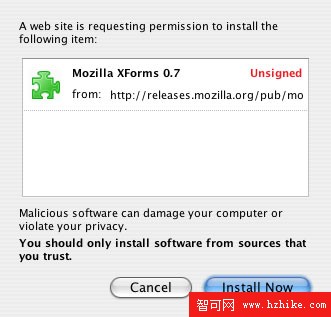
figure 代表一個塊級圖像,並且可以包含說明文字。過去這樣的標記是:
<a name="fig2"><b>Figure 2. Install Mozilla XForms dialog</b></a><br />
<img alt="A Web site is requesting permission to install the following item:
Mozilla XForms 0.7 Unsigned"
src="installdialog.jpg" border="0" height="317" hspace="5" vspace="5" width="331" />
<br />
結果如下:
圖 1. Install Mozilla XForms dialog
HTML5 的寫法:
<figure>
<legend>Figure 2. Install Mozilla XForms dialog</legend>
<img alt="A Web site is requesting permission to install the following item:
Mozilla XForms 0.7 Unsigned"
src="installdialog.jpg" border="0" height="317" hspace="5" vspace="5" width="331" />
</figure>
最關鍵的差別是:瀏覽器(尤其是螢幕閱讀器)能明確地把圖與說明關聯起來,而不是靠位置猜測。此外,figure 不只可用於圖片,也能替 audio、video、iframe、object 與 embed 加上說明。
dialog:對話
dialog 表示幾個人之間的對話,搭配 dt 表示講話者、dd 表示講話內容。這樣的結構讓老舊瀏覽器也能以合理方式呈現對話。以下取自伽利略《關於托勒密和哥白尼兩大世界體系的對話》的一段:
<dialog>
<dt>Simplicius </dt>
<dd>According to the straight line AF,
and not according to the curve, such being already excluded
for such a use.</dd>
<dt>Sagredo </dt>
<dd>But I should take neither of them,
seeing that the straight line AF runs obliquely. ...</dd>
<dt>Salviati </dt>
<dd><p>Your choice and the reason you
adduce for it seem to me most Excellent. ...</p></dd>
</dialog>
這個元素的確切語法當時仍有爭議:有人希望在 dialog 中放入非對話文本(例如劇本裡的舞台指示),也有人反對擴充 dt 與 dd 的用途。儘管細節未定,多數人都同意——用語義化的方式表達對話,方向是對的。
值得補充的是,HTML5 最終定案時 dialog 的設計已大幅調整,改以原生對話框元件的形式存在,而對話語義則交由 blockquote 等元素承擔。這也說明標準演進過程中,語義元素的形式往往需要反覆磨合。
- 上一篇文章: AIR 2.0 新特性全解析與開發環境配置指南
- 下一篇文章: HTML5 預覽(四):以 DOM 為基礎的雙語法設計