用 HTML 與 JavaScript 實作簡單計算機(附思路)
編輯:HTML和Xhtml
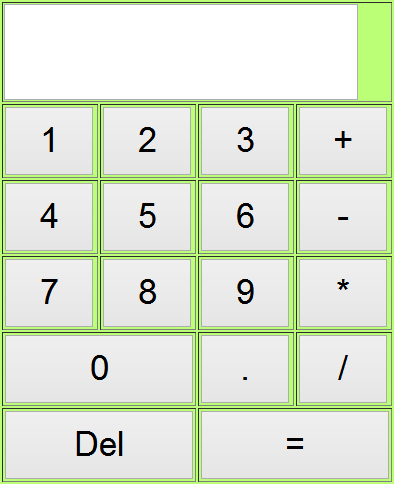
以下範例實作了一個具備加減乘除功能的簡單計算機。核心思路是:把按鍵內容以字串形式存進文字框,按下「=」時呼叫 eval 計算並輸出結果。
<!DOCTYPE html>
<html>
<meta name="content-type" content="text/html; charset=UTF-8">
<head>
<title>Calculator</title>
<script type="text/javascript">
var numresult;
var str;
function onclicknum(nums) {
str = document.getElementById("nummessege");
str.value = str.value + nums;
}
function onclickclear() {
str = document.getElementById("nummessege");
str.value = "";
}
function onclickresult() {
str = document.getElementById("nummessege");
numresult = eval(str.value);
str.value = numresult;
}
</script>
</head>
<body>
<table border="1" align="center" style="height: 350px; width: 270px">
<tr><td colspan="4">
<input type="text" id="nummessege" style="height: 90px; width: 350px; font-size: 50px" />
</td></tr>
<tr>
<td><input type="button" value="1" onclick="onclicknum(1)"></td>
<td><input type="button" value="2" onclick="onclicknum(2)"></td>
<td><input type="button" value="3" onclick="onclicknum(3)"></td>
<td><input type="button" value="+" onclick="onclicknum('+')"></td>
</tr>
<tr>
<td><input type="button" value="4" onclick="onclicknum(4)"></td>
<td><input type="button" value="5" onclick="onclicknum(5)"></td>
<td><input type="button" value="6" onclick="onclicknum(6)"></td>
<td><input type="button" value="-" onclick="onclicknum('-')"></td>
</tr>
<tr>
<td><input type="button" value="7" onclick="onclicknum(7)"></td>
<td><input type="button" value="8" onclick="onclicknum(8)"></td>
<td><input type="button" value="9" onclick="onclicknum(9)"></td>
<td><input type="button" value="*" onclick="onclicknum('*')"></td>
</tr>
<tr>
<td colspan="2"><input type="button" value="0" onclick="onclicknum(0)"></td>
<td><input type="button" value="." onclick="onclicknum('.')"></td>
<td><input type="button" value="/" onclick="onclicknum('/')"></td>
</tr>
<tr>
<td colspan="2"><input type="button" value="Del" onclick="onclickclear()"></td>
<td colspan="2"><input type="button" value="=" onclick="onclickresult()"></td>
</tr>
</table>
</body>
</html>
三個主要函式分別負責:onclicknum 拼接數字與運算子、onclickclear 清空、onclickresult 以 eval 求值並回填。表格則用來排列出計算機的按鍵佈局。
- 上一篇文章: HTML 打折計算價格的實作原理與完整程式碼
- 下一篇文章: 分割線 hr 在各瀏覽器的差異與相容寫法