CSS 佈局入門:fixed、absolute、relative、z-index 與 float 實解
編輯:HTML和Xhtml
一、position: fixed 固定定位
鎖定相對於瀏覽器視窗的位置,元素不會隨頁面滾動而移動。右下角懸停彈出的客服視窗就是典型應用。

二、position: absolute 絕對定位
行為取決於外層有沒有定位祖先:
- 外層沒有
position: absolute或relative時,該 div 相對於瀏覽器定位。下圖中的 b 就是距瀏覽器右緣 50px、距下緣 20px。 - 外層有定位時,該 div 改以「外層的邊框」為基準。下圖中的 bb 是距 d 的右緣 50px、距 d 的下緣 20px。

三、position: relative 相對定位
相對於元素「原本所在的位置」做位移,原位置仍然佔據標準流的空間。若外層沒有任何包裹元素,效果就等同相對於瀏覽器做相對位移。

四、z-index 分層
定位元素在 Z 軸上是有層級的,可以想成一疊紙,數字越大越靠上。前面的 relative 範例中 aa 蓋住了 a,原因是後寫的元素預設層級較高。若不想改動程式碼順序,就用 z-index 把 a 提上來:
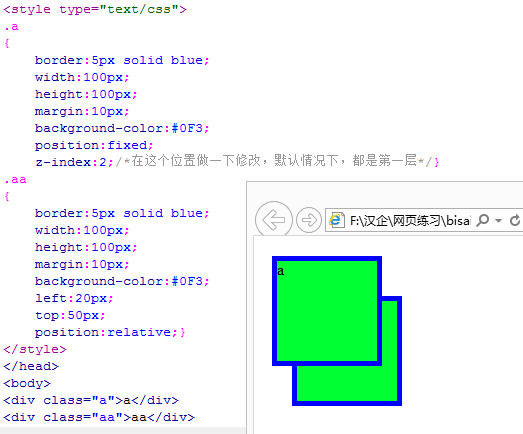
五、float: left / right 浮動
浮動元素不需要指定 left、top,它會貼齊容器(或瀏覽器)的左側或右側;若外部有包裹的 div,則相對於該 div 的內容區塊靠左上或右上排列。
幾個高頻用的附加屬性
overflow: hidden;   /* 超出部分隱藏;scroll 則顯示捲軸 */
cursor: pointer;    /* 滑鼠移入時的游標形狀 */
半透明效果的寫法:
<div class="box">透明區域</div>

.box {
  opacity: 0.5;
  -moz-opacity: 0.5;
  filter: alpha(opacity=50);
}
綜合練習:仿做網址大全的版面
.a, .b, .c, .d, .e, .f, .g, .h, .i {
  border: 5px solid blue;
  margin: 10px;
  position: absolute;
}
.a { width: 1000px; height: 100px;  left: 150px; top: 80px;   }
.b { width: 240px;  height: 200px;  left: 150px; top: 200px;  }
.c { width: 740px;  height: 300px;  left: 410px; top: 200px;  }
.d { width: 740px;  height: 200px;  left: 410px; top: 520px;  }
.e { width: 240px;  height: 1500px; left: 150px; top: 420px;  }
.f { width: 240px;  height: 150px;  left: 150px; top: 1940px; }
.g { width: 740px;  height: 1350px; left: 410px; top: 740px;  }
.h { width: 1000px; height: 200px;  left: 150px; top: 2110px; }
.i { width: 1000px; height: 200px;  left: 150px; top: 2330px; }
<body bgcolor="#F0F0F0">
<div class="a">a</div>
<div class="b">b</div>
<div class="c">c</div>
<div class="d">d</div>
<div class="e">e</div>
<div class="f">f</div>
<div class="g">g</div>
<div class="h">h</div>
<div class="i">i</div>
</body>把公共樣式抽出來、只讓各區塊負責自己的座標,這段程式碼就短了很多——這也是 class 群組選擇器的價值。

最後提醒:全部用絕對定位排版雖然直觀,但元素全部脫離標準流,父容器高度會塌陷,頁面也無法隨內容伸縮。正式專案中應以標準流為骨架,絕對定位只用於局部裝飾性元素。