後台回傳 JSON 時,只要資料裡有 DateTime 型別,用系統自帶的序列化工具編碼後就會得到一串又長又莫名其妙的數字。比如學生的生日 2014-01-31,變成了 1391141532000。
複製代碼 代碼如下:
//設置服務器響應的結果為純文本格式
   context.Response.ContentType = "text/plain";
   //學生對象集合
   List<Student> students = new List<Student>
   {
       new Student(){Name ="Tom",
                   Birthday =Convert.ToDateTime("2014-01-31 12:12:12")},
       new Student(){Name ="Rose",
                   Birthday =Convert.ToDateTime("2014-01-10 11:12:12")},
       new Student(){Name ="Mark",
                   Birthday =Convert.ToDateTime("2014-01-09 10:12:12")}
   };

   //javascript序列化器
   JavaScriptSerializer jss=new JavaScriptSerializer();
   //序列化學生集合對象得到json字符
   string studentsJson=jss.Serialize(students);
   //將字符串響應到客戶端
   context.Response.Write(studentsJson);
   context.Response.End();

這個數字其實是「從 1970 年 1 月 1 日起算的毫秒數」。1391141532000 / 1000 / 60 / 60 / 24 / 365 ≈ 44.11,44 + 1970 = 2014,年月日時分秒就都能反推出來。格式本身合法且無歧義,問題是它不對人類友善。下面三條路都能解決。
方法一:後台先格式化再送出
用 LINQ 的 Select 重新投影集合,把日期屬性換成字串屬性。順手還能把前端用不到的欄位剔除,減少傳輸量。
複製代碼 代碼如下:
using System;
using System.Collections.Generic;
using System.Web;

using System.Web.Script.Serialization;

namespace JsonDate1
{
  using System.Linq;

  /// <summary>
  /// 學生類,測試用
  /// </summary>
  public class Student
  {
      /// <summary>
      /// 姓名
      /// </summary>
      public String Name { get; set; }

      /// <summary>
      /// 生日
      /// </summary>
      public DateTime Birthday { get; set; }
  }

  /// <summary>
  /// 返回學生集合的json字符
  /// </summary>
  public class GetJson : IHttpHandler
  {
      public void ProcessRequest(HttpContext context)
      {
          //設置服務器響應的結果為純文本格式
          context.Response.ContentType = "text/plain";
          //學生對象集合
          List<Student> students = new List<Student>
          {
              new Student(){Name ="Tom",Birthday =Convert.ToDateTime("2014-01-31 12:12:12")},
              new Student(){Name ="Rose",Birthday =Convert.ToDateTime("2014-01-10 11:12:12")},
              new Student(){Name ="Mark",Birthday =Convert.ToDateTime("2014-01-09 10:12:12")}
          };

          //使用Select方法重新投影對象集合將Birthday屬性轉換成一個新的屬性
          //注意屬性變化後要重新命名,並立即執行
          var studentSet =
                    students.Select
                    (
                    p => new { p.Name, Birthday = p.Birthday.ToString("yyyy-mm-dd") }
                    ).ToList();

          //javascript序列化器
          JavaScriptSerializer jss = new JavaScriptSerializer();
          //序列化學生集合對象得到json字符
          string studentsJson = jss.Serialize(studentSet);
          //將字符串響應到客戶端
          context.Response.Write(studentsJson);
          context.Response.End();
      }

      public bool IsReusable
      {
          get
          {
              return false;
          }
      }
  }
}
屬性型別變了要記得重新命名(屬性名可以維持相同),也可以改用 LINQ 查詢表達式達成同樣目的。
運行結果:
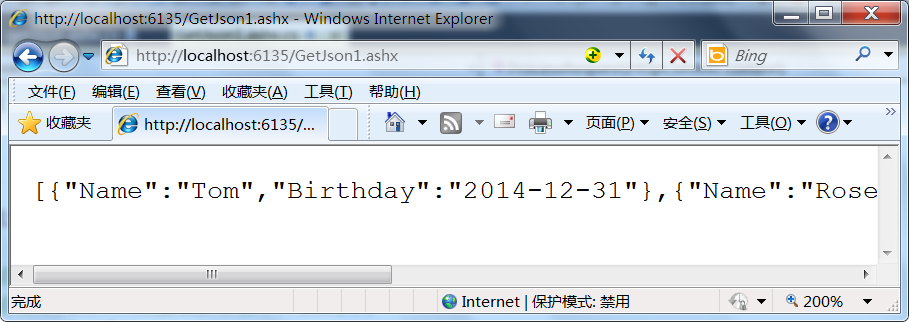
日期這下好讀了,但要注意:在 JavaScript 裡它此時只是一個普通字串,不是日期對象。
方法二:在 JavaScript 端還原成 Date 對象
把 "Birthday":"\/Date(1391141532000)\/" 裡的非數字字元用正則清掉,剩下純毫秒數,再丟給 Date 建構式即可。
複製代碼 代碼如下:
<!DOCTYPE html>
<html xmlns="https://www.w3.org/1999/xhtml">
<head>
   <title>json日期格式處理</title>
   <script src="Scripts/jquery-1.10.2.min.js" type="text/javascript"></script>
   <script type="text/javascript">
       $(function() {
                    $.getJSON("getJson.ashx", function (students) {
                            $.each(students, function (index, obj) {
                                    $("<li/>").html(obj.Name).appendTo("#ulStudents");

                                    //使用正則表達式將生日屬性中的非數字(\D)刪除
                                    //並把得到的毫秒數轉換成數字類型
                                    var birthdayMilliseconds = parseInt(obj.Birthday.replace(/\D/igm, ""));
                                    //實例化一個新的日期格式,使用1970 年 1 月 1 日至今的毫秒數為參數
                                    var birthday = new Date(birthdayMilliseconds);

                                    $("<li/>").html(birthday.toLocaleString()).appendTo("#ulStudents"); ;
                            });
                    });
       });
   </script>
</head>
<body>
   <h2>json日期格式處理</h2>
   <ul id="ulStudents">
   </ul>
</body>
</html>

/\D/igm 中,\D 代表非數字,igm 分別是忽略大小寫、全域多次替換、多行替換。若資料裡還夾帶 +86 之類的內容,調整正則即可。如果專案裡到處都要處理日期,不妨擴充一個 String 原型方法,省得重複寫:
複製代碼 代碼如下:
$(function () {
        $.getJSON("getJson.ashx", function (students) {
                $.each(students, function (index, obj) {
                        $("<li/>").html(obj.Name).appendTo("#ulStudents");

                        //使用正則表達式將生日屬性中的非數字(\D)刪除
                        //並把得到的毫秒數轉換成數字類型
                        var birthdayMilliseconds = parseInt(obj.Birthday.replace(/\D/igm, ""));
                        //實例化一個新的日期格式,使用1970 年 1 月 1 日至今的毫秒數為參數
                        var birthday = new Date(birthdayMilliseconds);

                        $("<li/>").html(birthday.toLocaleString()).appendTo("#ulStudents");
                        $("<li/>").html(obj.Birthday.toDate()).appendTo("#ulStudents");
                });
        });
    });

    //在String對象中擴展一個toDate方法,可以根據要求完善
    String.prototype.toDate = function () {
            var dateMilliseconds;
            if (isNaN(this)) {
                    //使用正則表達式將日期屬性中的非數字(\D)刪除
                    dateMilliseconds =this.replace(/\D/igm, "");
            } else {
                    dateMilliseconds=this;
            }
            //實例化一個新的日期格式,使用1970 年 1 月 1 日至今的毫秒數為參數
            return new Date(parseInt(dateMilliseconds));
    };
這個 toDate 只是拋磚引玉,不夠嚴謹,可依實際需求補強。
方法三:換用第三方 JSON 庫
市面上不少序列化庫早就把日期問題處理好了,常見的有:
- fastJSON
- JSON_checker
- Jayrock
- Json.NET - LINQ to JSON
- LitJSON
- JSON for .NET
- JsonFx
- JSONSharp
- JsonExSerializer
- fluent-json
- Manatee Json
以 LitJSON 為例:
複製代碼 代碼如下:
using System;
using System.Collections.Generic;
using System.Web;

using LitJson;

namespace JsonDate2
{
  using System.Linq;

  /// <summary>
  /// 學生類,測試用
  /// </summary>
  public class Student
  {
      /// <summary>
      /// 姓名
      /// </summary>
      public String Name { get; set; }

      /// <summary>
      /// 生日
      /// </summary>
      public DateTime Birthday { get; set; }
  }

  /// <summary>
  /// 返回學生集合的json字符
  /// </summary>
  public class GetJson : IHttpHandler
  {
      public void ProcessRequest(HttpContext context)
      {
          //設置服務器響應的結果為純文本格式
          context.Response.ContentType = "text/plain";
          //學生對象集合
          List<Student> students = new List<Student>
          {
              new Student(){Name ="Tom",Birthday =Convert.ToDateTime("2014-01-31 12:12:12")},
              new Student(){Name ="Rose",Birthday =Convert.ToDateTime("2014-01-10 11:12:12")},
              new Student(){Name ="Mark",Birthday =Convert.ToDateTime("2014-01-09 10:12:12")}
          };

          //序列化學生集合對象得到json字符
          string studentsJson = JsonMapper.ToJson(students);
          //將字符串響應到客戶端
          context.Response.Write(studentsJson);
          context.Response.End();
      }

      public bool IsReusable
      {
          get
          {
              return false;
          }
      }
  }
}
運行結果如下:

這時日期已經是可讀格式,前端直接建構對象即可:
var date = new Date("01/31/2014 12:12:12");
alert(date.toLocaleString());
客戶端完整代碼:
複製代碼 代碼如下:
$(function () {
        $.getJSON("GetJson2.ashx", function (students) {
                $.each(students, function (index, obj) {
                        $("<li/>").html(obj.Name).appendTo("#ulStudents");

                        var birthday = new Date(obj.Birthday);
                        $("<li/>").html(birthday.toLocaleString()).appendTo("#ulStudents");
                });
        });

    });

    var date = new Date("01/31/2014 12:12:12");
    alert(date.toLocaleString());
三條路各有取捨:後台轉換最省事但前端拿到的是字串;前端還原保留了日期對象能力卻要寫轉換邏輯;換庫最省心,代價是多一個依賴。挑一個與團隊習慣相符的,全專案統一就好。
相關文章
-
JavaScriptSerializer 與 __type:JSON 反序列化如何還原正確型別 C# 中把物件格式化成 JSON 字串:從 JavaScriptSerializer 到 DataContractJsonSerializer JSON資料格式的編寫與在.NET中的運行實踐 再封裝 jQuery ajax:一個函式搞定 JSON 與純文字請求 詳解 jQuery Ajax 異步處理 JSON 資料:ASP.NET 兩種實作路線 以 JSON 提交表單資料到 ASP.NET Handler 的完整流程 用 Ajax 做無刷新分頁(ASP.NET + jQuery) 用 JSON 打通前後台傳值:一套以標籤屬性驅動的通用方案 JavaScriptSerializer 序列化時間的處理示例 處理 C# 序列化後 /Date()/ 格式的 JSON 日期顯示