JSON 以鍵值對為基礎,用逗號分隔成員、用中括號表示數組,表達嵌套結構直觀,是 Web 與移動端最常見的數據交換格式。SQL Server 從 2016 版開始原生支持 JSON:以 Unicode 字符類型存儲,並提供一組函數完成校驗、查詢與修改。本文系統梳理這套能力。
順帶推薦一個調試利器:JSON Formatter,用於校驗與格式化。
一、定義與校驗 JSON
JSON 在 SQL Server 中不是獨立類型,用 nvarchar 存即可,再用 ISJSON 判斷是否合法:
 declare @json nvarchar(max)
set @json = N'{ "info":{ "type":1, "address":{ "town":"bristol", "county":"avon", "country":"england" }, "tags":["sport", "water polo"] }, "type":"basic" }'
select isjson(@json)
ISJSON ( expression ) 的返回值:1 表示是合法 JSON,0 表示不是,NULL 表示傳入值本身為 NULL。
二、Path 表達式
Path 由兩部分組成:可選的 Path Mode 與 Path 本體。
Path Mode:lax 與 strict
可以在表達式開頭顯式聲明 lax 或 strict,不寫則默認 lax。lax 模式下路徑出錯時函數返回 NULL,不會報錯;strict 模式下路徑出錯直接拋出異常。批量處理時 lax 更寬容,需要及早發現數據問題時 strict 更合適。
四個運算符
- $:代表整個 JSON 文檔;
- .:訪問對象成員,也稱字段或 Key;
- []:訪問數組元素,下標從 0 開始;
- Key Name:鍵名,若包含空格、$、逗號或中括號,需用雙引號包起來。
以這份數據為例:
 { "people": [
  { "name": "John", "surname": "Doe" },
  { "name": "Jane", "surname": null, "active": true }
] }
各表達式的含義:
$:整個文檔,此處即 people 數組;$.people[0]:數組第一個元素;$.people[0].name:取到 John;$.people[1].surname:該元素存在 surname 鍵但值為 null;若鍵不存在,默認 lax 模式下返回 NULL。
三、查詢 JSON 數據
JSON_VALUE:取標量
 declare @json nvarchar(max)
set @json = N'{ "info":{ "type":1, "address":{ "town":"bristol", "county":"avon", "country":"england" }, "tags":["sport", "water polo"] }, "type":"basic" }'
select json_value(@json, '$.type') as type,
    json_value(@json, '$.info.type') as info_type,
    json_value(@json, '$.info.address.town') as town,
    json_value(@json, '$.info.tags[0]') as tag
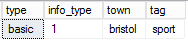
返回值一律是字符串類型,需要數值時要自行 CAST。
JSON_QUERY:取片段
 declare @json nvarchar(max)
set @json = N'{ "info":{ "type":1, "address":{ "town":"bristol", "county":"avon", "country":"england" }, "tags":["sport", "water polo"] }, "type":"basic" }'
select json_query(@json, '$') as json_context,
    json_query(@json, '$.info') as info,
    json_query(@json, '$.info.address') as info_address,
    json_query(@json, '$.info.tags') as info_tags

path 參數可省略,默認就是 $,即返回整個文檔。
四、修改 JSON 數據
JSON_MODIFY ( expression , path , newValue ) 的行為分幾種情況:
- 屬性存在:改寫它的值;
- 屬性不存在:沿路徑新增該鍵值對;
- newValue 為 NULL:刪除該鍵值對;
- 帶 append 關鍵字:向數組追加元素。
 declare @info nvarchar(100) = '{"name":"john","skills":["c#","sql"]}'
-- update name
set @info = json_modify(@info, '$.name', 'mike')
-- insert surname
set @info = json_modify(@info, '$.surname', 'smith')
-- delete name
set @info = json_modify(@info, '$.name', null)
-- add skill
set @info = json_modify(@info, 'append $.skills', 'azure')
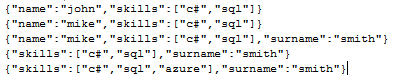
注意:把某個值設為 JSON 的 null 與「傳入 SQL 的 NULL」是兩件事,前者要寫 '$.name', 'null'(字符串)才會保留鍵並置空,後者則是刪除鍵。
五、用 OPENJSON 轉成關系表
OPENJSON 是行集函數,語法如下:
 OPENJSON( jsonExpression [ , path ] )
[ WITH ( colName type [ column_path ] [ AS JSON ]
     [ , colName type [ column_path ] [ AS JSON ] ] [ , . . . n ] ) ]
- path:指定關系表來源於 JSON 中的哪個位置;
- column_path:指定每列對應的路徑,建議始終顯式書寫;
- AS JSON:加了這個標記,該列類型必須是 nvarchar(max),表示值本身還是 JSON;不加則視為標量;
- WITH 選項:定義結果表結構,強烈建議寫上;不寫時函數只返回 key、value、type 三列。
 declare @json nvarchar(max)
set @json = N'{ "info":{ "type":1, "address":{ "town":"bristol", "county":"avon", "country":"england" }, "tags":["sport", "water polo"] }, "type":"basic" }'
SELECT info_type, info_address, tags
FROM OPENJSON(@json, '$.info')
with (
  info_type tinyint 'lax $.type',
  info_address nvarchar(max) 'lax $.address' as json,
  tags nvarchar(max) 'lax $.tags' as json
)
六、把關系表輸出為 JSON
用 FOR JSON 的兩種模式:
- AUTO:按 select 列表的順序自動生成嵌套結構;
- PATH:用列別名中的點號(dot-separated)控制分層,靈活度更高。
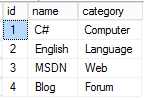
AUTO 模式:
select id, name, category from dbo.dt_json for json auto, root('json')
輸出:
 { "json":[
  { "id":1, "name":"C#", "category":"Computer" },
  { "id":2, "name":"English", "category":"Language" },
  { "id":3, "name":"MSDN", "category":"Web" },
  { "id":4, "name":"Blog", "category":"Forum" }
] }
PATH 模式:
 select id as 'book.id', name as 'book.name', category as 'product.category'
from dbo.dt_json for json path, root('json')
輸出:
 { "json":[
  { "book":{ "id":1, "name":"C#" }, "product":{ "category":"Computer" } },
  { "book":{ "id":2, "name":"English" }, "product":{ "category":"Language" } },
  { "book":{ "id":3, "name":"MSDN" }, "product":{ "category":"Web" } },
  { "book":{ "id":4, "name":"Blog" }, "product":{ "category":"Forum" } }
] }
實戰中還有一個常用組合:在查詢結果上套 OPENJSON 再 WITH,就能把「一筆訂單包含多個明細」這類一對多結構一次查詢展開,省去多次往返。需要注意 JSON 函數在 2016 之後的版本才可用,且巢狀層數與字符串長度受 nvarchar(max) 限制。
- 上一篇文章: 半小時入門 JSON:一維與二維數據的傳遞實例
- 下一篇文章: 《JSON 必知必會》讀後整理:從基本概念到安全實踐