node+websocket 實時聊天實例教程
編輯:JavaScript綜合知識
最近,負責的游戲需要一個聊天功能,由於是實時的聊天,便想到了現在挺火的websocket,折騰了一天一夜,總算有點眉目了,現在總結如下:
websocket 是html5一個通信協議,可以實時通信。本例的聊天是用的socket的框架socket.io實現的,socket.io 集成了websocket和xhr-polling(長輪詢)等多種通信方式
1.搭建node環境
從node官網,本人選擇的window的msi 一鍵安裝.安裝完node 之後還需配置系統環境變量 PATH 屬性裡添加上你的測試地址路徑. biu~ biu~
2.安裝socket.io
用npm install-g socket.io 命令 或者從socket.io官網下載文件放到node_modules文件夾裡面
3.服務端代碼 server.js
/
 * modules引入
 */
var express = require('express'),
	sio = require('socket.io'),
	fs=require('fs'),
	path = require('path')
	url = require('url');

//=========================app配置=============================
/**
 * app配置
 */
var app = module.export = express.createServer();
//=================配置socket.io=========================
/**
 * 配置socket.io
 *
 */
var io = sio.listen(app);
// assuming io is the Socket.IO server object
io.configure(function () {
  ///io.set("transports", ["websocket"]);
});

//===================socket鏈接監聽=================
/**
 * 開始socket鏈接監聽
 * @param {Object} socket
 */
io.sockets.on('connection', function (socket){
	//公共信息
	socket.on('public message',function(msg, fn){
		socket.broadcast.emit('public message',msg);
		fn(true);
	});

	//掉線,斷開鏈接處理
	socket.on('disconnect', function(){
		socket.broadcast.emit('public message','</pre>
<span style="color: red;">斷開連接。。。</span>
<pre class="javascript">');
	});

});

app.listen(3000, function(){
	var addr = app.address();
	console.log('app listening on http://127.0.0.1:' + addr.port);
});
4.客戶端代碼 chat.html
<!--<script src="/js/jquery.js"></script>
<script src="/js/socket.js"></script>--><script type="text/javascript">// <![CDATA[
$(function(){
var socket = io.connect('http://localhost:3000');
//開始連接服務器
socket.on('connect', function(){
$('#connecting').fadeOut();
show('連接服務器成功')
});
// 接收public message
socket.on('public message', function(msg){
show(msg);
});
$('#btn').click(function(){
var msg = $('#content').val();
// 發送公共消息 public message
socket.emit('public message', msg, function(ok){
if (ok) {
show(msg);
}
});
});
});
function show(msg){
var htm ="
<div class='message'>"+msg+"</div>
";
$('#main').append(htm);
}
// ]]></script></pre>
<div id="main">
<div id="connecting">正在連接服務器..</div>
</div>
<div id="send"><input id="content" type="text" /><button id="btn">發送</button></div>
5.先運行 服務端 命令:node server.js

客服端訪問client.html地址比如 http://localhost/…/chat.html
下面 是 Firefox和chrome的結果
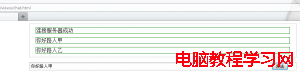
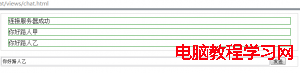
ps:目前firebox不支持websocket協議,用的是xhr-polling ,chrome用的是標准的websocket協議
下面從node服務器截取的圖片

現在websocket的標准還沒確定,不同浏覽器對握手協議支持的不同。 總之現在用websocket 是不推薦的,biu~biu~
- 上一頁:jQuery.fn解釋
- 下一頁:backbone.js學習實例
相關文章
- text-decoration:line-through CSS文字中劃線 刪除線 貫穿線樣式
- JS中script標簽defer和async屬性的區別詳解
- 基於Blod的ajax進度條下載實現示例代碼
- jQuery插件HighCharts實現氣泡圖效果示例【附demo源碼】
- jQuery插件HighCharts實現的2D堆條狀圖效果示例【附demo源碼下載】
- jQuery插件HighCharts繪制的2D堆柱狀圖效果示例【附demo源碼下載】
- jQuery插件HighCharts實現的2D條狀圖效果示例【附demo源碼下載】
- jQuery插件HighCharts實現的2D面積圖效果示例【附demo源碼下載】
- jQuery is not defined 錯誤原因與解決方法小結
- jQuery插件HighCharts繪制簡單2D折線圖效果示例【附demo源碼】
小編推薦
熱門推薦