本文記錄一個以 AngularJS 打造的自動完成(autocomplete)元件 Smarty 的開發過程,重點放在 Directive 的隔離作用域綁定符號,以及 Promise 在異步請求中的使用方式。
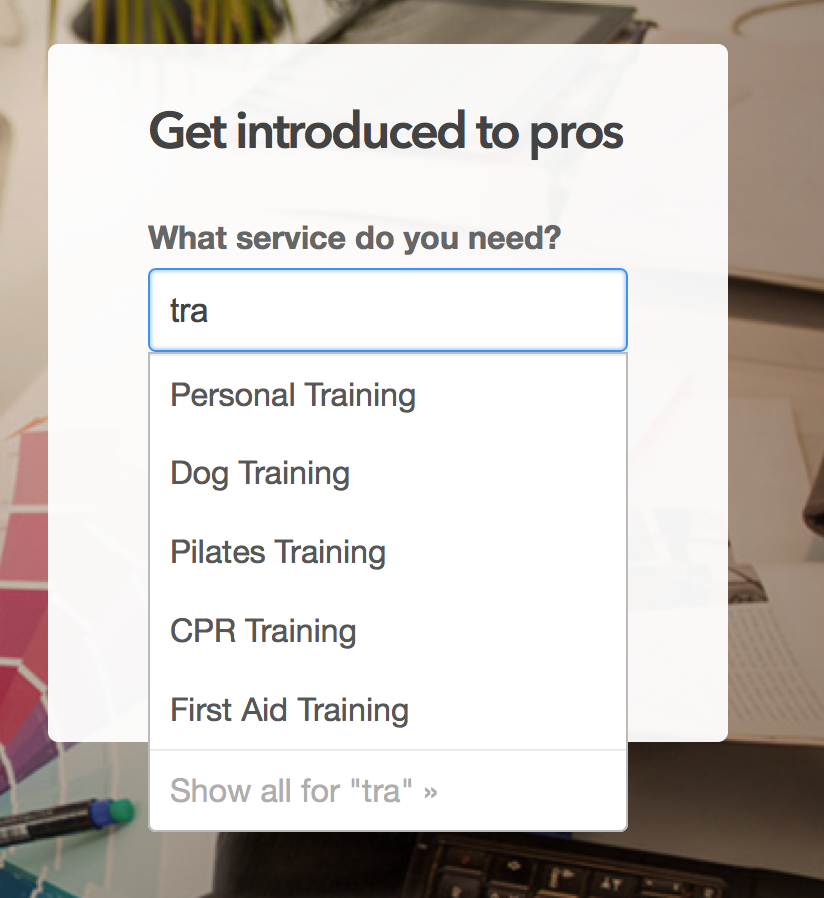
需求
Smarty 掛在首頁的搜尋欄上,目標是:
- 依使用者輸入的前綴字串,發出 HTTP 請求取得建議清單
- 以下拉列表呈現建議
- 隨輸入即時更新
- 速度要跟得上打字
- 導覽直覺且可關閉
- 可重複使用
AngularJS 的拆解方式
Angular 最受歡迎的一點,是它把問題拆成職責明確的概念。Smarty 大量用到其中兩個:Directive 負責與 DOM 綁定、處理元素互動;Service 透過依賴注入,為 Controller 與 Directive 提供可重用的獨立邏輯。
內建功能方面:用 ngIf 與 ngRepeat 條件式渲染並填滿建議列表;用 ngModel 把輸入框與 $scope 上的前綴變數雙向綁定,再搭配 $watch 監聽變化。
效能上,由於前綴每次變動都會觸發一次請求,因此使用 $http 的 cache: true 設定來快取結果,是提升反應速度最簡單的一招。
自訂的部分
smartySuggestor Service:提供 getSmartySuggestions(),接受使用者輸入的前綴,向後端 suggestion 服務發出請求並回傳建議。
smartyInput Directive:把使用者與下拉列表之間所有可能的互動都封裝起來,並搭配內建的 ng-mouseover、ng-click 處理滑鼠行為。測試則使用 Jasmine 搭配 angular-mocks,為下拉列表寫出「點擊外部應該消失」、「按 Enter 時應填入對應值」這類規格。
隔離作用域的兩種綁定符號
隔離作用域是學習 Angular 時最棘手的部分之一,以下用 Smarty 的實作分別說明。
=:雙向綁定
// 控制器
$scope.selected = -1;

// HTML
<input index="selected" smarty-input="" />

// SmartyInput 指令
scope: { index: "=", ... }
控制器作用域上的 selected(目前選中項的索引)與指令作用域的 index 雙向連動,因此使用者按上下鍵造成的變化會回傳給控制器。
&:呼叫父作用域的方法
// 控制器
$scope.setSelected = function (newValue) { ... };

// HTML
<input smarty-input="" select="setSelected(x)" />

// SmartyInput 指令
scope: { select: "&", ... }
...
scope.select({ "x": parseInt(scope.index) + 1 });
指令把控制器的 setSelected() 綁到自身的 select() 上,讓指令能在不依賴實作細節的情況下呼叫它。
@:把字串/表達式綁到本地作用域
// 控制器
$scope.prefix = "";

// 指令
scope: { prefix: "@", ... }
這讓建議選單中可以用 {{prefix}} 顯示目前前綴。這種綁定在較複雜的表達式中更常見,例如 next-index="{{selected + 1}}"。
Promise 串起整個流程
當 $scope.$watch 偵測到前綴變動,便呼叫 getSmartySuggestions():
var promise = smartySuggestor.getSmartySuggestions($scope.prefix);
promise.then(function (data) {
    $scope.suggestions = data;
});
在 getSmartySuggestions() 內部,$http.get 回傳一個等待伺服器回應的 promise:
function getSmartySuggestions(prefix) {
    requestParams["query"] = escape(prefix.toLowerCase());

    var promise = $http.get(requestUrl(), {
        params: requestParams,
        cache: true
    }).then(function (response) {
        return response.data.slice(0, 5).map(function (item) {
            return item.Name;
        });
    });

    return promise;
}
伺服器回應形如:
[{"ID":13,"Name":"Portrait Photography"},
 {"ID":24,"Name":"Commercial Photography"},
 {"ID":21,"Name":"Pet Photography"},
 {"ID":16,"Name":"Event Photography"},
 {"ID":26,"Name":"Headshot Photography"}]
接著在 promise 上呼叫 then(),在解析回呼中取出前 5 筆名稱;then() 會回傳一個新的 promise,處理後的結果被存進 getSmartySuggestions() 回傳的那個 promise 中。解析後的結果就是一個純字串陣列:
["Portrait Photography", "Commercial Photography",
 "Pet Photography", "Event Photography", "Headshot Photography"]
最後回到 $scope.$watch,再次呼叫 then(),把結果指派給 suggestions,畫面隨即更新。
心得
對初次接觸 Angular 的團隊來說,隔離作用域與 Promise 是兩個最需要反覆練習的課題。特別是隔離作用域,若能多看到別人在真實專案中如何選用 =、@、&,理解速度會快很多。而 Promise 的價值在於把「等待伺服器回應」這件事,用鏈式寫法表達成一條可讀的流程,避免回呼嵌套失控。
- 上一篇文章: 用傳統事件模型模擬現代事件綁定
- 下一篇文章: 深入 setTimeout 與 setInterval 的執行機制