AngularJS 默認使用 hash 方式做路由,URL 長這樣:
https://example.com/
https://example.com/#/about
https://example.com/#/contact
這個 # 讓不少團隊覺得彆扭,尤其是對外分享鏈接或做 SEO 時。好消息是:想去掉它只需要做兩件事。
第一步:配置 $locationProvider
先說說 $location 服務。它負責解析地址欄中的 URL 並同步應用狀態,反之亦然。要改變 URL 風格,我們用的是它的配置方法 $locationProvider,把 html5Mode 設為 true:
angular.module('scotchy', [])
  .config(function ($routeProvider, $locationProvider) {

    $routeProvider
      .when('/', {
        templateUrl : 'partials/home.html',
        controller  : mainController
      })
      .when('/about', {
        templateUrl : 'partials/about.html',
        controller  : mainController
      })
      .when('/contact', {
        templateUrl : 'partials/contact.html',
        controller  : mainController
      });

    // 使用 HTML5 History API
    $locationProvider.html5Mode(true);
  });
打開 html5Mode 之後,Angular 會改用 HTML5 History API 來操作瀏覽器歷史,路由 URL 變成 https://example.com/about 這樣的乾淨形式。
什麼是 HTML5 History API?它是操作瀏覽器歷史的標準接口,讓前端可以在不刷新頁面的前提下修改地址欄 URL 並支持前進後退。
第二步:設置相對鏈接的 base
啟用 html5Mode 後,相對路徑的解析基準會變化,所以需要在 <head> 裡顯式聲明 base:
<!doctype html>
<html>
<head>
  <meta charset="utf-8">
  <base href="/">
</head>
如果你的應用部署在子目錄(例如 /my-base),就把 href 改為 /my-base/。這個值必須與實際部署路徑一致,否則所有相對資源引用都會出錯。
老瀏覽器會自動回退
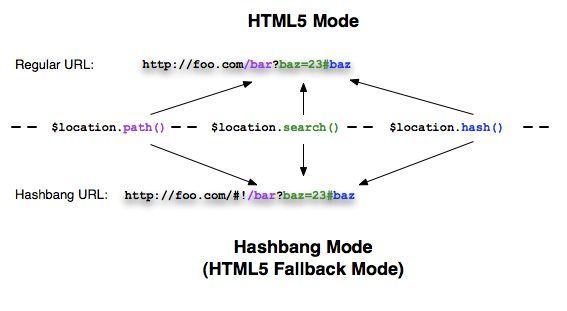
好消息是不用為兼容性操心:$location 服務在檢測到瀏覽器不支持 HTML5 History API 時,會自動回退到 hashbang(#!)方式。這個過程對開發者完全透明,無需額外配置。
服務端必須配合
這一步最容易被忽略,也是 html5Mode 上線後最常見的坑:因為 URL 現在是真實路徑(/about),當用戶直接訪問或刷新這個地址時,請求會打到服務器。如果服務器沒有配置回退規則,就會返回 404。
做法是配置一條 fallback:所有未匹配到靜態資源的請求,都返回 index.html,由前端路由接管。例如:
- Nginx:
try_files $uri $uri/ /index.html; - Apache:使用
mod_rewrite將請求重寫到 index.html。 - Node/Express:
app.get('*', ...)返回 index.html。
小結
去掉 # 的關鍵就三點:$locationProvider.html5Mode(true) 打開新模式、<base> 標明部署根路徑、服務端配置 fallback 到 index.html。三者缺一,要麼鏈接 404,要麼資源加載失敗。配置完成後,你就擁有了乾淨、對 SEO 更友好的 URL。
- 上一篇文章: 用 AngularJS 打造單頁應用的完整指引(路由 + 模板注入)
- 下一篇文章: jQuery 圖文自動輪播效果插件實現思路