本文介紹AngularJS的視圖功能應用,包括ng-view、ng-template與$routeProvider的使用,需要的朋友可以參考。
AngularJS支持透過在單個頁面上的多個視圖來實現單頁應用。要做到這一點,AngularJS提供了ng-view和ng-template指令,以及$routeProvider服務。
ng-view
ng-view標記只是簡單地創建一個占位符,是一個相應的視圖(HTML或ng-template視圖),可以根據配置來放置。
使用:定義一個帶ng-view的div在主模塊中。
<div ng-app="mainApp">
...
<div ng-view></div>
</div>
ng-template
ng-template指令用來創建使用script標籤的HTML視圖,它包含一個用於由$routeProvider映射控制器視圖的"id"屬性。
使用:定義類型為ng-template的腳本塊在主模塊中。
<div ng-app="mainApp">
...
<script type="text/ng-template" id="addStudent.html">
<h2> Add Student </h2>
{{message}}
</script>
</div>
$routeProvider
$routeProvider是組網址的配置,將它們映射到相應的HTML頁面或ng-template,並附加一個使用相同鍵的控制器服務。
使用:定義主模塊的腳本塊,並設置路由配置。
var mainApp = angular.module("mainApp", ['ngRoute']);
mainApp.config(['$routeProvider', function($routeProvider) {
$routeProvider
.when('/addStudent', {
templateUrl: 'addStudent.html',
controller: 'AddStudentController'
})
.when('/viewStudents', {
templateUrl: 'viewStudents.html',
controller: 'ViewStudentsController'
})
.otherwise({ redirectTo: '/addStudent' });
}]);
以下是在上面的例子中需要注意的重要問題:
$routeProvider被定義為在mainApp模塊的配置功能中使用;
$routeProvider當定義了URL"/addStudent"映射到"addStudent.html"。addStudent.html應存在於與主html頁面相同的路徑。如果html頁面沒有定義,那麼ng-template會用id="addStudent.html";
"otherwise"用來設置默認視圖;
"controller"用來設置該視圖對應的控制器。
例子
下面的例子展示了上述所有指令。
testAngularJS.html
<html>
<head>
<title>Angular JS Views</title>
<script src="https://ajax.googleapis.com/ajax/libs/angularjs/1.2.15/angular.min.js"></script>
<script src="https://ajax.googleapis.com/ajax/libs/angularjs/1.2.25/angular-route.min.js"></script>
</head>
<body>
<h2>AngularJS Sample Application</h2>
<div ng-app="mainApp">
<p><a href="#addStudent">Add Student</a></p>
<p><a href="#viewStudents">View Students</a></p>
<div ng-view></div>
<script type="text/ng-template" id="addStudent.html">
<h2> Add Student </h2>
{{message}}
</script>
<script type="text/ng-template" id="viewStudents.html">
<h2> View Students </h2>
{{message}}
</script>
</div>
<script>
var mainApp = angular.module("mainApp", ['ngRoute']);
mainApp.config(['$routeProvider', function($routeProvider) {
$routeProvider
.when('/addStudent', { templateUrl: 'addStudent.html', controller: 'AddStudentController' })
.when('/viewStudents', { templateUrl: 'viewStudents.html', controller: 'ViewStudentsController' })
.otherwise({ redirectTo: '/addStudent' });
}]);
mainApp.controller('AddStudentController', function($scope) {
$scope.message = "This page will be used to display add student form";
});
mainApp.controller('ViewStudentsController', function($scope) {
$scope.message = "This page will be used to display all the students";
});
</script>
</body>
</html>
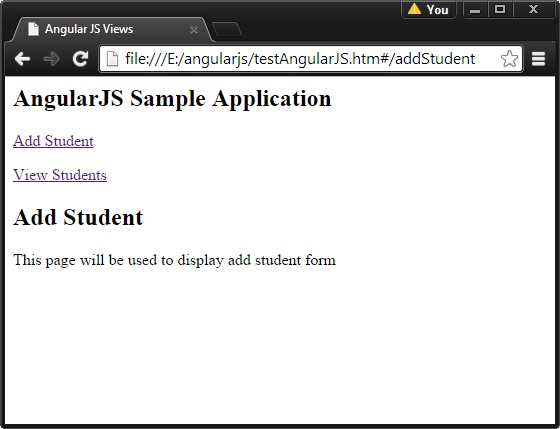
結果
在Web瀏覽器中打開textAngularJS.html,看到的結果如下:
- 上一篇文章: 在AngularJS應用中實現動畫效果的代碼示例
- 下一篇文章: AngularJS中使用factory和service的方法介紹