AngularJS 表格實作:用 ng-repeat 畫表並加上樣式
編輯:JavaScript綜合知識
表格資料本質上就是「重複的結構」,因此 ng-repeat 是渲染表格最順手的工具。本文示範如何用它產生日 deserves 樣式的資料表格。
用 ng-repeat 產生表格列
<table>
  <tr>
    <th>Name</th>
    <th>Marks</th>
  </tr>
  <tr ng-repeat="subject in student.subjects">
    <td>{{ subject.name }}</td>
    <td>{{ subject.marks }}</td>
  </tr>
</table>
表頭寫死一次,內容列則由資料陣列決定筆數,之後增減科目完全不需要改 HTML。
用 CSS 讓表格好看一點
<style>
table, th, td {
  border: 1px solid grey;
  border-collapse: collapse;
  padding: 5px;
}
table tr:nth-child(odd)  { background-color: #f2f2f2; }
table tr:nth-child(even) { background-color: #ffffff; }
</style>
border-collapse: collapse 讓相鄰格線合併成一條,視覺更乾淨;nth-child 的奇偶規則則做出斑馬線效果,長表格閱讀時更不容易串行。
完整範例
建立 testAngularJS.html:
<html>
<head>
<title>Angular JS Table</title>
<style>
table, th, td {
  border: 1px solid grey;
  border-collapse: collapse;
  padding: 5px;
}
table tr:nth-child(odd)  { background-color: #f2f2f2; }
table tr:nth-child(even) { background-color: #ffffff; }
</style>
</head>
<body>
<h2>AngularJS Sample Application</h2>
<div ng-app="" ng-controller="studentController">
<table border="0">
  <tr><td>Enter first name:</td><td><input type="text" ng-model="student.firstName"></td></tr>
  <tr><td>Enter last name: </td><td><input type="text" ng-model="student.lastName"></td></tr>
  <tr><td>Name: </td><td>{{student.fullName()}}</td></tr>
  <tr><td>Subject:</td><td>
    <table>
      <tr><th>Name</th><th>Marks</th></tr>
      <tr ng-repeat="subject in student.subjects">
        <td>{{ subject.name }}</td>
        <td>{{ subject.marks }}</td>
      </tr>
    </table>
  </td></tr>
</table>
</div>
<script>
function studentController($scope) {
  $scope.student = {
    firstName: "Mahesh",
    lastName: "Parashar",
    fees: 500,
    subjects: [
      {name:'Physics',  marks:70},
      {name:'Chemistry',marks:80},
      {name:'Math',     marks:65},
      {name:'English',  marks:75},
      {name:'Hindi',    marks:67}
    ],
    fullName: function () {
      var studentObject;
      studentObject = $scope.student;
      return studentObject.firstName + " " + studentObject.lastName;
    }
  };
}
</script>
<script src="https://ajax.googleapis.com/ajax/libs/angularjs/1.2.15/angular.min.js"</script>
</body>
</html>
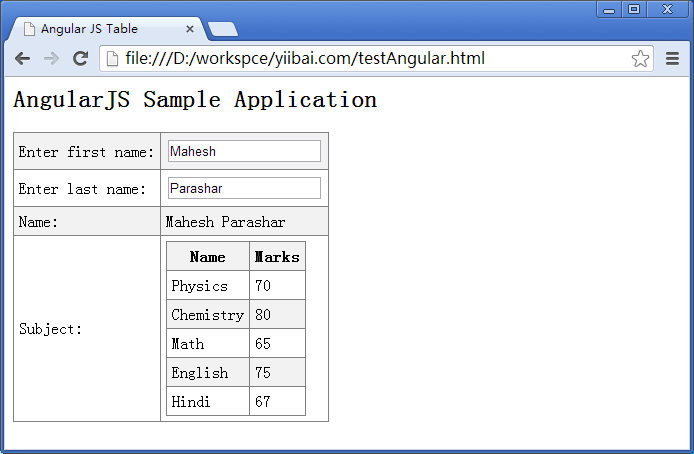
執行結果
打開頁面後,上方輸入框可改姓名並即時反映;右側表格則列出五個科目與分數,斑馬線樣式自動套用。