jQuery datepicker 實作日期區間連續選擇
編輯:JavaScript綜合知識
在許多後台系統與報表查詢中,常需要一次選擇「起始日期到結束日期」的區間。本文示範如何以 jQuery UI 的 datepicker 為基礎,改寫出連續選擇兩個日期並自動組合成區間的效果。
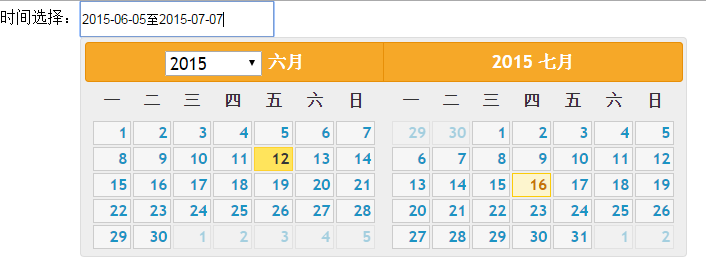
初始化與中文化設定
先載入 jQuery、jQuery UI 及對應樣式,並將 datepicker 的語言包設定為繁體中文:
<link rel="stylesheet" href="reset-jquery-ui.min.css" />
<script type="text/javascript" src="jquery-1.8.3.min.js"></script>
<script type="text/javascript" src="jquery-ui.js"></script>
$.datepicker.regional['zh-CN'] = {
clearText: '清除', closeText: '關閉',
prevText: '<上月', nextText: '下月>',
currentText: '今天',
monthNames: ['一月','二月','三月','四月','五月','六月',
'七月','八月','九月','十月','十一月','十二月'],
dayNames: ['星期日','星期一','星期二','星期三','星期四','星期五','星期六'],
dayNamesMin: ['日','一','二','三','四','五','六'],
dateFormat: 'yy-mm-dd', firstDay: 1, isRTL: false
};
$.datepicker.setDefaults($.datepicker.regional['zh-CN']);連續選擇的核心邏輯
透過計數器 a 記錄點擊次數:第一次選到的日期暫存起來,第二次選到時就與暫存值組合成區間,並依先後順序自動排列:
var a = 0;
var tmpdate = "";

function datePickerById(tagId){
    $(tagId).datepicker({
        isDataChecked: true,
        autoClose: true,
        showOtherMonths: true,
        changeYear: true,
        numberOfMonths: 2,        // 一次顯示兩個月
        showMonthAfterYear: true,
        onSelect: function(dateText, inst){
            a++;
            inst.autoClose = true;
            if(a == 1){
                inst.settings.isDataChecked = false;
                tmpdate = dateText;          // 暫存第一個日期
            }
            if(a == 2){
                a = 0;
                inst.settings.isDataChecked = false;
                inst.autoClose = false;
                var date1 = new Date(tmpdate).getTime();
                var date2 = new Date(dateText).getTime();
                if(date1 < date2){
                    $(tagId).val(tmpdate.replace(/-/ig,"-") + "至" + dateText.replace(/-/ig,"-"));
                } else if(date1 == date2){
                    a = 1;                   // 兩次選同一天,重新開始
                    inst.settings.isDataChecked = false;
                    inst.autoClose = true;
                } else {
                    $(tagId).val(dateText.replace(/-/ig,"-") + "至" + tmpdate.replace(/-/ig,"-"));
                }
            }
        }
    });
}
頁面呼叫
<body>
    時間選擇:<input id="div1" style="height:30px;width:190px;"/>
    <script type="text/javascript">
        datePickerById('#div1');
    </script>
</body>
改寫 jQuery UI 讓日曆不提前關閉
若使用 jQuery UI 1.11.4,需要修改原始碼中的 _hideDatepicker,加入 autoClose 判斷,讓面板在選完第一個日期後仍不關閉:
_hideDatepicker: function(input) {
    var showAnim, duration, postProcess, onClose, inst = this._curInst;
    if (!inst || (input && inst !== $.data(input, "datepicker"))) { return; }
    // 增加 inst.autoClose 控制日曆面板
    if (this._datepickerShowing || !inst.autoClose) {
        showAnim = this._get(inst, "showAnim");
        duration = this._get(inst, "duration");
        postProcess = function() { $.datepicker._tidyDialog(inst); };
        if(inst.autoClose === true){
            // 此處不隱藏
        } else {
            if ( $.effects && ( $.effects.effect[ showAnim ] || $.effects[ showAnim ] ) ) {
                inst.dpDiv.hide(showAnim, $.datepicker._get(inst, "showOptions"), duration, postProcess);
            } else {
                inst.dpDiv[(showAnim === "slideDown" ? "slideUp" :
                    (showAnim === "fadeIn" ? "fadeOut" : "hide"))]((showAnim ? duration : null), postProcess);
            }
        }
        if (!showAnim) { postProcess(); }
        this._datepickerShowing = false;
        onClose = this._get(inst, "onClose");
        if (onClose) {
            onClose.apply((inst.input ? inst.input[0] : null),
                [(inst.input ? inst.input.val() : ""), inst]);
        }
        this._lastInput = null;
        if (this._inDialog) {
            this._dialogInput.css({ position: "absolute", left: "0", top: "-100px" });
            if ($.blockUI) { $.unblockUI(); $("body").append(this.dpDiv); }
        }
        this._inDialog = false;
    }
},
經過上述改造,就能實現「點兩次選出日期區間、並以『起 至 迄』格式合併顯示」的連續選擇效果。