在製作圖片展示牆或商品列表時,經常會遇到需要在一個固定高度的容器內瀏覽大量內容的情況。本文將帶大家動手實現一個帶有上、下翻動按鈕的滾動效果,點擊按鈕即可讓列表平滑地向上或向下滾動。
實現思路
整個效果由一個外層容器包裹,內部包含一個「向上」按鈕、一個可滾動的清單區域,以及一個「向下」按鈕。核心是透過操作容器元素的 scrollTop 屬性,配合 setTimeout 做出逐幀遞減或遞增的緩動動畫,讓滾動過程顯得自然順滑,而不是生硬地跳動。
核心代碼
以下為完整的 HTML、CSS 與 JavaScript 結構:
<!DOCTYPE html>
<html>
<head>
<meta charset="utf-8" />
<title>js帶按鈕上下滾動效果</title>
<style>
ul{ margin:0; padding:0; list-style:none; height:100000px; }
li{ margin:0; padding:0; width:100px; height:100px; display:block; margin-bottom:5px; background:#009900; }
#img_bag{ width:110px; height:600px; background:#F2F2F2; margin:0 auto; text-align:center; }
#img_bag #img{ width:100px; height:525px; background:#969696; overflow:hidden; margin:auto; }
</style>
</head>
<body>
<div id="img_bag">
<a href="javascript:void(0)" onmousedown="moveTop()">▲</a>
<div id="img">
<ul>
<li>1</li><li>2</li><li>3</li><li>4</li><li>5</li><li>6</li>
</ul>
</div>
<a href="javascript:void(0)" onmousedown="moveBottom()">▼</a>
</div>
<script>
function $(obj){ return document.getElementById(obj); }
var maxHeight=$("img").getElementsByTagName("ul")[0].getElementsByTagName("li").length*105;
var targety = 211;
var dx;
var a=null;
function moveTop(){
var le=parseInt($("img").scrollTop);
if(le>211){ targety=parseInt($("img").scrollTop)-211; }
else{ targety=parseInt($("img").scrollTop)-le-1; }
scTop();
}
function scTop(){
dx=parseInt($("img").scrollTop)-targety;
$("img").scrollTop-=dx*.3;
clearScroll=setTimeout(scTop,50);
if(dx*.3<1){ clearTimeout(clearScroll); }
}
function moveBottom(){
var le=parseInt($("img").scrollTop)+211;
var maxL=maxHeight-600;
if(le<maxL){ targety=parseInt($("img").scrollTop)+211; }
else{ targety=maxL }
scBottom();
}
function scBottom(){
dx=targety-parseInt($("img").scrollTop);
$("img").scrollTop+=dx*.3;
a=setTimeout(scBottom,50);
if(dx*.3<1){ clearTimeout(a) }
}
</script>
</body>
</html>
要點說明
每個列表項的高度加上間距約為 105 像素,因此最大滾動高度可透過「列表項數量 × 105」計算得出。向下滾動時需判斷是否已接近底部,避免滾過頭;向上滾動則以此類推。每次移動只前進「差值 × 0.3」,並透過 50 毫秒的定時器反覆呼叫,直到差值足夠小為止,這樣就能得到近似緩動的平滑效果。
運行效果如下所示:
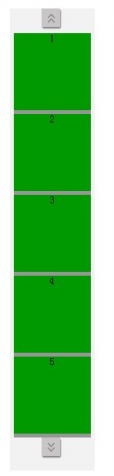
以上就是這個帶按鈕上下滾動效果的完整實現,希望對大家的 JavaScript 開發有所幫助。
- 上一篇文章: JS驗證上傳圖片的方法
- 下一篇文章: 用 JavaScript 實現 DIV 層拖動與動態新增圖層