頁面彈窗有好幾種做法:用 div 模擬、用 iframe 內嵌,或者用瀏覽器原生的 window.open() 開一個真正的視窗。本文示範最後一種,並說明父子視窗之間如何雙向傳遞資料。
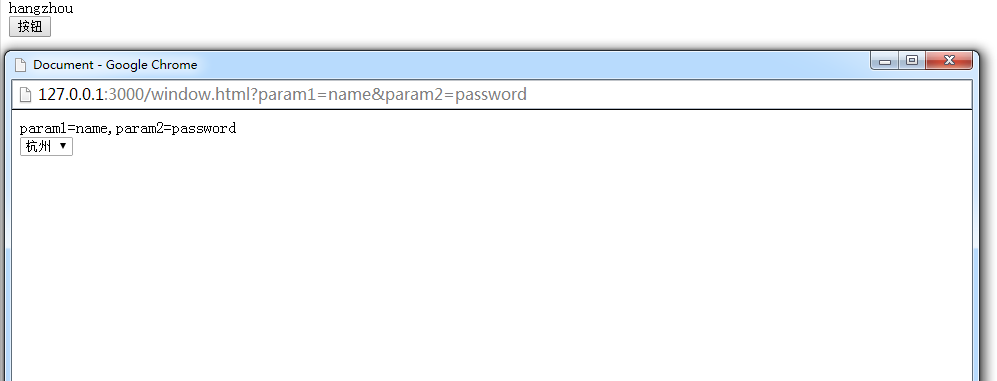
傳值原理
父視窗要傳資料給子視窗,靠的是網址參數:把資料拼在 query string 後面。
子視窗要傳資料回父視窗,靠的是父視窗上的全域函式:透過 window.opener 取得開啟它的那一層視窗,直接呼叫對方的方法。
父視窗(index.html)
<!DOCTYPE html>
<html lang="en">
<head>
<meta charset="UTF-8">
<title>Document</title>
</head>
<body>
<div id="content"></div>
<button id="test">按鈕</button>
<script>
var test = document.getElementById('test');
test.onclick = function () {
window.open(
'./window.html?param1=name¶m2=password',
'_blank',
'width=960,height=650,menubar=no,toolbar=no,location=no,' +
'directories=no,status=no,scrollbars=yes,resizable=yes'
);
};
// 供子視窗呼叫的全域函式
window.getContent = function (tx) {
document.getElementById('content').innerText = tx;
};
</script>
</body>
</html>子視窗(window.html)
<!DOCTYPE html>
<html lang="en">
<head>
<meta charset="UTF-8">
<title>Document</title>
</head>
<body>
<div id="content"></div>
<select name="" id="city">
  <option value="shanghai">上海</option>
  <option value="hangzhou">杭州</option>
</select>

<script>
// 取出網址中問號後的所有參數
var params = location.href.substring(location.href.lastIndexOf('?') + 1).split('&');
document.getElementById('content').innerText = params;

var city = document.getElementById('city');

city.onchange = function () {
  // 透過 opener 呼叫父視窗的全域函式
  window.opener.getContent(city.value);
};
</script>
</body>
</html>
注意這段程式需要在伺服器環境(http/https)中執行,直接雙擊以 file:// 開啟時,多數瀏覽器會因來源為 null 而阻擋跨視窗存取。
幾個實務上的補強
opener 可能不存在。若使用者直接複製子視窗網址在新分頁開啟,或瀏覽器設定阻擋了 opener 關聯,window.opener 會是 null,此時 window.opener.getContent(...) 就會拋錯。建議先判斷:
if (window.opener && typeof window.opener.getContent === 'function') {
  window.opener.getContent(city.value);
}字串拼接參數不安全。範例把值直接接在網址後,若值含有 &、= 或中文,解析時就會出錯。應使用 URLSearchParams 來組與讀:
// 父視窗
var url = new URL('./window.html', location.href);
url.searchParams.set('param1', 'name');
url.searchParams.set('param2', 'password');
window.open(url.href, '_blank', 'width=960,height=650');

// 子視窗
var p = new URLSearchParams(location.search);
var param1 = p.get('param1');
關閉子視窗後釋放 opener。為避免 opener 參照長期佔用記憶體,子視窗可在 unload 時清空:window.onunload = function(){ window.opener = null; }。
安全考量。若開啟的頁面是外部來源,對方可以完全控制你的父視窗物件,因此不應對不可信的網址使用 window.open 並暴露全域函式。此外 window.open 加上 noopener 特性(或以 rel="noopener noreferrer" 對待外部連結)能避免新視窗透過 window.opener 反向操作你的頁面,這是防範 tabnabbing 的標準做法。
最後補充:若只是需要在視窗間傳值,且雙方同網域,使用 localStorage 搭配 storage 事件,或 postMessage(跨網域適用),通常比依賴 opener 全域函式更清晰、也更安全。