使用 DOM 控制表單:屬性、方法與提交機制
編輯:JavaScript綜合知識
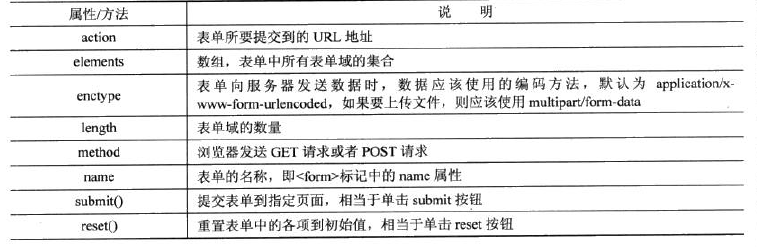
表單 <form> 是網頁收集使用者資料最普遍的方式,包含文字框、密碼框、下拉選單、單選鈕與複選框等。JavaScript 能輕鬆操作表單,進行資料驗證、自動填值與事件處理。本文將系統性地介紹表單的常用屬性與方法。
每個 form 都會被解析為一個 form 物件,可透過 document.forms 集合存取,既能用 name 也能用索引:
document.forms["form1"] // 依 name 取得表單
document.forms[1] // 取得文件中第二個表單
下表單示範了多種元素搭配 label,讓點擊文字即可聚焦對應控制項,提升使用體驗:
<form method="post" name="myForm1" action="addInfo.aspx">
<p><label for="name">請輸入您的姓名:</label><br><input type="text" name="name" id="name"></p>
<p><label for="passwd">請輸入您的密碼:</label><br><input type="password" name="passwd" id="passwd"></p>
<p>請選擇性別:<br>
<input type="radio" name="sex" id="male" value="male"><label for="male">男</label>
<input type="radio" name="sex" id="female" value="female"><label for="female">女</label></p>
<p><input type="submit" name="btnSubmit" value="Submit">
<input type="reset" name="btnReset" value="Reset"></p>
</form>
一般建議每個表單元素都具備 name 與 id:name 用於提交給伺服器,id 則用於綁定與功能篩選。
存取表單元素
表單內所有元素都收錄在 form 的 elements 集合中,可用索引或 name 取得,其中最直觀的是 oForm.elements.comments 這種寫法:
var oForm = document.forms["form1"];
var otextForm = oForm.elements[0]; // 第一個元素
var otextPasswd = oForm.elements["passwd"]; // 依 name 取得
var otextcomments = oForm.elements.comments; // 最直觀
表單的提交
提交可由 submit 按鈕或 image 按鈕完成,使用者在按下回車或點擊按鈕時即觸發,無需額外程式碼:
<input type="submit" name="btnsubmit" value="Submit">
<input type="image" name="picSubmit" src="Submit.jpg">
若擔心使用者因網路緩慢而重複點擊提交按鈕,造成伺服器負擔,可用 disabled 屬性暫時鎖定按鈕,避免重複送出。
- 上一篇文章: 使用 DOM 動態操作表格:新增、修改與刪除
- 下一篇文章: 用 DOM 控制文本框:限制字數與自動選取