jQuery 表單域選擇器用法完全解析
編輯:JavaScript綜合知識
表單域是指網頁中的 input、textarea、select 與 button 等元素。jQuery 提供了一系列專用的表單域選擇器,讓我們能輕鬆選取各種類型的表單元素。本文將完整整理這些選擇器的用法,並附上可直接運行的實例。
常見的表單域選擇器
$(":input"):選取所有 input、textarea、select 與 button 元素。$(":text"):選取所有文字輸入框。$(":password"):選取所有密碼輸入框。$(":radio"):選取所有單選按鈕。$(":checkbox"):選取所有複選框。$(":file"):選取所有檔案上傳框。$(":image"):選取所有圖像按鈕。$(":hidden"):選取所有不可見元素(CSS display 為 none)以及隱藏域。$(":submit"):選取所有提交按鈕。$(":reset"):選取所有重置按鈕。
完整實例
<!DOCTYPE html PUBLIC "-//W3C//DTD XHTML 1.0 Transitional//EN" "https://www.w3.org/TR/xhtml1/DTD/xhtml1-transitional.dtd">
<html xmlns="https://www.w3.org/1999/xhtml">
<head>
<meta http-equiv="Content-Type" content="text/html; charset=utf-8" />
<title>表單域選擇器</title>
<script type="text/javascript" src="jquery-1.7.min.js"></script>
<script type="text/javascript">
$(document).ready(function(){
  $(":text").attr("value", "文字框");
  $(":password").attr("value", "密碼框");
  $(":radio:eq(0)").attr("checked", "true");
  $(":checkbox").attr("checked", "true");
  $(":image").attr("src", "ICO.ICO");
  $(":file").css("width", "200px");
  $(":hidden").attr("value", "已保存的值");
  $("select").css("background", "#FCF"); // 注意沒有冒號
  $(":submit").attr("id", "btn1");
  $(":reset").attr("name", "btn");
  $("textarea").attr("value", "文本域"); // 注意沒有冒號
});
</script>
</head>
<body>
<table width="730" height="145" border="1">
  <tr>
    <td>文字框</td><td><input type="text"/></td>
    <td>密碼框</td><td><input type="password" /></td>
  </tr>
  <tr>
    <td>單選按鈕</td><td><input type="radio" /><input type="radio" /></td>
    <td>複選框</td><td><input type="checkbox" /><input type="checkbox" /></td>
  </tr>
  <tr>
    <td>圖像</td><td><input type="image" /></td>
    <td>檔案域</td><td><input type="file" /></td>
  </tr>
  <tr>
    <td>隱藏域</td><td><input type="hidden" />(不可見)</td>
    <td>下拉列表</td><td><select><option>選項一</option><option>選項二</option></select></td>
  </tr>
  <tr>
    <td>提交按鈕</td><td><input type="submit" /></td>
    <td>重置按鈕</td><td><input type="reset" /></td>
  </tr>
  <tr>
    <td>文字區域:</td><td colspan="3"><textarea cols="70" rows="3"></textarea></td>
  </tr>
</table>
</body>
</html>
效果圖如下所示:
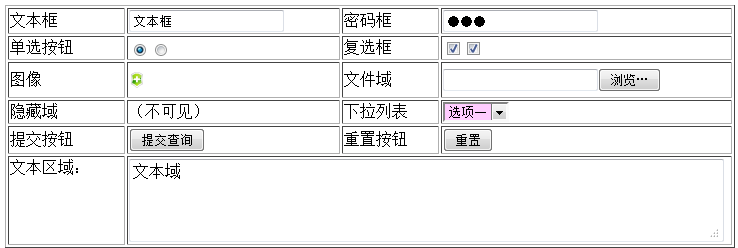
需要特別注意的是,select 與 textarea 是直接用標籤名稱選取(沒有冒號),而 :text、:radio 等則屬於表單域選擇器(帶有冒號)。掌握這些差異,就能精準地操作各種表單元素。希望本文能對你的 jQuery 程式設計有所幫助。
- 上一篇文章: JavaScript 操作 HTML 自訂屬性的方法
- 下一篇文章: jQuery 過濾選擇器用法詳解