擴充 jQuery:寫一個自己的 disable() 方法
編輯:JavaScript綜合知識
jQuery 包裝物件提供了大量現成方法,但再完整的函式庫也不可能涵蓋所有需求,所以它刻意開放了擴充機制。以「一次停用一組表單元素」為例,jQuery 本身並沒有 disable() 這種方法,我們可以自己加一個。
呼叫端長這樣
<!DOCTYPE>
<html lang="en">
<head>
<title>Custom Method!</title>
<meta http-equiv="content-type" content="text/html;charset=utf-8">
<script type="text/javascript" src="js/jquery-2.1.1.js"></script>
<script type="text/javascript">
    jQuery(function()
    {
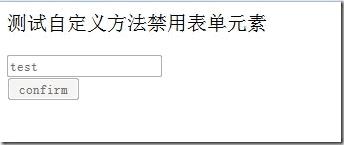
        $("form input").disable();
    });
</script>
</head>
<body>
<p>測試自定義方法禁用表單元素</p>
<form>
    <input type="text" value="test"><br/>
    <input type="button" value="confirm" class="test">
</form>
</body>
</html>
執行後,文字框與按鈕都變成不可操作:
若只想停用按鈕,把選擇器收窄即可:
jQuery(function()
{
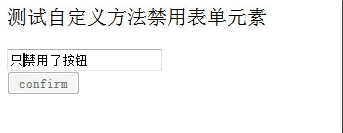
    $("form input.test").disable();
});
結果就只停用了帶 class="test" 的按鈕:
擴充的實作
打開未壓縮的 jquery-2.1.1.js,找到合適的位置加入以下程式碼:
jQuery.fn.disable = function () {

    return this.each(function()
    {
        if (this.disabled != null) this.disabled = true;
    });

}
幾個關鍵點:
- 掛在
jQuery.fn上:jQuery.fn就是jQuery.prototype,掛上去之後所有 jQuery 物件都能呼叫這個方法。 - 用
this.each()遍歷:選擇器可能選到多個元素,必須逐一處理,不能只針對第一個。 return this:回傳原本的 jQuery 物件以維持鏈式呼叫,例如$("form input").disable().css("color", "gray");才能繼續串下去。if (this.disabled != null):這個判斷用來過濾掉不支援 disabled 的元素(例如div),避免在非表單元素上寫入無意義的屬性。
順著同樣的思路,也可以補一個反向的方法:
jQuery.fn.enable = function () {
    return this.each(function(){
        if (this.disabled != null) this.disabled = false;
    });
};
實務建議
直接改動 jQuery 原始檔並不理想,日後升級版本時會很痛苦。更恰當的做法是另外開一支 jquery.extend.js,在 jQuery 載入之後引入,把自訂方法集中在裡面。若要對外發佈,也可以遵循 jQuery 官方建議,用 IIFE 包成獨立插件並註冊到 jQuery.fn:
(function($){
    $.fn.disable = function(){
        return this.each(function(){
            if (this.disabled != null) this.disabled = true;
        });
    };
})(jQuery);
另外提醒,較新版的 jQuery 已提供 .prop('disabled', true),能更精確地處理屬性與特性之間的差異,若環境允許,直接用 prop 會比自製方法更省事。
- 上一篇文章: 用 userAgent 判斷瀏覽器與行動裝置終端
- 下一篇文章: 取消 radio 選取的三種做法