JavaScript 取得 select 選項的 value 與 text
編輯:JavaScript綜合知識
取得 select 中被選中選項的 value 相對簡單,但要拿到顯示文字(text),新手常會卡住,因為它不像 value 那樣有現成的屬性。
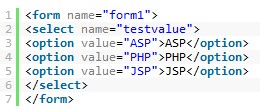
示例表單,包含一個下拉選單與各選項的值:
JavaScript 部分:

取值與取文字
// 取得選中項的 value
var val = document.getElementById('city').value;

// 取得選中項顯示的文字
var sel = document.getElementById('city');
var txt = sel.options[sel.selectedIndex].text;
關鍵是 selectedIndex 搭配 options 集合,先定位到選中的 option,再讀它的 text。
用 jQuery 寫更短:
var val = $("#city").val();
var txt = $("#city option:selected").text();
遍歷所有選項
var sel = document.getElementById('city');
for(var i = 0; i < sel.options.length; i++){
 console.log(sel.options[i].value, sel.options[i].text);
}
補充一點:option 的 text 是畫面上的文字,label 屬性則是另一回事(在 optgroup 情境才有意義)。若要取的是 option 的 innerHTML,用 innerHTML 亦可,但 text 語意更明確。
- 上一篇文章: 用 JS 搭配 CSS 為連結加上類型小圖示
- 下一篇文章: 用 JavaScript 倒數計時後自動跳轉網址