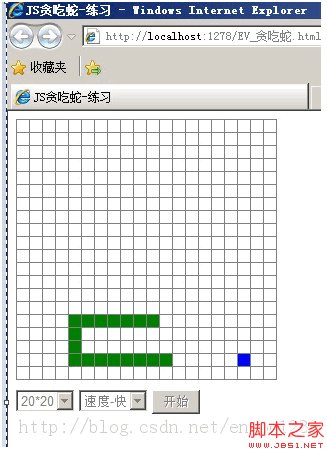
貪吃蛇是練習遊戲邏輯的經典題目:不涉及美術資源,卻涵蓋了狀態管理、計時器、鍵盤事件、碰撞偵測與隨機生成。以下是一個以表格為渲染基礎的完整實作,作為個人練習與備份。
整體架構
程式分成四個部分:Direction 存放方向常數(用方向鍵的 keycode)、Common 存放全域設定(棋盤尺寸、速度、計時器 handle)、Control 作為控制器負責初始化與流程調度、Snake 與 Food 分別管理蛇與食物的狀態。
樣式與方向常數
#pannel table {
  border-collapse: collapse;
}
#pannel table td {
  border: 1px solid #808080;
  width: 10px;
  height: 10px;
  font-size: 0;
  line-height: 0;
  overflow: hidden;
}
#pannel table .snake { background-color: green; }
#pannel table .food  { background-color: blue; }

var Direction = new function () {
  this.UP    = 38;
  this.RIGHT = 39;
  this.DOWN  = 40;
  this.LEFT  = 37;
};
var Common = new function () {
  this.width = 20;   /* 水平方向方格數 */
  this.height = 20;  /* 垂直方向方格數 */
  this.speed = 250;  /* 速度,值越小越快 */
  this.workThread = null;
};
棋盤用 table 的每個 td 當格子,蛇身與食物只是切換 td 的 class,靠 CSS 上色。這是最省事的渲染方式,缺點是格子多時 DOM 節點數量可觀;若改成 canvas 會流暢得多。
控制器:初始化與啟動
var Main = new function () {
  var control = new Control();
  window.onload = function () {
    control.Init("pannel");
    document.getElementById("btnStart").onclick = function () {
      control.Start();
      this.disabled = true;
      document.getElementById("selSpeed").disabled = true;
      document.getElementById("selSize").disabled = true;
    };
    document.getElementById("selSpeed").onchange = function () {
      Common.speed = this.value;
    }
    document.getElementById("selSize").onchange = function () {
      Common.width = this.value;
      Common.height = this.value;
      control.Init("pannel");
    };
  };
};

function Control() {
  this.snake = new Snake();
  this.food = new Food();

  /* 初始化:建立表格 */
  this.Init = function (pid) {
    var html = [];
    html.push("<table>");
    for (var y = 0; y < Common.height; y++) {
      html.push("<tr>");
      for (var x = 0; x < Common.width; x++) {
        html.push('<td id="box_' + x + "_" + y + '"> </td>');
      }
      html.push("</tr>");
    }
    html.push("</table>");
    this.pannel = document.getElementById(pid);
    this.pannel.innerHTML = html.join("");
  };

  /* 開始遊戲:監聽鍵盤、建立食物、啟動刷新線程 */
  this.Start = function () {
    var me = this;
    this.MoveSnake = function (ev) {
      var evt = window.event || ev;
      me.snake.SetDir(evt.keyCode);
    };
    try {
      document.attachEvent("onkeydown", this.MoveSnake);
    } catch (e) {
      document.addEventListener("keydown", this.MoveSnake, false);
    }
    this.food.Create();
    Common.workThread = setInterval(function () {
      me.snake.Eat(me.food); me.snake.Move();
    }, Common.speed);
  }
}
幾個值得學的地方:用陣列 push 收集 HTML 再 join('') 一次寫入,比反覆操作 innerHTML 有效率;用 me = this 保存控制器的參考,避免 setInterval 回呼裡 this 指向改變;attachEvent 與 addEventListener 的 try/catch 切換是舊時代的跨瀏覽器寫法,現在直接用 addEventListener 即可。
蛇的移動與碰撞偵測
function Snake() {
  this.isDone = false;
  this.dir = Direction.RIGHT;
  this.pos = new Array(new Position());

  /* 移動:擦除尾部,全體前進,判斷是否結束 */
  this.Move = function () {
    document.getElementById("box_" + this.pos[0].X + "_" + this.pos[0].Y).className = "";

    // 所有節點向前移動一步
    for (var i = 0; i < this.pos.length - 1; i++) {
      this.pos[i].X = this.pos[i + 1].X;
      this.pos[i].Y = this.pos[i + 1].Y;
    }

    // 重新設定頭的位置
    var head = this.pos[this.pos.length - 1];
    switch (this.dir) {
      case Direction.UP:    head.Y--; break;
      case Direction.RIGHT: head.X++; break;
      case Direction.DOWN:  head.Y++; break;
      case Direction.LEFT:  head.X--; break;
    }
    this.pos[this.pos.length - 1] = head;

    // 畫蛇,同時判斷是否咬到自己
    for (var i = 0; i < this.pos.length; i++) {
      var isExits = false;
      for (var j = i + 1; j < this.pos.length; j++)
        if (this.pos[j].X == this.pos[i].X && this.pos[j].Y == this.pos[i].Y) {
          isExits = true;
          break;
      }
      if (isExits) { this.Over(); break; }  /* 咬到自己 */
      var obj = document.getElementById("box_" + this.pos[i].X + "_" + this.pos[i].Y);
      if (obj) obj.className = "snake";
      else { this.Over(); break; }  /* 移出邊界 */
    }
    this.isDone = true;
  };

  this.Over = function () {
    clearInterval(Common.workThread);
    alert("游戲結束!");
  }

  /* 吃食物 */
  this.Eat = function (food) {
    var head = this.pos[this.pos.length - 1];
    var isEat = false;
    switch (this.dir) {
      case Direction.UP:    if (head.X == food.pos.X && head.Y == food.pos.Y + 1) isEat = true; break;
      case Direction.RIGHT: if (head.Y == food.pos.Y && head.X == food.pos.X - 1) isEat = true; break;
      case Direction.DOWN:  if (head.X == food.pos.X && head.Y == food.pos.Y - 1) isEat = true; break;
      case Direction.LEFT:  if (head.Y == food.pos.Y && head.X == food.pos.X + 1) isEat = true; break;
    }
    if (isEat) {
      this.pos[this.pos.length] = new Position(food.pos.X, food.pos.Y);
      food.Create(this.pos);
    }
  };

  /* 控制移動方向:不能直接 180 度回頭 */
  this.SetDir = function (dir) {
    switch (dir) {
      case Direction.UP:    if (this.isDone && this.dir != Direction.DOWN) { this.dir = dir; this.isDone = false; } break;
      case Direction.RIGHT: if (this.isDone && this.dir != Direction.LEFT) { this.dir = dir; this.isDone = false; } break;
      case Direction.DOWN:  if (this.isDone && this.dir != Direction.UP)   { this.dir = dir; this.isDone = false; } break;
      case Direction.LEFT:  if (this.isDone && this.dir != Direction.RIGHT){ this.dir = dir; this.isDone = false; } break;
    }
  };
}
移動的核心思路是「全體往前挪一格,再算新的頭」。碰撞偵測用雙層迴圈檢查是否有兩節重疊;同時 getElementById 若回傳 null(頭已超出棋盤),也判定結束。SetDir 裡的 isDone 旗標確保一次移動只接受一次轉向,且禁止直接回頭撞自己。
食物的隨機生成
function Food() {
  this.pos = new Position();
  this.Create = function (pos) {
    document.getElementById("box_" + this.pos.X + "_" + this.pos.Y).className = "";
    var x = 0, y = 0, isCover = false;
    do {
      x = parseInt(Math.random() * (Common.width - 1));
      y = parseInt(Math.random() * (Common.height - 1));
      isCover = false;
      if (pos instanceof Array) {
        for (var i = 0; i < pos.length; i++) {
          if (x == pos[i].X && y == pos[i].Y) { isCover = true; break; }
        }
      }
    } while (isCover);  /* 排除蛇佔用的位置 */
    this.pos = new Position(x, y);
    document.getElementById("box_" + x + "_" + y).className = "food";
  };
}

function Position(x, y) {
  this.X = 0;
  this.Y = 0;
  if (arguments.length >= 1) this.X = x;
  if (arguments.length >= 2) this.Y = y;
}
用 do-while 確保食物不會出現在蛇身上。這裡用 arguments.length 判斷建構參數個數,讓 Position 可以有兩種呼叫方式;在 ES6 之後,寫成 constructor(x = 0, y = 0) 會清楚得多。
頁面與控制項
<div id="pannel" style="margin-bottom: 10px;"></div>
<select id="selSize">
  <option value="20">20*20</option>
  <option value="30">30*30</option>
  <option value="40">40*40</option>
</select>
<select id="selSpeed">
  <option value="500">速度-慢</option>
  <option value="250" selected="selected">速度-中</option>
  <option value="100">速度-快</option>
</select>
<input type="button" id="btnStart" value="開始" />
可以再加強的地方
這個版本沒有分數統計與最高分記錄,也沒有暫停功能——後者只要在鍵盤事件裡加上 clearInterval 與重啟即可。若要更流暢的畫面,可把 table 換成 canvas,用 requestAnimationFrame 取代 setInterval,並以「只重繪變化過的格子」代替每次全清重畫。這些改進都能在現有邏輯上直接疊加,是很好的下一步練習。