jQuery 三合一實戰:層級動畫切換、字數遞減與導航 Tab
編輯:JavaScript綜合知識
做後台管理頁面時,為了提升互動性,往往得動手做點效果。原生 JS 雖然可行,但瀏覽器相容性一直令人頭痛,因此改用 jQuery 搭配 CSS 與 DOM 操作,就能輕鬆實現良好的用戶體驗。本文完整示範三個實用功能,很適合拿來練手。
先說背景。回歸前端開發後,我在後台文章編輯頁需要一些互動效果,於是整理出這三個功能點:
1. 利用 jQuery 的 toggle() 函數實現層的隱藏與顯示動畫;
2. 仿新浪、騰訊微博的輸入框字符動態遞減效果(可作為獨立 JS 引入,到處通用);
3. 用幾個導航按鈕切換不同內容,類似 Tab 的效果。
以下是所有代碼:
<!DOCTYPE html PUBLIC "-//W3C//DTD XHTML 1.0 Transitional//EN" "https://www.w3.org/TR/xhtml1/DTD/xhtml1-transitional.dtd">
<html xmlns="https://www.w3.org/1999/xhtml">
<head>
<meta http-equiv="Content-Type" content="text/html; charset=utf-8" />
<title>用 jquery 實現兩個 table 的顯示與隱藏</title>
<script type="text/javascript" src="jquery-1.2.6.min.js" language="javascript"> </script>
<style>
/* 整體 table 樣式 */
.mainbox {margin:5px 10px;overflow:hidden;zoom:1;_margin:5px;}
.mainnav_title {line-height:40px;height:40px;border-bottom:1px solid #eee;color:#ddd;}
.mainnav_title a {color:#004499;margin:0 5px;padding:4px 7px;background:#EFEFEF;}
.mainnav_title a:hover ,.mainnav_title a.on{background:#498CD0;color:#FFF;}
.table_form td{padding-left:12px}
.table_form th span{color:#FF0000}
.table_form th{font-weight:normal; text-align:right;padding-right:10px; color:#777}
.table_form td label{ vertical-align:middle}
.table_form td , .table_form th{padding:8px 0 5px 8px;line-height:22px;}
.table_form tbody td,.table_form tbody th{border-bottom:1px solid #eee; }
.colorpanel tbody td,.colorpanel tbody th{ padding:0;border-bottom: none;}
/* 控制文章字數輸入樣式 */
.textAfter{font-weight: 700;font-size: 22px;font-style: italic;color:#FF0000;font-family: Constantia, Georgia;}
.textCount{font-weight: 700;font-size: 22px;font-style: italic;font-family: Constantia, Georgia;}
/* 文章列表頁面樣式 */
.article_search{border:1px solid #FFCC33; background-color:#FFFFCC;height:46px;margin:10px 0px 10px 0px;line-height:46px;padding:0px 15px 0px 15px;}
.advsetup{background-color:red; height:57px;line-height:57px;}
.search_table a:hover ,.search_table a.on{background:#498CD0;color:#FFF;}
.search_table a{margin:5px;padding:5px;height:15px;line-height:15px;}
.search a{color:#004499;margin:0 5px;padding:4px 7px;background:#EFEFEF;}
</style>
<script>
/* 控制文章字數輸入函數 */
$(function(){
  $("td span").addClass('textCount');// 頁面加載時為所有 span 標簽添加新浪字體樣式
})
/*
 words_deal 函數是一個通用的仿新浪字符輸入函數
 dom:當前要操作的對象
 num:限制字符數量
 id: 通過傳入 id 值動態添加需要操作的 span
 */
function words_deal(dom,num,id)
{
  var curLength=$(dom).val().length; // 獲取文本框中輸入的文字總數量
  if(curLength>num)// 判斷是否大於限制字符數量
  {
    var totalNum=$(dom).val().substr(0,num);
    $(dom).val(totalNum); // 重新載入字符並彈框提示
    alert("超過字數限制,多出的字將被截斷!" );
  }
  else
  {
    if(curLength>num-10)
    {// 倒數 10 個字符時改變樣式,字體變紅
      $('.textCount_'+id).addClass("textAfter");
    }
    else
    {
      $('.textCount_'+id).removeClass("textAfter");
    }
    $(".textCount_"+id).text(num-$(dom).val().length); // 累加計數顯示
  }
}
// 文章列表菜單欄效果控制函數
function fun_search(dom,id){
  if(id!=1){
    $(".article_search").toggle("fast",function(){
    });
  }
  var className = $(dom).attr("class");
  if(className != 'on'){
    $('.search_table a').removeClass('on');
    $(dom).addClass('on');
  }
}
</script>
</head>
<body>
<!-- 包含層 start -->
<div class="mainbox">
<!-- 導航欄 start -->
<div id="nav" class="mainnav_title">
<ul>
<a href="javascript:;" onclick="toOpen(this,'1');" class="on">添加文章</a>
<a href="javascript:;" onclick="toOpen(this,'2');">高級設置</a>
<a href="javascript:;" onclick="fun_search(this,2);">搜索</a>
</ul>
</div>
<!-- 導航欄 end -->
<!-- 搜索層 start -->
<div class="article_search" style="display:none;">
<form id="searchForm" action="admin/user/0" method="post">
添加時間:
<input type="text" class="input-text" name="dateMin" id="dateMin" readonly="readonly"/> -
<input type="text" class="input-text" name="dateMax" id="dateMax" readonly="readonly"/>
<select name="channel_id2" id="channel_id2">
<option value="" >--- 全部欄目 ---</option>
<c:forEach items="${list}" var="list">
<option value="${list.id}">--- ${list.name} ---</option>
</c:forEach>
</select>
<select name="choose">
<option value="" >--- 查詢條件 ---</option>
<option value="" >--- ID ---</option>
<option value="" >--- 標題 ---</option>
<option value="" >--- 簡介 ---</option>
<option value="" >--- 發布人 ---</option>
</select>
<input type="text" class="input-text" name="txtSearch" size="30"></input>
<input type="submit" class="button" value="搜索"></input>
</form>
</div>
<!-- 搜索層 end -->
<!-- 第一個 table 層 start -->
<table id="table_1" cellpadding=0 cellspacing=0 width="100%" class="table_form" >
<tr>
<th width="140"><span>*</span> 欄目</th>
<td>
<select name="channel" id="channel">
<option value="" >--- 全部欄目 ---</option>
<c:forEach items="${list}" var="list">
<option value=""></option>
</c:forEach>
</select>
</td>
</tr>
<tr>
<th width="140"><span>*</span> 標題</th>
<td>
<input name="title" id="title" class="input-text" type="text" size="90" onkeyup="words_deal(this,40,1);"></input>剩余<span class="textCount_1">40</span>個字<br />
</td>
</tr>
<tr>
<th width="140">縮略圖:</th>
<td>
<table>
<td>
<input name="txtSmallPic" type="text" id="text" class="input-text" size="45"/>
<input name="btnUpdown" type="submit" value="本地上傳" class="button"/>
<input name="btnChoose" type="submit" value="站內選擇" class="button"/>
<input name="btnCut" type="submit" value="裁切" class="button"/>
</td>
<td><img src="thumbnail.ico" style="width:128px; height:128px;" /></td>
</table>
</td>
</tr>
<tr>
<th width="140">自定義屬性 </th>
<td>
<input id="chkDiyAtrr" type="checkbox" /> 首頁頭條推薦
<input id="chkDiyAtrr" type="checkbox" /> 首頁焦點圖推薦
<input id="chkDiyAtrr" type="checkbox" /> 視頻首頁每日熱點
<input id="chkDiyAtrr" type="checkbox" /> 視頻首頁頭條推薦
<input id="chkDiyAtrr" type="checkbox" /> 視頻首頁焦點圖
<input id="chkDiyAtrr" type="checkbox" /> 首頁圖片推薦<br></br>
<input id="chkDiyAtrr" type="checkbox" /> 欄目首頁推薦
<input id="chkDiyAtrr" type="checkbox" /> 視頻欄目精彩推薦
<input id="chkDiyAtrr" type="checkbox" /> 網站頂部推薦
</td>
</tr>
<tr>
<th width="140">TAG標簽</th>
<td>
<input id="txtTag" class="input-text" type="text" size=""/> (','號分開,單個標簽小於12字節)
</td>
</tr>
</table>
<!-- 第一個 table 層 end -->
<!-- 第二個 table 層 start -->
<table id="table_2" style="display:none;" cellpadding=0 cellspacing=0 width="100%" class="table_form">
<tr>
<th width="140">附加選項</th>
<td>
<input id="chkDiyAtrr" type="checkbox" /> 提取第一個圖片為縮略圖
<input id="chkWatermark" type="checkbox" /> 圖片是否加水印
</td>
</tr>
<tr><th width="140">分頁選項</th>
<td>
<input id="rdoManual" type="radio" class="input-text" /> 手動 (分頁符為: #p#分頁標題#e# )
<input id="rdoAutomatic" type="radio" class="input-text" /> 自動 大小:
<input id="txtPage" type="text" style=" width:20px;" />K
</td>
</tr>
<tr>
<th width="140"> 評論選項</th>
<td>
<input id="rdoAllow" type="radio" class="input-text"/> 允許評論
<input id="rdoBan" type="radio" class="input-text" /> 禁止評論
</td>
</tr>
<tr>
<th width="140"><span>*</span> 標題</th>
<td>
<input name="title" class="input-text" type="text" size="90" id="TextArea" onkeyup="words_deal(this,20,2);"/>
剩余<span class="textCount_2">20</span>個字<br />
</td>
</tr>
<tr>
<th width="140"> 文章排序 </th>
<td colspan="2">
<select id="u108" class="u108">
<option selected="" value="默認排序">默認排序</option>
<option value="置頂一周">置頂一周</option>
<option value="置頂一月">置頂一月</option>
<option value="置頂一年">置頂一年</option>
</select>
</td>
</tr>
</table>
<!-- 第二個 table 層 end -->
</div>
<!-- 包含層 end -->
</body>
<script>
// 切換界面
function toOpen(dom,id){
  var className = $(dom).attr("class");
  if(className != 'on'){
    $('table[id^=table_]').hide();
    $('.mainnav_title ul a').removeClass('on');
    $('#table_'+id).show();
    $(dom).addClass('on');
  }
}
// 文章列表菜單欄效果控制函數
function fun_search(dom,id){
  if(id!=1){
    $(".article_search").toggle("fast",function(){
    });
  }
  var className = $(dom).attr("class");
  if(className != 'on'){
    $('.search_table a').removeClass('on');
    $(dom).addClass('on');
  }
}
</script>
</html>
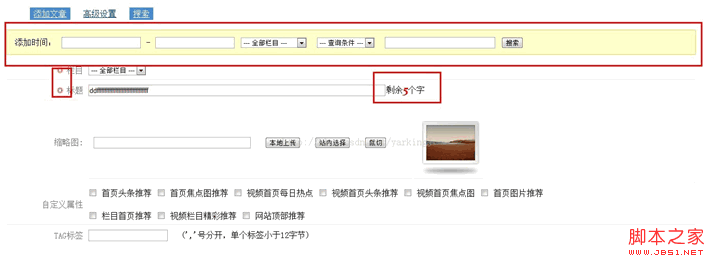
以下是運行的效果圖:
最後提醒一句:寫程式時養成加註釋、注重代碼規範的好習慣,日後維護時你會感謝現在的自己。