頁面左側貼邊的提示卡片,平時藏在畫面外,滑過或點擊才平滑滑出——訂閱提醒、客服入口、活動通知都愛用這個模式。實作關鍵是 position:fixed 加上負的 left 值。
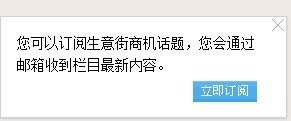
HTML 結構
分成兩塊:一個露出邊界的把手(.reading),一個滑出的內容區(.read)。
<div class="reading"></div>

<div class="read">
  <a target="_blank" class="read_close">
    <img src="../css/images/icon_close.gif" />
  </a>
  <p>您可以訂閱生意街商機話題,您會通過郵箱收到欄目最新內容。</p>
  <p class="read_btn">
    <a href="#" target="_blank">
      <img src="../css/images/read02.gif" />
    </a>
  </p>
</div>
CSS
/* 固定停留在左側的把手 */
.reading {
  position:fixed;
  left:0px;
  bottom:30px;
  cursor:pointer;
  width:25px;
  height:75px;
}

/* 內容區:藏在畫面左側外,滑出時才會看到 */
.read {
  border:1px solid #d0d0d0;
  width:285px;
  height:100px;
  -moz-box-shadow:0px 1px 2px #ccc;
  -webkit-box-shadow:0px 1px 2px #ccc;
  box-shadow:0px 1px 2px #ccc;      /* CSS3 陰影效果 */
  background:#fff;
  position:fixed;
  left:-287px;                       /* 負值讓它整塊藏到左邊外面 */
  bottom:30px;
  z-index:10;
}

.read p {
  font-size:14px;
  line-height:22px;
  padding:15px 0 0 16px;
  width:240px;
}

.read p.read_btn {
  text-align:right;
  padding-top:5px;
}

.read_close {
  float:right;
  padding:2px;
  cursor:pointer;
}
兩個數字要對上:.read 寬度 285px 加上左右各 1px 邊框共 287px,所以 left:-287px 剛好整塊藏到視口外。滑出的目標值就是 left:0。這兩個數字必須同步修改,否則會露出黑邊或滑不乾淨。
jQuery 部分
$(function () {
  var $read = $(".read");

  // 滑過把手 → 滑出;移開 → 收回
  $(".reading").hover(function () {
    $read.stop(true).animate({ left: 0 }, 300);
  }, function () {
    $read.stop(true).animate({ left: -287 }, 300);
  });

  // 點關閉鈕直接收回
  $(".read_close").click(function () {
    $read.stop(true).animate({ left: -287 }, 300);
  });
});
三個實作要點
1. stop(true) 不能省。滑鼠快速進出時,若前一次動畫還沒跑完又啟動新的,動畫會堆疊排隊,卡片會「抽搐」好幾下才停。stop(true) 會清空佇列並停止當前動畫,第二個參數 true 表示連尚未執行的也一起丟掉。若要讓它平滑地從目前位置接續,改成 stop(true, false)。
2. 陰影的三行寫法是歷史遺產。-moz-box-shadow 與 -webkit-box-shadow 是前綴階段產物,現在只留 box-shadow 一行即可。
3. 舊 IE 的 position:fixed 問題。IE6 不支援 fixed,當年需要用 expression() 這種 CSS 運算式硬湊:
_position:absolute;
_top:expression(eval(document.documentElement.scrollTop
      + document.documentElement.clientHeight
      - this.offsetHeight
      - (parseInt(this.currentStyle.marginTop,10) || 0)
      - (parseInt(this.currentStyle.marginBottom,30) || 0)));
底線的 _ 前綴是 IE6 專屬的 hack(其他瀏覽器會忽略)。這段寫法效能極差——expression 在每次捲動時都會重新計算,是 IE 卡頓的主要兇手之一。今天完全不需要考慮它。
小改進建議
把 -287 這個魔術數字抽成變數,並從元素實際寬度算出來,改版時才不會漏改:
var hideLeft = -($read.outerWidth() + 2);   // 含 border
$read.css('left', hideLeft);
另外,滑出式的提示在行動裝置上沒有 hover,記得補上 click 或 tap 的觸發路徑;而純滑過就觸發的設計對鍵盤使用者也不友善,加上 tabindex 與 focus 事件會好很多。