本文承接上一篇文章對文件物件模型(DOM)的介紹,進一步探討如何建立、刪除與修改 DOM 樹的各個部分,藉此實現網頁的即時更新。
當瀏覽器顯示網頁時,HTML 或 CSS 會被轉化成物件模型。無論程式碼簡單或複雜、集中或分散,瀏覽器使用的都是這個物件模型,而非你提供的原始文字檔。這個模型稱為文件物件模型(DOM),它連結了代表文件中元素、屬性與文字的所有物件;給定網頁的具體模型就稱為該頁面的 DOM 樹。
了解 DOM 樹只是第一步,接下來還要懂得如何操作它。若你往 DOM 樹新增一個元素,它會立即出現在使用者眼前,無須重新載入頁面;若刪除某段文字,那段文字便從螢幕上消失。透過 DOM 修改介面,就具備了強大的程式能力與靈活性。
跨瀏覽器、跨語言
DOM 是一項 W3C 標準,因此所有現代瀏覽器都支持它(至少在程度上支持)。只要使用 DOM 核心功能並留意少數特殊情況,DOM 程式碼就能以一致的方式用於任何瀏覽器。DOM 同時也是跨語言的規範,W3C 為 C、Java、JavaScript 等語言定義了語言綁定。本文主要以 JavaScript 的 DOM 綁定為主,因為多數非同步應用都需要在瀏覽器中執行 JavaScript。
節點的概念
節點是 DOM 中最基本的物件類型,實際上 DOM 定義的其他物件大多是節點物件的擴展。在 DOM 樹中,基本上一切都是節點:每個元素、每個屬性、每段文字,甚至註解、特殊字元與 DOCTYPE 聲明全都是節點。
用最簡單的話說,DOM 樹中的任何事物都是節點。元素與文字看似差異極大,但若換個角度觀察,每個元素與每段文字都有一個父節點、一個類型,以及某種明確的結構(是否有子節點、兄弟節點、屬於哪個文件)。將所有物件都視為節點,能大幅簡化操作。
節點的屬性
常用的節點屬性包括:
- nodeName:報告節點的名稱。
- nodeValue:提供節點的「值」。
- parentNode:返回父節點。
- childNodes:孩子節點列表。
- firstChild/lastChild:孩子列表中第一個/最後一個節點的捷徑。
- previousSibling/nextSibling:返回前一個/下一個兄弟節點。
- attributes:僅用於元素節點,返回屬性列表。
值得注意的是,nodeName 與 nodeValue 並非適用於所有節點類型。例如文字節點沒有名稱,其 nodeName 為空值(在部分瀏覽器中顯示為「未定義」),而 nodeValue 則回傳文字內容;元素的 nodeName 是元素名,nodeValue 則總是空值。因此使用這些屬性時,務必留意可能回傳空值的情況。
以下程式碼示範如何取得頁面 DOM 樹並使用節點屬性:
// These first two lines get the DOM tree for the current Web page,
//    and then the <Html> element for that DOM tree
var myDocument = document;
var HtmlElement = myDocument.documentElement;

// What's the name of the <html> element? "Html"
alert("The root element of the page is " + HtmlElement.nodeName);

// Look for the <head> element
var headElement = HtmlElement.getElementsByTagName("head")[0];
if (headElement != null) {
    alert("We found the head element, named " + headElement.nodeName);
    // Print out the title of the page
    var titleElement = headElement.getElementsByTagName("title")[0];
    if (titleElement != null) {
        // The text will be the first child node of the <title> element
        var titleText = titleElement.firstChild;
        // We can get the text of the text node with nodeValue
        alert("The page title is '" + titleText.nodeValue + "'");
    }
    // After <head> is <body>
    var bodyElement = headElement.nextSibling;
    while (bodyElement.nodeName.toLowerCase() != "body") {
        bodyElement = bodyElement.nextSibling;
    }
    // We found the <body> element...
}
節點的方法
所有節點都具備的方法包括:
- insertBefore(newChild, referenceNode):將 newChild 插入到 referenceNode 之前。
- replaceChild(newChild, oldChild):以 newChild 取代 oldChild。
- removeChild(oldChild):刪除 oldChild。
- appendChild(newChild):將 newChild 附加到孩子列表末端。
- hasChildNodes():有孩子時回傳 true。
- hasAttributes():有屬性時回傳 true。
以下程式碼在上一段基礎上示範移除 body 中所有頂層 img 元素:
// Remove all the top-level <img> elements in the body
if (bodyElement.hasChildNodes()) {
    for (i=0; i<bodyElement.childNodes.length; i++) {
        var currentNode = bodyElement.childNodes[i];
        if (currentNode.nodeName.toLowerCase() == "img") {
            bodyElement.removeChild(currentNode);
        }
    }
}
你可以把下列程式碼存成 HTML 檔並用瀏覽器打開,實際動手測試:
<Html>
 <head>
  <title>JavaScript and the DOM</title>
  <script language="JavaScript">
   function test() {
   // These first two lines get the DOM tree for the current Web page,
   //    and then the <Html> element for that DOM tree
   var myDocument = document;
   var HtmlElement = myDocument.documentElement;
   // What's the name of the <html> element? "Html"
   alert("The root element of the page is " + HtmlElement.nodeName);
   // Look for the <head> element
   var headElement = HtmlElement.getElementsByTagName("head")[0];
   if (headElement != null) {
     alert("We found the head element, named " + headElement.nodeName);
     // Print out the title of the page
     var titleElement = headElement.getElementsByTagName("title")[0];
     if (titleElement != null) {
       // The text will be the first child node of the <title> element
       var titleText = titleElement.firstChild;
       // We can get the text of the text node with nodeValue
       alert("The page title is '" + titleText.nodeValue + "'");
     }
     // After <head> is <body>
     var bodyElement = headElement.nextSibling;
     while (bodyElement.nodeName.toLowerCase() != "body") {
       bodyElement = bodyElement.nextSibling;
     }
     // We found the <body> element...
     // Remove all the top-level <img> elements in the body
     if (bodyElement.hasChildNodes()) {
        for (i=0; i<bodyElement.childNodes.length; i++) {
           var currentNode = bodyElement.childNodes[i];
           if (currentNode.nodeName.toLowerCase() == "img") {
             bodyElement.removeChild(currentNode);
           }
        }
     }
   }
 }
  </script>
 </head>
 <body>
  <p>JavaScript and DOM are a perfect match.
     You can read more in <i>Head Rush Ajax</i>.</p>
  <img src="example.jpg" />
  <input type="button" value="Test me!" onClick="test();" />
 </body>
</Html>
載入頁面後點擊按鈕,一連串警示框會顯示根元素名稱、head 元素與頁面標題,程式執行完畢後圖片便會從頁面即時刪除。
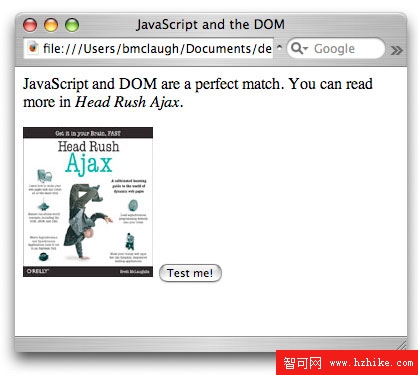
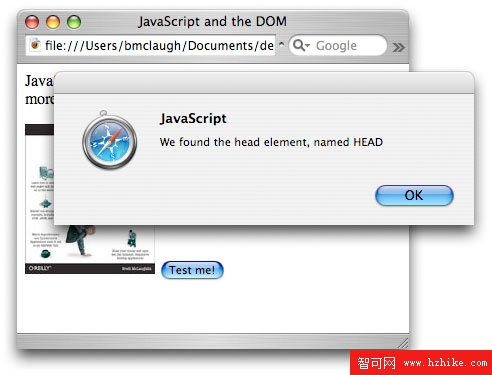
圖 2. 使用 nodeValue 顯示元素名稱的警示框
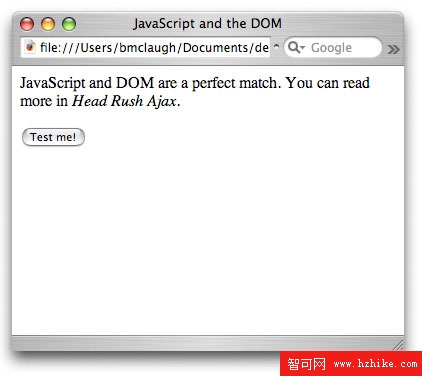
圖 3. 使用 JavaScript 即時刪除圖像
API 設計上的取捨
對熟悉物件導向程式的人而言,DOM 並非完全的物件導向 API。一方面,很多時候要直接使用屬性而非呼叫方法(例如用 nodeName 屬性而非 getNodeName());另一方面,由於 DOM 必須同時支援 C、Java、JavaScript 等語言,而 JavaScript 不支援「方法重載」,因此像 NamedNodeMap 的 getNamedItem(String name) 與 getNamedItemNS(Node node) 只能取不同名稱,這對習慣重載的 OO 開發者來說略顯奇怪。
通用節點類型
多數 Web 應用只會用到四種節點類型:
- 文件節點:代表整個 HTML 文件,也就是整棵 DOM 樹,在 JavaScript 中以 document 關鍵字存取。
- 元素節點:代表 HTML 元素,如 a 或 img。
- 屬性節點:代表元素屬性,如 href 或 src。
- 文字節點:代表文件中的文字。
可使用 document 物件建立新節點,例如 createElement(elementName)、createTextNode(text)、createAttribute(attributeName)。這些方法只建立節點,還需用 insertBefore() 或 appendChild() 把它們附加到文件中:
var pElement = myDocument.createElement("p");
var text = myDocument.createTextNode("Here's some text in a p element.");
pElement.appendChild(text);
bodyElement.appendChild(pElement);
元素節點
元素有兩組專屬方法。一組與屬性處理有關:getAttribute(name)、removeAttribute(name)、setAttribute(name, value)、getAttributeNode(name)、removeAttributeNode(node);另一組與尋找嵌套元素有關:getElementsByTagName(elementName)。以下示範建立 img 元素並設定屬性:
var imgElement = document.createElement("img");
imgElement.setAttribute("src", "example.jpg");
imgElement.setAttribute("width", "130");
imgElement.setAttribute("height", "150");
bodyElement.appendChild(imgElement);
屬性節點與文字節點
DOM 把屬性表示成節點,可透過元素的 attributes 屬性存取;不過實務上通常直接用 getAttribute/removeAttribute/setAttribute 處理屬性更簡單。文字節點則一般用 nodeValue 存取文字內容,並可用 appendData(text)、insertData(position, text)、replaceData(position, length, text) 來增加或改寫節點中的資料。
如何判斷節點類型
DOM 定義了若干節點類型常數,如 Node.ELEMENT_NODE、Node.ATTRIBUTE_NODE、Node.TEXT_NODE、Node.DOCUMENT_NODE,可搭配 nodeType 屬性判斷節點類型。但要注意:這些 Node 常數在 Internet Explorer 中無法正確使用,會導致錯誤。由於多數人仍在使用 IE,應避免在程式碼中直接使用 Node.ELEMENT_NODE 這類構造,改用數值或自行定義的對照方式,才能讓 DOM 程式碼與 Ajax 應用相容於所有主流瀏覽器。
結語
學會操作 DOM 之後,不妨動手實驗:建立節點並加入孩子列表、刪除空節點、變更節點的 CSS 樣式並觀察孩子節點是否繼承,看看能否打造更接近桌面應用、能響應用戶動作而移動的網站。可能性無限,每一次嘗試都會學到新知識。
- 上一篇文章: 打造跨平台的 Ajax 應用
- 下一篇文章: 如何以 Ajax 進行 Web 應用程式開發