DIV CSS 佈局教程網

您现在的位置: DIV+CSS佈局教程網 >> 網頁腳本 >  >> JavaScript入門知識 >> AJAX入門 >> AJAX詳解
讓 UpdatePanel 支援檔案上傳(五):處理重新導向的 HttpModule
編輯:AJAX詳解     

元件寫完了,來實際試一試。

首先把 AjaxUploadHelper 控制項放在頁面裡,位置緊接在 ScriptManager 之後——因為它必須在第一時間告訴 ScriptManager:目前正處於一個異步刷新的過程中。

使用 AjaxFileUploadHelper 控制項
<%@ Register Assembly="AjaxFileUploadHelper" Namespace="Jeffz.Web" TagPrefix="jeffz" %>
//...
<asp:ScriptManager ID="ScriptManager1" runat="server" />
<jeffz:AjaxFileUploadHelper runat="server" ID="AjaxFileUploadHelper1" />
//...

接著在頁面上放一個 UpdatePanel,裡頭依序擺入 FileUpload 控制項、一顆按鈕和一個 Label。為了更容易看出異步刷新的效果,我們在面板內外各放一個時間顯示:

頁面
<%= DateTime.Now %>
<asp:UpdatePanel ID="UpdatePanel1" runat="server">
  <ContentTemplate>
    <%= DateTime.Now %><br />
    <asp:FileUpload ID="FileUpload1" runat="server" />
    <asp:Button ID="Button1" runat="server" Text="Upload" OnClick="Button1_Click" /><br />
    <asp:Label ID="Label1" runat="server" Text=""></asp:Label>
  </ContentTemplate>
</asp:UpdatePanel>

在程式碼後置檔裡為按鈕掛上事件處理:

Code Behind
protected void Button1_Click(object sender, EventArgs e)
{
    if (this.FileUpload1.PostedFile != null)
    {
        this.Label1.Text = this.FileUpload1.PostedFile.ContentLength + " bytes";
    }
    else
    {
        this.Label1.Text = "";
    }
}

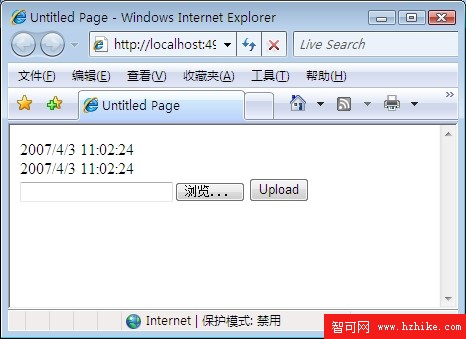
打開頁面,可以看到控制項與兩個時間都正常顯示。

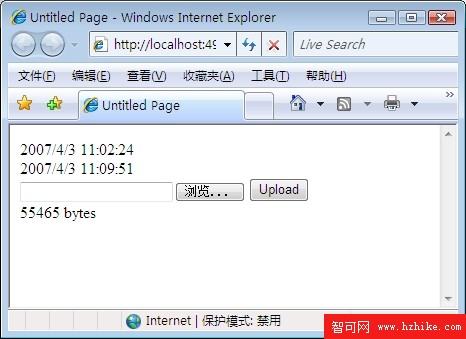
選一個檔案、按下 Upload,你會發現只有 UpdatePanel 裡的那個時間改變了,檔案大小也顯示出來:
很震撼吧?但如果把程式碼後置檔改成這樣:

加入重新導向
protected void Button1_Click(object sender, EventArgs e)
{
    this.Response.Redirect("AnotherPage.aspx", true);
}

重新整理頁面、按下按鈕,你會發現……失敗了?為什麼?

原因在於:一次「普通」的 PostBack 中若執行了 Redirect,瀏覽器會收到一個狀態碼為 302 的回應以及一個跳轉目標,然後把使用者帶到目標頁面。但 XHR 發出的請求遇到這種回應時,會自動重新請求,而且不會告訴客戶端到底發生了什麼。結果客戶端拿到的是跳轉之後的資源,而不是最初請求的那一份。

為了解決這個問題,ASP.NET Ajax 提供了一個元件:ScriptModule,它的註冊資訊可以在 web.config 裡找到。

web.config 中的註冊
<system.web>
  <!-- other configurations -->
  <httpModules>
    <add name="ScriptModule" type="System.Web.Handlers.ScriptModule, System.Web.Extensions, ..."/>
  </httpModules>
  <!-- other configurations -->
</system.web>
<!-- for IIS 7 -->
<system.webServer>
  <!-- other configurations -->
  <modules>
    <add name="ScriptModule" preCondition="integratedMode" type="System.Web.Handlers.ScriptModule, System.Web.Extensions, ..."/>
  </modules>
  <!-- other configurations -->
</system.webServer>

它解決問題的關鍵程式碼如下:

ScriptModule
public class ScriptModule : IHttpModule
{
    protected virtual void Init(HttpApplication context)
    {
        context.PreSendRequestHeaders += new EventHandler(PreSendRequestHeadersHandler);
        // ...
    }

    private void PreSendRequestHeadersHandler(object sender, EventArgs args)
    {
        HttpApplication application = (HttpApplication)sender;
        HttpResponse response = application.Response;
        if (response.StatusCode == 302)
        {
            if (PageRequestManager.IsAsyncPostBackRequest(application.Request.Headers))
            {
                string redirectLocation = response.RedirectLocation;
                List<HttpCookie> cookies = new List<HttpCookie>(response.Cookies.Count);
                for (int i = 0; i < response.Cookies.Count; i++)
                    cookies.Add(response.Cookies[i]);

                response.ClearContent();
                response.ClearHeaders();
                for (int i = 0; i < cookies.Count; i++)
                    response.AppendCookie(cookies[i]);

                response.Cache.SetCacheability(HttpCacheability.NoCache);
                response.ContentType = "text/plain";
                PageRequestManager.EncodeString(response.Output, "pageRedirect", String.Empty, redirectLocation);
            }
            else if //...
        }
    }
}

它回應的是 PreSendRequestHeaders 事件,該事件在伺服器端送出 Header 之前觸發。此時若狀態碼為 302(代表回應將使客戶端跳到另一頁),就把所有即將送出的內容清空、重新指定要傳的資訊。這裡最關鍵的改動是 Response Body:因為客戶端要解析收到的字串,所以必須送出「length|type|id|content」這樣的格式。注意上面標紅的那行,它送出的會是類似 16|pageRedirect||/AnotherPage.aspx| 的合法字串。

客戶端的實作也不難找,它在收到重新導向資訊之後負責跳轉:

客戶端支援頁面重新導向的程式碼
function Sys$WebForms$PageRequestManager$_onFormSubmitCompleted(sender, eventArgs) {
    // ...
    for (var i = 0; i < delta.length; i++) {
        var deltaNode = delta[i];
        switch (deltaNode.type) {
            case "updatePanel":
                Array.add(updatePanelNodes, deltaNode);
                break;
            // ...
            case "pageRedirect":
                window.location.href = deltaNode.content;
                return;
            // ...
        }
    }
    // ...
}

想通這層道理,我們自己寫一個同類模組就輕鬆多了:

AjaxFileUploadModule
public class AjaxFileUploadModule : IHttpModule
{
    public void Init(HttpApplication context)
    {
        context.PreSendRequestHeaders += new EventHandler(PreSendRequestHeadersHandler);
    }

    private void PreSendRequestHeadersHandler(object sender, EventArgs e)
    {
        HttpApplication application = (HttpApplication)sender;
        HttpResponse response = application.Response;
        if (response.StatusCode == 302
            && AjaxFileUploadUtility.IsInIFrameAsyncPostBack(application.Request.Params))
        {
            string redirectLocation = response.RedirectLocation;
            List<HttpCookie> cookies = new List<HttpCookie>(response.Cookies.Count);
            for (int i = 0; i < response.Cookies.Count; i++)
                cookies.Add(response.Cookies[i]);

            response.ClearContent();
            response.ClearHeaders();
            for (int i = 0; i < cookies.Count; i++)
                response.AppendCookie(cookies[i]);

            response.Cache.SetCacheability(HttpCacheability.NoCache);
            response.ContentType = "text/plain";

            AjaxFileUploadUtility.WriteScriptBlock(response, true);
            StringBuilder sb = new StringBuilder();
            TextWriter writer = new StringWriter(sb);
            AjaxFileUploadUtility.EncodeString(writer, "pageRedirect", String.Empty, redirectLocation);
            response.Write(sb.Replace("*/", "*//*").ToString());
            AjaxFileUploadUtility.WriteScriptBlock(response, false);
            response.End();
        }
    }

    public void Dispose() {}
}

上面標紅的部分,就是我們的模組與 ASP.NET Ajax 內建 ScriptModule 唯一的差別:判斷條件換成自己那套 iframe 異步回傳的識別方式,輸出則包進 script 區塊裡。在 web.config 註冊 AjaxFileUploadModule 之後,伺服器端呼叫 Redirect 時客戶端就能正常跳轉了。此時客戶端收到的文字長這樣:

客戶端收到的內容
<script type='text/javascript' language='javascript'>
window.__f__ = function() { /*16|pageRedirect||/AnotherPage.aspx|*/ }
</script>

至此,所有元件終於都湊齊了。

XML學習教程| jQuery入門知識| AJAX入門| Dreamweaver教程| Fireworks入門知識| SEO技巧| SEO優化集錦|
Copyright © DIV+CSS佈局教程網 All Rights Reserved