Rails 中的 AJAX 開發:link_to_remote 用法解析
編輯:AJAX詳解
Rails 提供了多個輔助方法,讓你能在視圖模板中輕鬆實作 AJAX。其中最簡單且通用的方式之一就是 link_to_remote()。本文以一個「查詢目前時間」的小範例來說明。
視圖模板 index.rhtml
<html>
<head>
<title>AJax Demo</title>
<%= javascript_include_tag "prototype" %>
</head>
<body>
<h1>What time is it?</h1>
<div id="time_div">
I don't have the time, but
<%= link_to_remote( "點擊這裡",
    :update => "time_div",
    :url => { :action => :say_when }) %>
and I will look it up.
</div>
</body>
</html>模板中有兩個關鍵的輔助方法:javascript_include_tag() 用來引入 Prototype JavaScript 函式庫(Rails 的所有 AJAX 功能都依賴它);link_to_remote() 則建立遠端連結。
link_to_remote() 在這個範例中使用了三個參數:
- 要顯示的連結文字,這裡是「點擊這裡」。
- 要被結果替換的 DOM 元素 id,這裡是
time_div。 - 要呼叫的伺服器端 action 的 URL,這裡是
say_when。
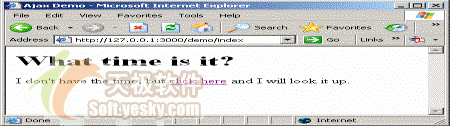
圖1. 點擊連結前
控制器類別
class DemoController < ApplicationController
  def index
  end
  def say_when
    render_text "<p>The time is <b>" + DateTime.now.to_s + "</b></p>"
  end
end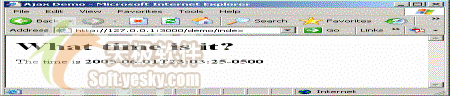
圖2. 點擊連結後
index action 不做任何事,只是讓 Rails 生成 index.rhtml 模板;say_when 則組出一段包含目前日期時間的 HTML 片段。當使用者點擊連結時,瀏覽器會建立 XMLHttpRequest 物件並送到伺服器,伺服器回傳含時間的 HTML 片段,客戶端 JavaScript 收到後便用它替換 time_div 的內容。
插入而非替換內容
你也可以選擇插入回應而非取代現有內容,只要加上 :position 參數:
<%= link_to_remote( "點擊這裡",
    :update => "time_div",
    :url => { :action => :say_when },
    :position => "after" ) %>
position 可接受 before、after、top、bottom 等值,其中 top 與 bottom 會插入到目標元素內部,before 與 after 則插入到外部。
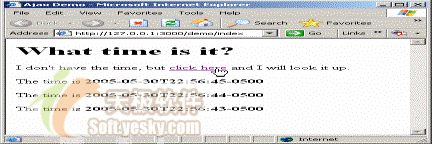
圖3. 在指定位置插入新內容
無論哪種方式,這個網頁與瀏覽器顯示的 URL 都不會改變。在這個小例子中或許省不了多少時間,但當頁面變得更複雜、只需更新一小部分時,這種差異就會變得非常顯著。