先前談過表單重複提交的問題。除了 token 口令校驗與重定向之外,還有一種常見手法:把表單在新頁面中處理,完成後關閉當前頁面,並刷新最初發出請求的那個頁面。這樣即使使用者手快連點兩下,後端也能靠 token 攔住重複寫入。
以下示範使用 artDialog.js 搭配 window.open 實作。
一、檔案結構
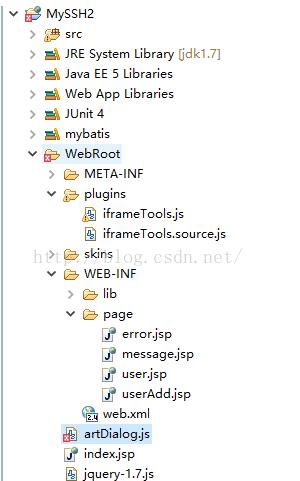
二、user.jsp(列表頁)
<%@ page language="java" import="java.util.*" pageEncoding="UTF-8"%>
<%@ taglib uri="/struts-tags" prefix="s"%>
<%@ taglib uri="https://java.sun.com/jsp/jstl/core" prefix="c"%>
<!DOCTYPE HTML PUBLIC "-//W3C//DTD HTML 4.01 Transitional//EN">
<html>
<head>
<title>user 列表</title>
<meta http-equiv="pragma" content="no-cache">
<meta http-equiv="cache-control" content="no-cache">
<meta http-equiv="expires" content="0">
<script type="text/javascript" src="/MySSH2/jquery-1.7.js"></script>
<script type="text/javascript" src="/MySSH2/artDialog.js?skin=default"></script>
<script type="text/javascript">
function openA() {
    window.open("/MySSH2/user/manage_addUI");
}
</script>
</head>
<body>
<br/>
<a href="<s:url action="manage_addUI" namespace="/user"/>">添加用戶</a>
<a href="javascript:void(0)" onclick="openA()">添加用戶</a>
<br/>
用戶列表:<br/>
<s:iterator value="#request.users">
  id:<s:property value="id"/><br/>
  name:<s:property value="name"/><br/>
</s:iterator>
</body>
</html>
三、userAdd.jsp(表單頁)
<%@ page language="java" import="java.util.*" pageEncoding="UTF-8"%>
<%@ taglib uri="/struts-tags" prefix="s"%>
<%@ taglib uri="https://java.sun.com/jsp/jstl/core" prefix="c"%>
<!DOCTYPE HTML PUBLIC "-//W3C//DTD HTML 4.01 Transitional//EN">
<html>
<head>
<title>用戶添加</title>
<meta http-equiv="pragma" content="no-cache">
<meta http-equiv="cache-control" content="no-cache">
<meta http-equiv="expires" content="0">
<script type="text/javascript" src="/MySSH2/jquery-1.7.js"></script>
<script type="text/javascript">
function AddUser() {
    var submitData = $('#userForm').serialize();
    console.log(submitData);
    $.ajax({
        type: "post",
        url: "/MySSH2/user/manage_add",
        cache: false,
        data: submitData,
        dataType: 'json',
        success: function (result) {
            if (result.success) {
                window.opener.art.dialog({ time: 2, content: '保存成功' });
                setTimeout(function () { window.opener.location.reload(); }, 3);
            } else {
                window.opener.art.dialog({ time: 2, content: '保存失敗' });
                setTimeout(function () { window.opener.location.reload(); }, 3);
            }
            window.close();
        },
        error: function (XMLHttpRequest, textStatus, errorThrown) {
            alert("error");
        }
    });
}
</script>
</head>
<body>
<s:form id="userForm" action="manage_add" namespace="/user" method="post">
  用戶名:<s:textfield name="user.name"/><br/>
  <s:token></s:token>
  <input type="button" value="保存" onclick="AddUser()"/>
</s:form>
</body>
</html>
四、UserManageAction.java
package com.myssh2.action;

import java.io.IOException;
import java.io.PrintWriter;
import javax.annotation.Resource;
import javax.servlet.ServletException;
import org.apache.struts2.ServletActionContext;
import org.springframework.context.annotation.Scope;
import org.springframework.stereotype.Controller;
import com.myssh2.bean.User;
import com.myssh2.service.UserService;
import com.opensymphony.xwork2.ActionContext;
import com.opensymphony.xwork2.ActionSupport;

@Controller
@Scope("prototype")
public class UserManageAction extends ActionSupport {

    @Resource
    UserService userService;

    private User user;

    public User getUser() { return user; }
    public void setUser(User user) { this.user = user; }

    public String addUI() {
        return "add";
    }

    public void add() throws ServletException, IOException {
        ServletActionContext.getResponse().setContentType("text/html;charset=utf-8");
        PrintWriter out = ServletActionContext.getResponse().getWriter();
        try {
            userService.addUser(user);
            ActionContext.getContext().put("message", "保存成功");
            out.write("{\"success\":true}");
        } catch (Exception e) {
            e.printStackTrace();
            out.write("{\"success\":false,\"msg\":\"error\"}");
        }
    }
}
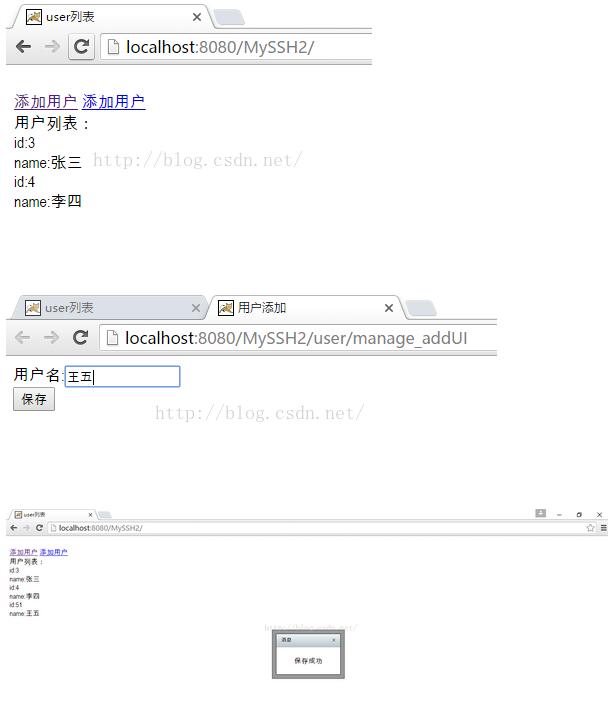
頁面效果:
程式碼在說什麼
$('#userForm').serialize() 把表單內容序列化成 a=1&b=2 形式的查詢字串,這也是為什麼表單裡要放 <s:token>——它會一起被送出,供後端比對以攔截重複提交。
window.opener.art.dialog({time:2, content:'保存成功'}) 是回過頭去操作開啟本視窗的那個頁面(父頁面),並呼叫 artDialog 的定時關閉功能。
setTimeout(function(){window.opener.location.reload();}, 3) 則是定時刷新父頁面。這裡有個細節要留意:dialog 顯示 2 秒、reload 在 3 秒後執行,時間差只有 1 秒,實務上建議把 reload 延後到 dialog 關閉之後再執行,或直接把時間拉開,避免提示還沒看完畫面就跳掉了。
改用新寫法會更省事
window.open 加上 window.opener 的組合是經典做法,但實務上有幾個痛點:可能被瀏覽器的彈出視窗阻擋器攔下;window.opener 也存在被惡意頁面反向操作的風險(安全性考量上,開新視窗時建議加上 noopener)。
今天的專案更常改用非互動式對話框(<dialog>、Bootstrap Modal、artDialog 的 iframe 模式)在同一頁內完成表單,送出成功後直接重新載入列表區塊。這樣不必處理視窗焦點與 opener 的時序問題,行動裝置上的體驗也好得多。