Ajax 異步載入完全解析:從原生四步驟到 jQuery 封裝
編輯:AJAX基礎知識
AJAX(Asynchronous JavaScript and XML)不是新語言,而是一套沿用既有標準的新用法:在不重新載入整個頁面的前提下與伺服器交換資料,並更新局部內容。本文從最基礎的原生流程講起,再對照 jQuery 的簡化寫法。
一、四個基本步驟
- 建立 Ajax 物件:原生寫法需判斷瀏覽器類型。
- 設定回呼函式:與伺服器互動完成後要觸發的處理。
- 開啟並送出請求:GET 與 POST 的寫法略有不同。
- 取得回應並更新頁面。
二、取得 Ajax 物件
各瀏覽器支援程度不同,需分別處理:

var xmlhttp;
if (window.XMLHttpRequest) {
    xmlhttp = new XMLHttpRequest();          // 標準瀏覽器
} else {
    xmlhttp = new ActiveXObject("Microsoft.XMLHTTP");   // IE6 及更早
}
三、readyState 與 status
伺服器回應的過程會經過幾個階段,由 readyState 表示:
- 0:請求未初始化
- 1:伺服器連線已建立
- 2:請求已接收
- 3:請求處理中
- 4:請求已完成,且回應已就緒
而 status 是 HTTP 狀態碼,常用 200(OK)、404(找不到頁面)、500(伺服器錯誤)等。真正可以安全讀取回應內容的時機是 readyState 為 4 且 status 為 200。
四、開啟交互:open(method, url, async)
url 的填法會隨 method 而異,這點務必留意。async 建議維持 true,只有極少數特殊情境才設為 false。
GET 方式
直接把參數接在 url 後即可,建議使用絕對路徑:
xmlhttp.open("GET", "/Test/servlet/AjaxServlet?userinput=" + str.value, true);
xmlhttp.send();
POST 方式
需要多設定一個 Content-Type 標頭,並把參數放在 send() 裡:
xmlhttp.open("POST", "ajax_test.asp", true);
xmlhttp.setRequestHeader("Content-type", "application/x-www-form-urlencoded");
xmlhttp.send("fname=Bill&lname=Gates");
五、更新頁面
回應若是一般內容,用 responseText:
document.getElementById("myDiv").innerHTML = xmlhttp.responseText;
若回應是 XML 且需以 XML 物件解析,用 responseXML:
xmlDoc = xmlhttp.responseXML;
txt = "";
x = xmlDoc.getElementsByTagName("ARTIST");
for (i = 0; i < x.length; i++) {
    txt = txt + x[i].childNodes[0].nodeValue + "<br />";
}
document.getElementById("myDiv").innerHTML = txt;
六、實例:以 Servlet 處理
AjaxServlet.java
package one;

import java.io.IOException;
import java.io.PrintWriter;
import javax.servlet.ServletException;
import javax.servlet.annotation.WebServlet;
import javax.servlet.http.*;

@WebServlet("/AjaxServlet")
public class AjaxServlet extends HttpServlet {
    private static final long serialVersionUID = 1L;

    protected void doGet(HttpServletRequest request, HttpServletResponse response)
            throws ServletException, IOException {

        String userinput = request.getParameter("userinput");
        System.out.println("客戶端連接!");
        System.out.println("請求信息為:" + userinput);

        // 統一回應編碼,避免中文亂碼
        response.setContentType("text/html;charset=UTF-8");
        response.setCharacterEncoding("UTF-8");

        PrintWriter out = response.getWriter();
        if (userinput == null || userinput.length() < 6) {
            out.write("<h3>the length of input string must be more than 6!</h3>");
        } else {
            out.println("<h3>Correct!</h3>");
        }
        out.close();
    }

    protected void doPost(HttpServletRequest request, HttpServletResponse response)
            throws ServletException, IOException {
        doGet(request, response);
    }
}
web.xml
<?xml version="1.0" encoding="UTF-8"?>
<web-app xmlns:xsi="https://www.w3.org/2001/XMLSchema-instance"
         xmlns="https://java.sun.com/xml/ns/javaee"
         xsi:schemaLocation="https://java.sun.com/xml/ns/javaee
                             https://java.sun.com/xml/ns/javaee/web-app_3_0.xsd"
         id="WebApp_ID" version="3.0">
  <display-name>Test</display-name>
  <welcome-file-list>
    <welcome-file>index.html</welcome-file>
    <welcome-file>index.htm</welcome-file>
    <welcome-file>index.jsp</welcome-file>
    <welcome-file>default.html</welcome-file>
    <welcome-file>default.htm</welcome-file>
    <welcome-file>default.jsp</welcome-file>
  </welcome-file-list>
  <servlet>
    <servlet-name>AjaxServlet</servlet-name>
    <servlet-class>one.AjaxServlet</servlet-class>
  </servlet>
  <servlet-mapping>
    <servlet-name>AjaxServlet</servlet-name>
    <url-pattern>/servlet/AjaxServlet</url-pattern>
  </servlet-mapping>
</web-app>
ajax.html
<!DOCTYPE html>
<html>
<head>
<meta charset="UTF-8">
<title>Ajax 測試</title>
</head>
<body>
<div>
  <h2>AJAX Test</h2>
  <input type="text" name="userinput"
         placeholder="用戶輸入,Ajax 方式獲得數據" onblur="getResult(this)">
  <br>
  <span id="ajax_result"</span>

  <script>
  getResult = function(str){
      if (0 == str.value.length) {
          document.getElementById("ajax_result").innerHTML = "Nothing";
          return;
      }

      var xmlhttp;
      if (window.XMLHttpRequest) {
          xmlhttp = new XMLHttpRequest();
      } else {
          xmlhttp = new ActiveXObject("Microsoft.XMLHTTP");
      }

      xmlhttp.onreadystatechange = function(){
          if (4 == xmlhttp.readyState && 200 == xmlhttp.status) {
              document.getElementById("ajax_result").innerHTML = xmlhttp.responseText;
          }
      };

      xmlhttp.open("GET", "/Test/servlet/AjaxServlet?userinput=" + str.value, true);
      xmlhttp.send();
  };
  </script>
</div>
</body>
</html>
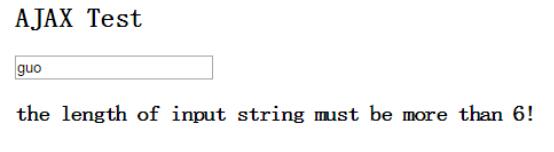
輸入長度小於 6 時:
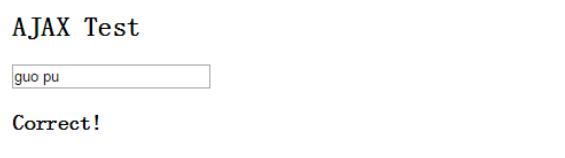
長度大於等於 6 時:
七、改用 JSP 作為後端
邏輯完全相同,只是把 Java 檔換成 JSP:
<%@ page contentType="text/html;charset=UTF-8" language="java" %>
<%
    // 接收參數
    String userinput = request.getParameter("userinput");
    System.out.println("userinput = " + userinput);

    // 檢查合法性
    if (userinput == null || userinput.trim().length() == 0) {
        out.println("code can't be null or empty");
    } else if (userinput.equals("admin")) {
        out.println("code can't be admin");
    } else {
        out.println("OK");
    }
%>
前端只需把 open() 的 url 換成 receiveParams.jsp?userinput=...,其餘不動,執行結果一致。
八、jQuery 的簡化寫法
原生寫法要處理的事很多,jQuery 幫我們抹平了跨瀏覽器差異,只需專注在業務邏輯上。
$.post()
$.post("./newProject", { newProjectName: project_name }, function(data, status){
    if (status == "success") {
        var nodes = data.getElementsByTagName("project");
        for (var i = 0; i < nodes.length; i++) {
            $("#project_items").append(
                '<option value="' + (i + 1) + '">' + nodes[i].getAttribute("name") + '</option>'
            );
        }
    }
});
$.ajax()
$(function(){
    $("#testAjax").click(function(){
        $.ajax({
            type: "POST",
            url: "test.php",
            data: "name=garfield&age=18",
            success: function(data){
                $("#myDiv").html('<h2>' + data + '</h2>');
            }
        });
    });
});
$.get()
$(document).ready(function(){
    $("#bt").click(function(){
        $.get("mytest/demo/antzone.txt", function(data, status){
            alert("Data: " + data + "\nStatus: " + status);
        });
    });
});
九、實務上不能忽略的幾件事
- 回應編碼要一致:後端務必明確設定
Content-Type; charset=UTF-8,頁面也要有對應的 meta,中文亂碼九成出在這裡。 - GET 參數要編碼:以字串拼接 url 時,中文或特殊字元須用
encodeURIComponent()處理,否則會截斷。 - 別把 HTML 直接塞給使用者輸入的內容:
innerHTML = responseText若包含未淨化的使用者資料,就是 XSS 入口。 - 加上 error 處理與 timeout:只寫 success 是最常見的疏漏,一旦網路異常畫面就永遠停在 loading。
- 避免同一輸入框每次按鍵都發請求:用 debounce 或只在
change/blur時觸發,可減少大量無效請求。
總結
Ajax 的價值在於「局部更新」:既完成伺服器端驗證與資料取得,又不必重載整頁,網路流量與使用者等待都大幅降低。理解原生四步驟之後,再用 jQuery 或 fetch 都能快速上手。
這次的案例就當拋磚引玉,也歡迎在你的應用裡加上異步載入。
- 上一篇文章: Ajax 同步驗證單號是否重複:實作與更推薦的非同步寫法
- 下一篇文章: Ajax 技術組成與核心原理深度解析