ajax 實現輸入框實時聯想下拉列表的效果示例
編輯:AJAX基礎知識
本文分享一個在輸入框裡實時輸入、動態展示下拉候選列表的效果,類似搜索引擎的聯想提示,數據通過 ajax 異步從後台獲取。
一、樣式
<style type="text/css"> <!-- body{background:#fff} .Menu { position:relative; width:180px; height:120px; z-index:1; background: #EEE; border:1px solid #666; margin-top:-100px; display:none; } .Menu2 { position: absolute; left:0; top:0; width:100%; height:120px; overflow:hidden; z-index:1; OVERFLOW-y:auto; } .Menu2 ul{margin:0;padding:0} .Menu2 ul li{width:100%;height:25px;line-height:20px;text-indent:15px; border-bottom:1px dashed #999;color:#333;cursor:pointer;} input{width:120px} #List1,#List2{left:0px;top:103px;} --> </style>
二、HTML 結構
以「汽車品牌名」和「汽車廠商名」兩個輸入框為例,各自對應一個隱藏域存 id、一個浮層裝候選列表:
<tr> <th>汽車品牌名:</th> <td> <input type="text" id="generalBrandName" name="generalBrandName" value="${*.generalBrandName}" style="width:180px" onfocus="showAndHide('List1','show');" onblur="showAndHide('List1','hide');"/> <input type="hidden" id="brandIdGeneral" name="brandIdGeneral" value="${*.brandIdGeneral}" style="width:180px" /> <span class="required">必填*</span> <div class="Menu" id="List1"> <div class="Menu2" id="ListLi1"> </div> </div> </td> </tr> <tr> <th>汽車廠商名:</th> <td> <input type="text" id="brandName" name="brandName" value="${*.brandName}" style="width:180px" onfocus="showAndHide('List2','show');" onblur="showAndHide('List2','hide');" /> <input type="hidden" id="brandId" name="brandId" value="${*.brandId}" style="width:180px" /> <span class="required">必填*</span> <div class="Menu" id="List2"> <div class="Menu2" id="ListLi2"> </div> </div> </td> </tr>
三、JS 異步請求與動態渲染
頁面加載時,先針對不同浏覽器綁定合適的事件(IE 用 onPropertyChange,Firefox 用 input):
jQuery(function($) { if (navigator.userAgent.indexOf("MSIE") > 0) { document.getElementById('generalBrandName').attachEvent("onPropertyChange", appendList); document.getElementById('brandName').attachEvent("onPropertyChange", appendList); } else if (navigator.userAgent.indexOf("Firefox") > 0) { document.getElementById('generalBrandName').addEventListener("input", appendList, false); document.getElementById('brandName').addEventListener("input", appendList, false); } });
再給輸入框綁定 keyup 事件,當內容變化時觸發異步查詢:
jQuery(function($) { txtValue = $("#generalBrandName").val(); $("#generalBrandName").bind("keyup", function() { var currentValue = $(this).val(); if (currentValue != txtValue) { appendList('List1',currentValue); txtValue = currentValue; } }); txtValue = $("#brandName").val(); $("#brandName").bind("keyup", function() { var currentValue = $(this).val(); if (currentValue != txtValue) { appendList('List2',currentValue); txtValue = currentValue; } }); });
appendList 根據輸入框的內容過濾,用 $.getJSON 異步拉取候選數據(這裡用時間戳 id 避免 IE 讀緩存):
function appendList(obj,value){ value = encodeURIComponent(value); value = encodeURIComponent(value); //兩次使用 encodeURI() switch(obj){ case "List1": $.getJSON( ctx + "/car/carmodel/**.do", {keyWord : value, id : new Date().getTime()}, <!-- 產生一個時間戳,不讓 IE 以為是相同的 URL 而使用 cache --> function (json) { createLis('ListLi1',json); } ); break; case "List2": $.getJSON( ctx + "/car/carmodel/**.do", {keyWord : value, id : new Date().getTime()}, function (json) { createLis('ListLi2',json); } ); break; } }
createLis 動態生成 li 列表,showAndHide 控制浮層顯示隱藏,getValue 則在選中某項時把文本和 id 分別回填到輸入框與隱藏域:
function createLis(obj,json){ var executerDiv = document.getElementById(obj); //動態生成下拉列表框 executerDiv.innerHTML=""; var ul=document.createElement("ul"); $.each(json, function (i, item) { var li=document.createElement("li"); var str = "getValue('generalBrandName','"+item.brandNameGeneral+"','brandIdGeneral','"+item.brandIdGeneral+"');showAndHide('List1','hide')"; li.setAttribute("onmousedown",str); li.appendChild(document.createTextNode(item.brandNameGeneral)); ul.appendChild(li); }); executerDiv.appendChild(ul); } function showAndHide(obj,types){ var Layer=window.document.getElementById(obj); switch(types){ case "show": Layer.style.display="block"; appendList(obj,''); break; case "hide": Layer.style.display="none"; break; } } function getValue(obj1,str,obj2,idx){ var input=window.document.getElementById(obj1); input.value=str; var input=window.document.getElementById(obj2); input.value=idx; }
四、效果展示
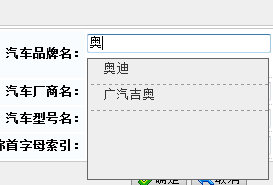
整個效果的關鍵點:實時監聽輸入框變化、異步拉取匹配數據、動態渲染候選列表,並在選中時同步回填可見文本與隱藏 id。同時用時間戳和兩次 encodeURI 分別處理了 IE 緩存與中文參數問題。以上就是本次輸入框聯想下拉效果的分享,希望能給大家一個參考。