只要做過前端開發,遲早會碰上 Ajax;而絕大多數時候,我們發出的都是同一個網域下的請求。一旦請求跨到不同網域,瀏覽器就會直接攔下並拋出錯誤,不允許跨域存取。這背後當然是安全性的考量,但需求不會因此消失,方法也絕不只一種。本文示範的是其中一種經典思路:靠 iframe 完成 Ajax 的跨域請求。
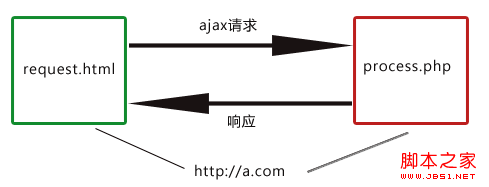
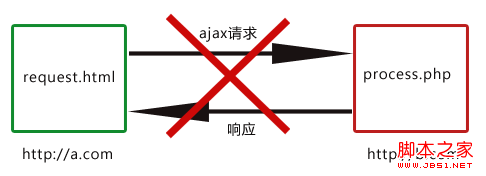
如下圖所示:a.com 上的 request.html 內嵌了一個指向 b.com 的 response.html,而 response.html 裡又嵌入了 a.com 的 proxy.html。
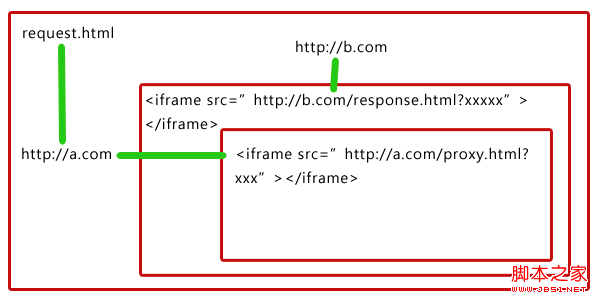
流程拆解
要讓 a.com 的 request.html 取得 b.com 上 process.php 的資料,做法是:把請求參數透過網址傳給 response.html,由 response.html 向 process.php 發出真正的 Ajax 請求(兩者同樣屬於 b.com),再把結果經由網址交給 proxy.html;最後因為 proxy.html 與 request.html 同域,就能在 proxy.html 中用 window.top 把結果送回 request.html。
整個思路其實很清晰:真正的 Ajax 請求並不發生在 a.com,而是發生在 b.com。a.com 只負責兩件事——由 request.html 把參數送進 b.com,再由 proxy.html 把 b.com 的回應遞回來。
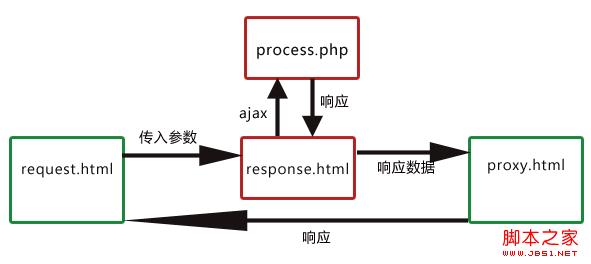
跨域訪問流程圖
檔案結構
https://a.com/
    request.html
    proxy.html
https://b.com/
    response.html
    process.php
一、request.html
為了方便理解,這裡把 JavaScript 直接寫在頁面裡:
<!DOCTYPE html>
<html>
<head>
<meta http-equiv="Content-Type" content="text/html; charset=UTF-8">
<title>request.html @ https://a.com</title>
</head>
<body>
<p id="result">這裡將會填上響應的結果</p>
<a id="sendBtn" href="javascript:void(0)">點擊,發送跨域請求</a>
<iframe id="serverIf"></iframe>
<script type="text/javascript">
document.getElementById("sendBtn").onclick = function () {
    var url = "https://b.com/response.html";
    var fn = "GetPerson";          // 定義在 response.html 的方法
    var reqdata = '{"id" : 24}';   // 請求參數
    var callback = "CallBack";     // 全流程完成後要執行的回呼
    CrossRequest(url, fn, reqdata, callback);
};
function CrossRequest(url, fn, reqdata, callback) {
    var server = document.getElementById("serverIf");
    // 本質上就是用 iframe 的 src 把參數與回呼名稱傳給 response.html
    server.src = url + "?fn=" + encodeURIComponent(fn)
               + "&data=" + encodeURIComponent(reqdata)
               + "&callback=" + encodeURIComponent(callback);
}
function CallBack(data) {
    document.getElementById("result").innerHTML =
        "My name is " + data.name + ". I am a " + data.sex + ". I am " + data.age + " years old.";
}
</script>
</body>
</html>
這個頁面其實就是在告訴 response.html:請執行你定義好的 GetPerson,並使用我給你的參數。比較容易卡住的地方是「為什麼要把 CallBack 也傳過去」——它明明定義在本頁,response.html 根本無法執行。答案很簡單:response.html 只是負責把這個函式名稱轉交給下一位,proxy.html 拿到名稱後就能執行,因為它和 request.html 同域。
二、response.html
<!DOCTYPE html>
<html>
<head>
<meta http-equiv="Content-Type" content="text/html; charset=UTF-8">
<title>response.html @ https://b.com</title>
</head>
<body>
<iframe id="proxy"></iframe>
<script type="text/javascript">
function _request(reqdata, url, callback) {          // 通用 Ajax 方法
    var xmlhttp = window.XMLHttpRequest
        ? new XMLHttpRequest()
        : new ActiveXObject("Microsoft.XMLHTTP");
    xmlhttp.onreadystatechange = function () {
        if (xmlhttp.readyState == 4 && xmlhttp.status == 200) {
            callback(xmlhttp.responseText);
        }
    };
    xmlhttp.open("POST", url);
    xmlhttp.setRequestHeader("Content-Type", "application/json; charset=utf-8");
    xmlhttp.send(reqdata);
}
function _getQuery(key) {                            // 取得網址參數
    var query = location.href.split("?")[1];
    return decodeURIComponent(query.split(key + "=")[1].split("&")[0]);
}
function GetPerson(reqdata, callback) {              // 向 process.php 發請求
    _request(reqdata, "process.php", function (data) {
        var proxy = document.getElementById("proxy");
        proxy.src = "https://b.com/Proxy.html?data=" + encodeURIComponent(data)
                  + "&callback=" + encodeURIComponent(callback);
    });
}
(function () {
    var fn = _getQuery("fn");
    var reqdata = _getQuery("data");
    var callback = _getQuery("callback");
    eval(fn + "('" + reqdata + "', '" + callback + "')");
})();
</script>
</body>
</html>
這一步負責接收 request.html 傳來的方法名與參數,向 process.php 發出真正的請求,然後把伺服器回應與回呼函式名一起轉給 proxy.html。
三、process.php
<?php
$data = json_decode(file_get_contents("php://input"));
header("Content-Type: application/json; charset=utf-8");
echo '{"id" : ' . $data->id . ', "age" : 24, "sex" : "boy", "name" : "huangxueming"}';
?>
四、proxy.html
<!DOCTYPE html>
<html>
<head>
<meta http-equiv="Content-Type" content="text/html; charset=UTF-8">
<title>proxy.html @ https://a.com</title>
</head>
<body>
<script type="text/javascript">
function _getUrl(key) {
    var query = location.href.split("?")[1];
    return decodeURIComponent(query.split(key + "=")[1].split("&")[0]);
}
(function () {
    var callback = _getUrl("callback");
    var data = _getUrl("data");
    // 同域,可以直接操作最上層視窗
    eval("window.top." + decodeURIComponent(callback) + "(" + decodeURIComponent(data) + ")");
})();
</script>
</body>
</html>
最後一步,proxy 終於同時拿到了回呼函式名與回應資料,透過 window.top 執行 request.html 裡定義的函式,跨域通信完成。
實務上的建議
proxy.html 基本上可以做成通用代理,不需要再改動;若要新增更多跨域方法,都加在 a.com 這一側即可,b.com 則如同提供一組介面供 a.com 呼叫(GetPerson 只是為了方便理解而舉的例)。另外別忘了把 iframe 隱藏起來。技術本身固然重要,但更關鍵的還是把原理看懂、能自己動手做。
- 上一篇文章: jQuery Ajax 實戰心得整理:請求中止、JSONP 跨域與 contentType 陷阱
- 下一篇文章: 在傳統 ASP 中實作 jQuery $.ajax:後端輸出 JSON 的完整流程
相關文章
-
用 window.parent 判斷頁面是否被嵌入 iframe JavaScript 在 iframe 框架中隱藏指定 div 深入剖析 JavaScript 中 window.top 的作用與陷阱 登入失效後如何跳出框架返回登入頁 用 location.href 讓頁面跳出框架的方法 iframe 父子頁面 JS 通信全攻略:同域直連與跨域繞道 用 window.top 做跨 frame 資料共享,告別漫長的 DOM 尋路 window、parent、top:JS 頁面跳轉與刷新的層級關係 用 location.href 跳出框架直接打開頁面的方法 在 iframe 內脫離框架:讓整個瀏覽器視窗跳轉