AJAX分頁效果簡單實現
編輯:AJAX基礎知識
最近寫一個給用戶組添加角色的功能,要求一邊是未添加的角色,一邊是已添加的角色,還有搜索功能, 點擊添加後,ajax保存操作.
考慮功能為待查詢功能分頁 , 下方分頁條, 一共有 2*2 ,4個ajax…
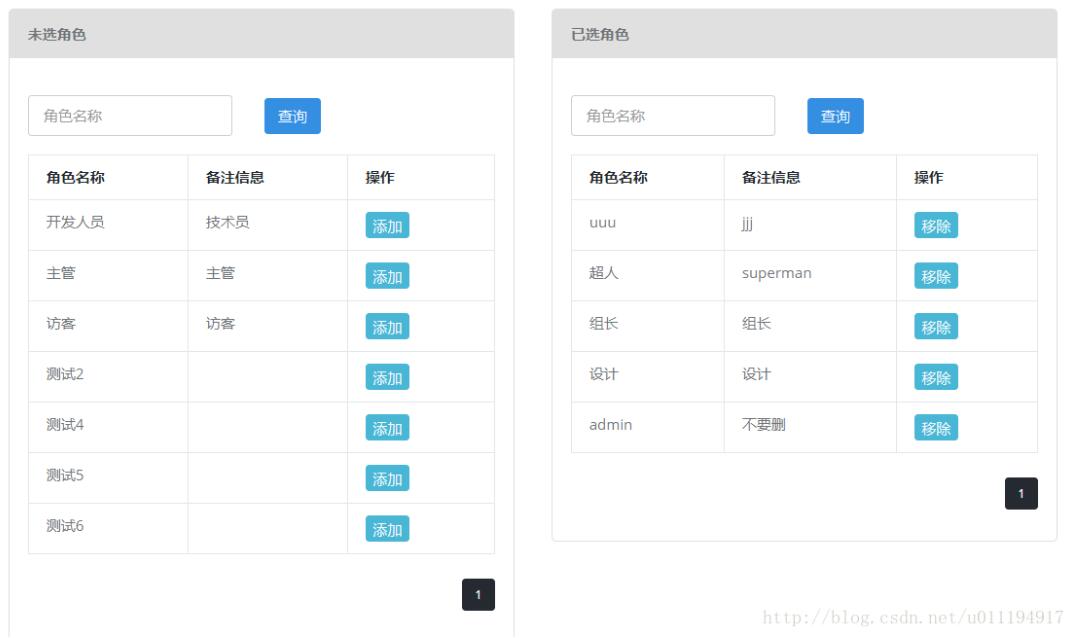
JS代碼如下:
$(document).ready(function() {
  App.init();
  currentRole(); // 當前角色
  currentRolePage();//當前角色分頁
  noAddRole(); //未添加角色
  noAddRolePage();//未添加角色分頁
 });

//當前角色列表
function currentRole(){
  var currentRoleCheckName =$("#currentRoleCheckName").val();
  // 當前角色的list集合
  $.ajax({
  async:true,
  type:"POST",
  //date:"groupId=rose",//發送到服務器的數據
  url:"${ctx}/group/ajax_showRolesForGroup.do",//請求路徑
  data:{"groupId":groupId,
  "page":page1,
  "checkName":currentRoleCheckName
  },
  dataType:"json", //返回數據的類型
  success:function(data){ //成功響應後的回調函數
  var result =data.pageSupport.items;
  console.log(data.pageSupport)
  var s="";
  for(var i in result){
   s+="<tr class='odd gradeX'><td>"+result[i].name+"</td>"
   +"<td>"+result[i].remark+"</td>"
   +"<td><button type='button' class='btn btn-xs btn-info m-r-5' onclick='to_RemoveRoleToGroup("+result[i].roleId+");'>移除</button></td></tr>";
  }
  $("#currentRole").html(s);

  }

 });
 }

//當前角色的分頁
 function currentRolePage(){
  var currentRoleCheckName =$("#currentRoleCheckName").val();
  var totalPage=0;
  $.ajax({
  async:true,
  type:"POST",
  //date:"groupId=rose",//發送到服務器的數據
  url:"${ctx}/group/ajax_showRolesForGroup.do",//請求路徑
  data:{"groupId":groupId,
  "page":page1,
  "checkName":currentRoleCheckName
  },
  dataType:"json", //返回數據的類型
  success:function(data){ //成功響應後的回調函數
  totalPage=data.pageSupport.last;
  console.log(totalPage)
  var i= 0;
  var a="";
  for( i=page1-2; i<=page1+2;i++){
  if(i>0 && i<=totalPage){
   if(i == 1){
   $("#prev1").attr('class','disabled');
   }
   if(page1 == i){
   a+="<li class='active' bs1='" + i + "'><a>"+i+"</a></li>";
   }else{
   a+="<li class='zhong1' bs1='" + i + "'><a href='javascript:void(0);' onclick='a_method("+i+");' >"+i+"</a></li>";
   }

  }
  }

  $("#fy_list").html(a);
  }

 });

 }
 //中間頁
 function a_method(i) {
  page1 = i;
  currentRole(); // 當前角色
  currentRolePage();//當前角色分頁
 }

//查詢操作
function currentRoleCheck(){
 page1=1;
 currentRole(); // 當前角色
 currentRolePage();//當前角色分頁
 }
HTML代碼如下:
<!-- 兩個相同的DIV 下面只是一個-->
<div class="panel-body col-md-6">
 <div style="border: 1px solid #E0E0E0;border-radius: 4px">
 <div class="panel-heading " style="background-color:#E0E0E0; ">

  <h2 class="panel-title"><b>已選角色</b></h2>
 </div>
 <div id="firstCheck" class="panel-body">
   <div style="padding-left: 0 !important;" id="firstCheck" class="panel-body">
    <form class="form-inline" method="POST" >
    <div class="form-group m-r-10">
     <input id="currentRoleCheckName" type="text" class="form-control" placeholder="角色名稱" name="fname" maxlength="40" />
    </div>
  <div class="checkbox m-r-10">
   </div>
 <button id="currentCheck"type="button" class="btn btn-sm btn-primary m-r-5" onclick="currentRoleCheck()" >查詢</button>
  </form>
   </div>
   <div >
   <table id='data-table' class='table table-bordered' >
   <thead>
     <tr>
     <th>角色名稱</th>
     <th>備注信息</th>
     <th>操作</th>
     </tr>
   </thead>
   <tbody id="currentRole">
    <!--
    當前用戶組已有角色list
   -->

   </tbody>
   </table>
   </div>
    <div class="buttonBox">

    <div align="right">
    <ul id="fy_list" class="pagination pagination-sm m-t-0 m-b-10 ">

    </ul>
    </div>
    </div>

  </div>

 </div>
</div>
以上就是本文的全部內容,希望對大家的學習有所幫助,也希望大家多多支持。
小編推薦
熱門推薦