淺談 JavaScript 的 Base64 加密與解密
編輯:關於JavaScript
Base64 並不是加密演算法,而是一種把二進制數據編碼成可打印字符的編碼方式,常用於在只支援 ASCII 的環境中傳輸數據。瀏覽器原生提供了 window.atob() 與 window.btoa() 一對方法即可完成互轉,但直接拿它處理中文會出問題——因為 btoa() 只接受 Latin1 範圍內的字符。這也是下面這段代碼要重點處理的地方。
HTML 結構
<!DOCTYPE html>
<html>
<head>
    <title>Page Title</title>
    <style type="text/css">
     *{font-family: Consolas;font-style: italic}
     .responsebox{width:900px;margin:10px auto;padding:10px;border:2px solid #366;border-radius: 10px 0 10px 0; text-align: center}
     .responsebox input,.responsebox button{font-size: 30px;margin:5px;padding:5px;}
     .spansuper{vertical-align: super;font-size: 14px}
     .spanbottom{vertical-align: text-bottom;font-size: 12px;margin-left: -110px}
     #showbox{width:900px;height:430px;border:5px solid #663;border-radius: 0 20px 0 20px;margin:10px auto;padding:8px;font-size: 20px}
    </style>
</head>
<body>
    <div class="responsebox">
        <h1>Javascript Base64 Encode & Decode<span class="spansuper">veinyf@gmail.com</span><span class="spanbottom">2014-12-27 17:44</span></h1>
        <input type="text" id="input">
        <input type="checkbox" id="checkbox" checked="checked">Base64
        <button id="btn">Convert done !</button>
    </div>
    <div id="showbox"></div>
</body>
JavaScript 邏輯
涉及到的知識點包括:window.atob()、window.btoa()、escape()/unescape()、encodeURIComponent()/decodeURIComponent(),以及正則表達式去除首尾空格:_string.replace(/(^\s*)|(\s*$)/g,"")。
(function CovertBase64orString(inputid, checkboxid, btnid, showid) {
    var checkbox = document.getElementById(checkboxid);
    var chkvalue = checkbox.getAttribute("checked");
    var btn = document.getElementById(btnid);
    var isbase64;      // true: 字符串轉 Base64;false: Base64 轉字符串
    var returnval = null;

    // 根據 check 按鈕的初始狀態賦值 isbase64
    chkvalue == "checked" ? isbase64 = true : isbase64 = false;

    checkbox.addEventListener("click", function(e) {
        var _ckvak = checkbox.getAttribute("checked");
        if (_ckvak == "checked") {
             checkbox.setAttribute("checked", null);
             isbase64 = false;
        } else {
             checkbox.setAttribute("checked", "checked");
             isbase64 = true;
        }
    }, true);

    btn.addEventListener("click", function(e) {
        var _show = document.getElementById(showid);
        var _inputvalue = document.getElementById(inputid).value;

        // 遍歷 showbox,清空原有內容
        var _showlength = _show.childNodes.length;
        while (_showlength > 0) {
             _show.removeChild(_show.childNodes[_showlength - 1]);
             _showlength--;
        }

        if (isbase64) {
             // 字符串轉 Base64,支援中文編碼
             returnval = window.btoa(unescape(encodeURIComponent(_inputvalue)));
        } else {
             // Base64 轉字符串
             returnval = decodeURIComponent(escape(window.atob(_inputvalue)));
        }

        _show.appendChild(document.createTextNode(returnval));
    }, true);
})("input", "checkbox", "btn", "showbox");
效果
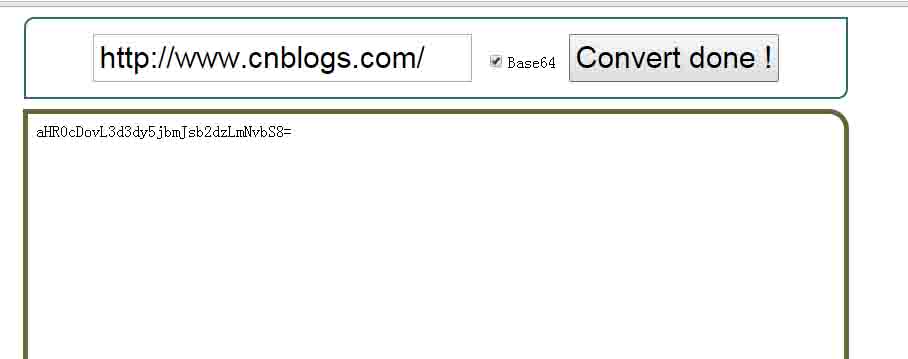
這裡的關鍵技巧是編碼時先 encodeURIComponent 再 unescape,把 UTF-16 的字符串轉成單字節序列後才交給 btoa();解碼時反向操作,用 escape 把單字節還原成 %XX 形式,再交給 decodeURIComponent。少了這一步,中文就會變成亂碼。
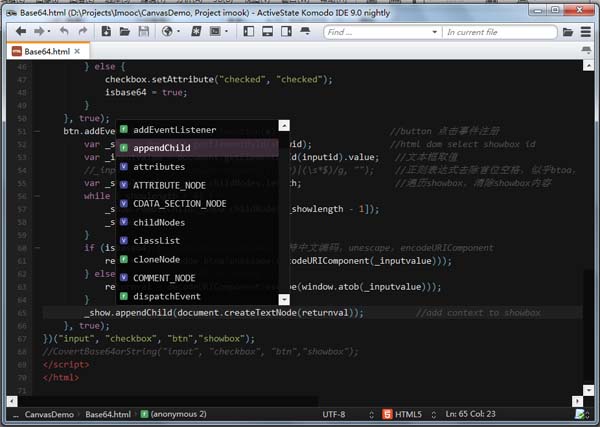
順帶推薦一個 JavaScript 開發工具:Komodo IDE(免費版為 Komodo Edit,基本功能一致)支援語法高亮、代碼智能感知,並且覆蓋 perl、python、ruby、nodejs 等多種語言,比 Aptana 更順手。
- 上一篇文章: JavaScript 設計模式之裝飾者模式介紹
- 下一篇文章: JavaScript 設計模式之代理模式介紹
相關文章
-
ASP.NET 中 Ajax 提交含 HTML 標籤參數的問題 XMLHTTP 傳送與接收中文內容的編碼策略 Data URI scheme 是什麼?在 CSS 中內嵌圖片的用法與限制 CSS3 實例:data 類型的 URL 是什麼 Data URI scheme 是什麼?圖片 Base64 編碼與使用範例 用 HTML5 File API 實現 Base64 與圖片的雙向轉換 .Net 中將圖片資料保存到 XML 文件 把圖片讀進 DOM 並存成 XML 檔(C#) .NET 中輕鬆處理 XML 資料:以 XmlTextWriter 序列化資料 在 .NET Framework 中輕鬆處理 XML(四):Base64 編碼