使用 jQuery 解析 XML 檔案的完整實作
編輯:關於JavaScript
本文分享如何透過 jQuery 解析 XML 檔案,並將資料提取到頁面中顯示,非常適合需要處理結構化資料的開發者參考。
一、XML 檔案結構(books.xml)
<?xml version="1.0" encoding="UTF-8"?> <root> <book id="1"> <name>深入淺出extjs</name> <author>張三</author> <price>88</price> </book> <book id="2"> <name>鋒利的jQuery</name> <author>李四</author> <price>99</price> </book> <book id="3"> <name>深入淺出flex</name> <author>王五</author> <price>108</price> </book> <book id="4"> <name>java編程思想</name> <author>錢七</author> <price>128</price> </book> </root>
二、頁面程式碼
<!DOCTYPE html PUBLIC "-//W3C//DTD HTML 4.01 Transitional//EN" "https://www.w3.org/TR/html4/loose.dtd"> <html> <head> <meta http-equiv="Content-Type" content="text/html; charset=UTF-8"> <title>jquery解析xml</title> <script type="text/javascript" src="js/jquery-1.4.2.min.js"></script> <script type="text/javascript"> $(function(){ $.post('books.xml',function(data){ var s=""; $(data).find('book').each(function(i){ var id=$(this).attr('id'); var name=$(this).children('name').text(); var author=$(this).children('author').text(); var price=$(this).children('price').text(); s+=id+" "+name+" "+author+" "+price+"<br>"; }); $('#mydiv').html(s); }); }); </script> </head> <body> <div id='mydiv'></div> </body> </html>
運行效果圖如下:
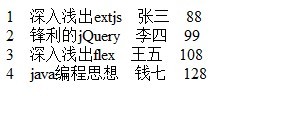
透過 jQuery 的 find 與 each 方法,我們可以輕鬆遍歷 XML 中的每個 book 節點,並提取其中的子節點內容,操作起來與處理 DOM 一樣直觀。
- 上一篇文章: 用 JavaScript 動態修改網址實現 URL 的增刪查改
- 下一篇文章: 避免 JavaScript 記憶體洩漏的常見陷阱與管理技巧