前端的純技術,很大一部分就是對規範的認知。而規範往往寫得晦澀,需要靠實驗才能驗證理解是否正確。本文以 DOMContentLoaded 為例,用 Chrome DevTools 的 Timeline 面板逐步驗證。
規範怎麼說
查 W3C HTML5 規範,一旦使用者代理停止解析文件,必須執行下列步驟:
Once the user agent stops parsing the document, the user agent must run the following steps:
1. Set the current document readiness to "interactive" and the insertion point to undefined. Pop all the nodes off the stack of open elements.
2. If the list of scripts that will execute when the document has finished parsing is not empty, run these substeps:
2.1 Spin the event loop until the first script in the list has its "ready to be parser-executed" flag set and the parser's Document has no style sheet that is blocking scripts.
2.2 Execute the first script in the list.
2.3 Remove the first script element from the list.
2.4 If the list is still not empty, repeat from substep 1.
3. Queue a task to fire a simple event that bubbles named DOMContentLoaded at the Document.
規範雖然繞口,但至少有一點是明確的:在 JS(不含動態插入的 JS)執行完之後,才會觸發 DOMContentLoaded。
再看 MDN 的說法:
The DOMContentLoaded event is fired when the document has been completely loaded and parsed, without waiting for stylesheets, images, and subframes to finish loading.
Note: Stylesheet loads block script execution, so if you have a
<script>after a<link rel="stylesheet" ...>, the page will not finish parsing – and DOMContentLoaded will not fire – until the stylesheet is loaded.
由此可得出一個理論:DOMContentLoaded 本身不等待 CSS 檔、圖片、iframe 載入完成。它的觸發時機是:載入頁面、解析完所有標籤、設定 interactive 狀態並執行每個靜態 script 標籤中的 JS,然後觸發。而 JS 的執行需要等待位於它前面的 CSS 載入並執行完成,因為 JS 可能依賴前面 CSS 計算出來的樣式。
理論需要驗證。以下四個實驗以 Chrome 搭配 Fiddler 模擬慢速網路進行。
實驗一:DOMContentLoaded 不直接等 CSS 與圖片
index.html:
 <!DOCTYPE html>
<html lang="zh-CN">
<head>
<meta charset="UTF-8">
<title></title>
<link rel="stylesheet" type="text/css" href="./css/main.css" rel="external nofollow" rel="external nofollow" >
</head>
<body>
<p>Content</p>
<img src="./img/chrome-girl.jpg">
</body>
</html>
圖一
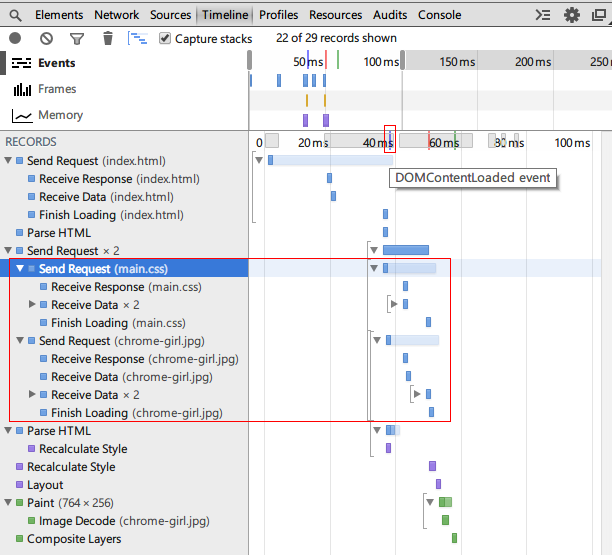
結果:頁面中沒有 script 標籤時,DOMContentLoaded 並未等待 CSS 檔與圖片載入完成。
Chrome 開發者工具的 Timeline 面板能記錄下瀏覽器的一舉一動。圖一紅色小方框中的藍線代表 DOMContentLoaded,它右邊的紅線與綠線分別是 load 事件與 First paint。滑鼠 hover 在這些線上會出現帶說明文字的 tips(這個互動設計確實不太友善)。
實驗二:DOMContentLoaded 需要等 JS 執行完
index.html:
 <!DOCTYPE html>
<html lang="zh-CN">
<head>
<meta charset="UTF-8">
<title></title>
<script type="text/javascript">
console.timeStamp('Inline script before link in head');
window.addEventListener('DOMContentLoaded', function(){
  console.timeStamp('DOMContentLoaded event');
});
</script>
<link rel="stylesheet" type="text/css" href="./css/main.css" rel="external nofollow" rel="external nofollow" >
<script type="text/javascript">
console.timeStamp('Inline script after link in head');
</script>
</head>
<body>
<p>Content</p>
<img src="./img/chrome-girl.jpg">
<script type="text/javascript" src="./js/main.js"></script>
</body>
</html>
main.js:
console.timeStamp('External script after link in body');
圖二
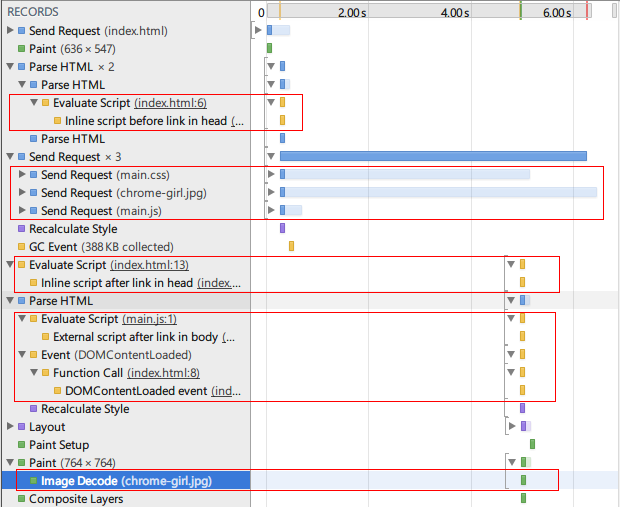
結果:靜態 script 標籤存在時,DOMContentLoaded 需要等 JS 執行完才觸發。而 script 中的 JS 又需要等於其前面的 CSS 載入完成。
console.timeStamp() 會在 Timeline 中留下一條記錄,並對應上方的一條黃線。
從圖二可以看出:CSS 之前的 JS 立刻執行;CSS 之後的 JS 必須等 CSS 載入完才執行。最明顯的是 main.js 早就下載完畢,卻仍要等 main.css 才能跑。而 DOMContentLoaded 則在 JS 執行完後才觸發。
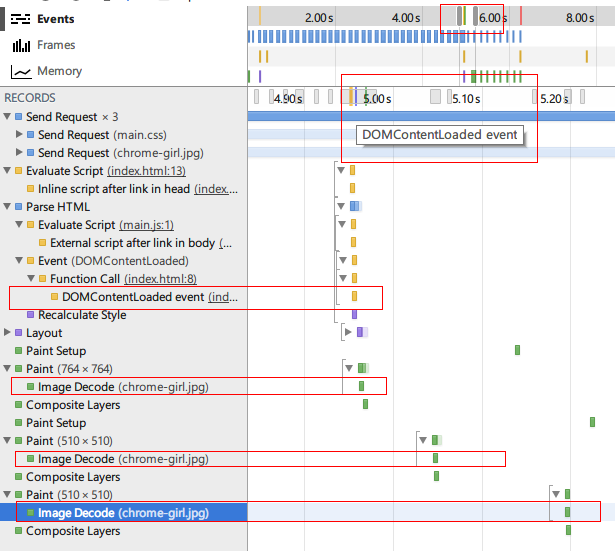
滑動 Timeline 面板下方表示展示區域的滑塊(圖三),放大後即可看到那條被黃線綠線擠在一起而看不清的藍線。
圖三
值得補充的是:現代瀏覽器會併發預載入 CSS 與 JS——一開始就同時發出這些請求。但執行順序仍依原本的依賴關係。先載入完成的資源,若其依賴尚未就緒,就只能等。
實驗三:img 何時開始解碼與繪製?
圖四
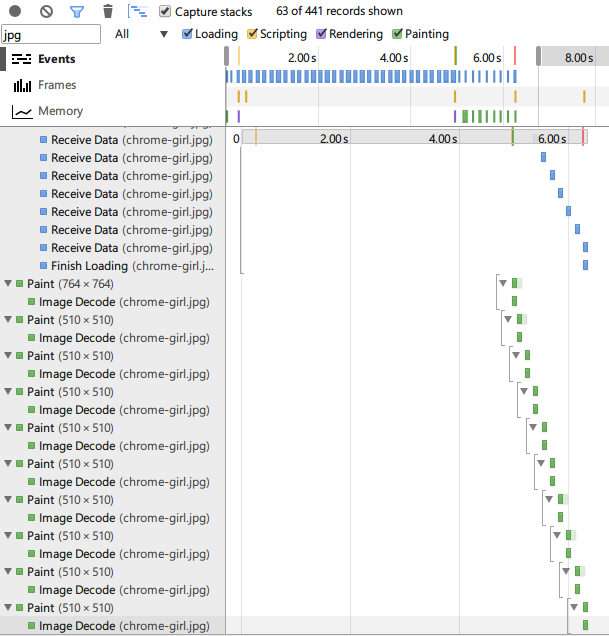
從圖三可以發現一個有趣現象:img 的請求老早就發出,卻延遲了一段時間才開始解碼。圖二、圖三紅框中只框出了部分解碼記錄,實際上這些記錄一直持續到圖片載入結束——也就是說,img 是一邊載入一邊解碼的。
抱著「猜想—驗證」的想法,我推測這是因為 img 是否需要呈現出來,得等所有 JS 與 CSS 執行完才知道。因為 main.js 可能會執行 DOM 操作把這個 img 刪掉或改掉 src,而 CSS 也可能將它設為 display: none。

圖五

圖六

圖七
比對結果:
· 圖五沒有 JS 也沒有 CSS,img 資料一收到就立刻開始解碼。
· 圖六沒有 JS,但 img 要等 CSS 載入完才開始解碼。
· 圖七與圖六唯一的差別是 CSS 把 img 設為 display: none;,結果 img 雖然發出了請求,卻完全沒有進行解碼。
這證明:img 是否需要解碼與繪製,確實要等 CSS 載入、執行完才能決定。也就是說,CSS 會阻塞 img 的呈現。那 JS 呢?

圖八
圖八對應的程式碼:
 <!DOCTYPE html>
<html lang="zh-CN">
<head>
<meta charset="UTF-8">
<title></title>
<script type="text/javascript">
console.timeStamp('Inline script in head');
window.addEventListener('DOMContentLoaded', function(){
  console.timeStamp('DOMContentLoaded event');
});
</script>
</head>
<body>
<p>Content</p>
<img src="./img/chrome-girl.jpg">
<script type="text/javascript" src="./js/main.js"></script>
</body>
</html>
結果相當令人意外:在有 JS 而沒有 CSS 的頁面中,img 收到資料後就立刻開始解碼、繪製,JS 並未阻塞 img 的呈現。這與「JS 會阻塞 img 資源」的傳統認知不同,看來 Chrome 對 img 的載入與呈現做了新的優化。
這些發現如何轉化為優化手段
我們常用的 jQuery $(document).ready() 就是對 DOMContentLoaded 事件的監聽(其內部還會透過模擬 DOMContentLoaded 與監聽 onload 提供降級方案)。通常建議在 DOMContentLoaded 觸發時為 DOM 元素註冊事件,因此讓它盡快觸發,就等於讓頁面盡快可互動。可用的手段包括:
· 精簡 CSS:減小檔案體積,或把單一 CSS 拆成多個檔案以併行載入,縮短 CSS 對 JS 的阻塞時間。
· 次要 JS 動態插入:動態建立的 script 標籤不阻塞 DOMContentLoaded 的觸發,適合非關鍵的統計、客服 widget 等。
· CSS 精靈圖善用預載入:把精靈圖放進 HTML 中與 CSS 一起載入,能與 img 的解碼時機配合得更好。
方法論上的收穫
做實驗的過程中,最深的感受是 Chrome DevTools 的 Timeline 面板非常強大——瀏覽器的一舉一動都被完整記錄下來。
以前前端要理解瀏覽器內部行為,途徑有三種:摸著石頭過河做黑盒測試、事倍功半地讀瀏覽器原始碼、或者花時間研究一份不確定是否適用當前的規則。但瀏覽器發展日新月異(本文中「JS 不阻塞 img 呈現」就是新出現的行為),別人的經驗始終有時效性。關鍵是結合自己的業務與需求場景,針對性地做分析與優化。
PS:以上測試環境為 Windows / Chrome,並以 Fiddler 模擬慢速網路。文中結論反映的是測試當時的瀏覽器行為,不同版本與不同瀏覽器(Firefox、Safari)的實作細節可能有所差異,實際優化前請以自家目標裝置重新驗證。
- 上一篇文章: 隨滑鼠飄移的時鐘特效(僅支援 IE)
- 下一篇文章: 比 setTimeout 更快的異步執行方案(跨瀏覽器)
相關文章
-
深入 jQuery 的 ready 機制:原始碼逐段解析 用 JS 監聽瀏覽器關閉事件並提醒用戶 頁面載入完成後才執行 JS:defer、onload 與 DOMContentLoaded 多個函式共用 window.onload:addLoadEvent 的實作與原理 頁面載入順序與 onload、ready 的執行時機解析 window.onload 掛載多個函式與追加事件的完整探討 頁面載入後自動執行函式的三種方式 window.onload 如何追加多個初始化函數而不互相覆蓋 把 jQuery 的 ready 機制抽出來單獨使用 封裝 DOMContentLoaded 事件:原理與跨瀏覽器相容實作