fixedBox:讓 div 隨捲動固定在頂部的相容 IE6 以上寫法
編輯:關於JavaScript
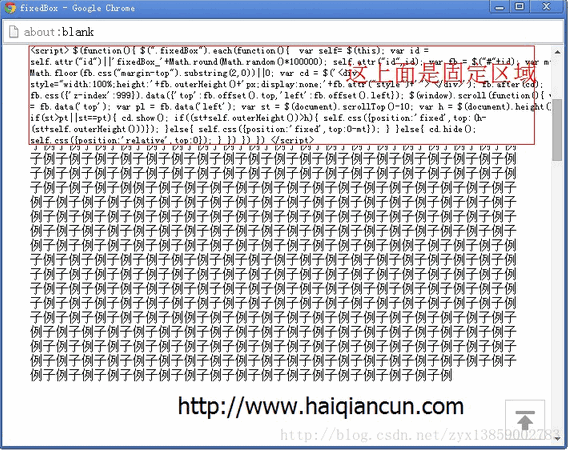
要讓某個區塊在頁面捲到它之後固定在視窗頂端,做法是監聽 scroll 事件,比對該元素的初始位置與目前捲動量,切換 position 屬性。為了避免元素改為 fixed 後原位置塌陷造成版面跳動,還要預先插入一個同高的佔位 div。
<!DOCTYPE html PUBLIC "-//W3C//DTD XHTML 1.0 Transitional//EN" "https://www.w3.org/TR/xhtml1/DTD/xhtml1-transitional.dtd">
<html xmlns="https://www.w3.org/1999/xhtml">
<head>
<meta http-equiv="Content-Type" content="text/html; charset=utf-8" />
<title>fixedBox</title>
<script id="xcore" type="text/javascript" src="https://www.haiqiancun.com/xWidget-0.1/xcore.js"></script>
<style>
* { margin: 0px; padding: 0px; }
body { height: 3000px; }
</style>
<script>
$(function () {
    $(".fixedBox").each(function () {
        var self = $(this);
        var id = self.attr("id") || 'fixedBox_' + Math.round(Math.random() * 100000);
        self.attr("id", id);

        var fb = $("#" + id);
        var mt = Math.floor(fb.css("margin-top").substring(2, 0)) || 0;

        // 建立同高的佔位層,避免元素 fixed 後版面跳動
        var cd = $('<div style="height:' + fb.outerHeight() + 'px;display:none;'
                   + fb.attr("style") + '"> </div>');
        fb.after(cd);

        fb.css({ 'z-index': 999 }).data({
            'top': fb.offset().top,
            'left': fb.offset().left
        });

        $(window).scroll(function () {
            var pt = fb.data('top');
            var st = $(document).scrollTop() - 10;
            var h = $(document).height();

            if (st > pt || st == pt) {
                cd.show();
                // 若已接近頁面底部,改為貼齊底部避免遮內容
                if ((st + self.outerHeight()) > h) {
                    self.css({ position: 'fixed', top: (h - (st + self.outerHeight())) });
                } else {
                    self.css({ position: 'fixed', top: 0 - mt });
                }
            } else {
                cd.hide();
                self.css({ position: 'relative', top: 0 });
            }
        });
    });
})
</script>
</head>
<body>
<div style="width:90%;margin:0px auto;">
<div class="fixedBox" style="margin-top:50px; width:100%; overflow:hidden; background:#fff; font-size:12px;">
    <script>
    $(function () {
        $(".fixedBox").each(function () {
            var self = $(this);
            var id = self.attr("id") || 'fixedBox_' + Math.round(Math.random() * 100000);
            self.attr("id", id);
            var fb = $("#" + id);
            var mt = Math.floor(fb.css("margin-top").substring(2, 0)) || 0;
            var cd = $('<div style="width:100%;height:' + fb.outerHeight()
                       + 'px;display:none;' + fb.attr("style") + '"> </div>');
            fb.after(cd);
            fb.css({ 'z-index': 999 }).data({
                'top': fb.offset().top,
                'left': fb.offset().left
            });
            $(window).scroll(function () {
                var pt = fb.data('top');
                var st = $(document).scrollTop() - 10;
                var h = $(document).height();
                if (st > pt || st == pt) {
                    cd.show();
                    if ((st + self.outerHeight()) > h) {
                        self.css({ position: 'fixed', top: (h - (st + self.outerHeight())) });
                    } else {
                        self.css({ position: 'fixed', top: 0 - mt });
                    }
                } else {
                    cd.hide();
                    self.css({ position: 'relative', top: 0 });
                }
            })
        })
    })
    </script>
</div>

頁面內容(足夠長以便捲動測試)
</div>
</body>
</html>
幾個細節說明:以 class 而非 id 篩選,同一頁可放多組;.data() 把初始座標快取值下來,避免每次 scroll 都重新計算造成效能問題;scrollTop() - 10 的偏移是為了讓元素稍微早一點吸附。原範例中 fb.css("margin-top").substring(2, 0) 的參數順序有誤(起始 index 大於結束 index),實測會回傳空字串,靠後面的 || 0 才倖免於難,建議改成 parseInt(fb.css("margin-top"), 10) || 0。
今日做法:直接用 CSS 的 position: sticky 一行即可取代整套腳本,且效能與相容性都更好(IE 不支援,但現代瀏覽器皆已支援)。
- 上一篇文章: JS 圖片無縫滾動:間隔可自訂、滑鼠移入即暫停
- 下一篇文章: JS 拖曳軌跡記錄與回放:從流程分析到程式實作
相關文章
-
讓浮動元素平滑跟隨捲動條: दिलjee 缓動追蹤實作 用 CSS 讓 div 固定在頁面頂端與底端 跨瀏覽器的 CSS 固定定位(position:fixed)實作 讓 IE6 也能支援 position: fixed 的模擬做法 讓圖片廣告固定在瀏覽器右下角的 CSS 寫法(IE7 與 Firefox) 純 CSS 實作底部固定浮動效果:借鏡天涯論壇的做法 如何讓 position:fixed 在 IE6 中正常運作 讓 position:fixed 在 IE6 中真正可用的完整寫法 用 absolute 模擬 position:fixed 的固定側欄 用 position:fixed 讓 div 在視窗正中央對齊