不依賴 HTML5,用 JavaScript 實作彈球打磚塊遊戲
編輯:關於JavaScript
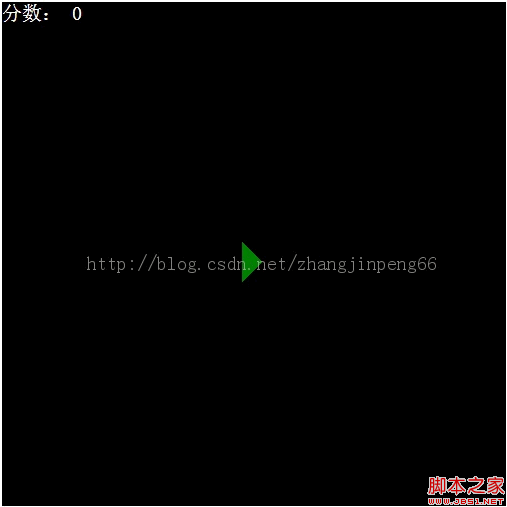
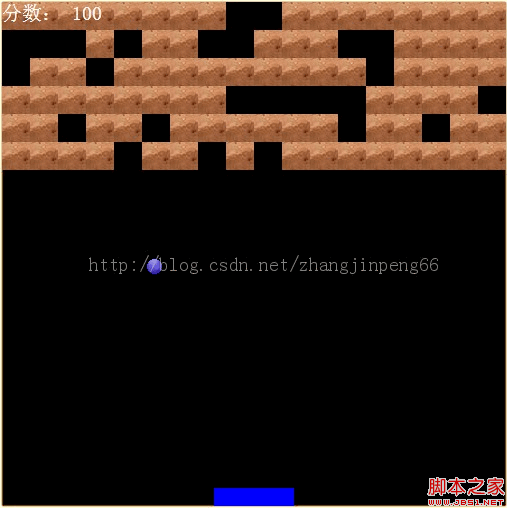
彈球打磚塊是相當經典的小遊戲。本文分享一款不依賴 HTML5 Canvas、純用傳統 DOM 與 JavaScript 實作的版本,玩家用左右方向鍵移動底部擋板反彈小球,擊碎上方磚塊得分,還會隨機掉落「魔法棒」改變擋板大小。
HTML 佈局(index.html)
<!DOCTYPE HTML PUBLIC "-//W3C//DTD HTML 4.01//EN" "https://www.w3.org/TR/html4/strict.dtd">
<html>
<head>
<meta http-equiv="Content-Type" content="text/html; charset=utf-8"/>
<title>彈球游戲</title>
<link rel="stylesheet" type="text/css" href="css/index.css"/>
</head>

<body>
<center>
<div id="gamePanel" tabindex="0">
<div class="score">分數:
<span id="score">0</span>
</div>
<div id="startBtn" onclick="Start()"></div>
</div>
</center>
<script type="text/javascript" src="js/magic.js"></script>
<script type="text/javascript" src="js/brick.js"></script>
<script type="text/javascript" src="js/ball.js"></script>
<script type="text/javascript" src="js/stick.js"></script>
<script type="text/javascript" src="js/game.js"></script>
</body>
</html>
樣式(index.css)
#gamePanel{
width:504px;
height:504px;
background:Black;
position:relative;
}

#gamePanel .score{
font-size:20px;
color:White;
position:absolute;
left:0;
top:0;
z-index:9999;
}

#gamePanel .stick{
width:80px;
height:18px;
position:absolute;
background:blue;
}

#gamePanel .ball{
width:15px;
height:15px;
position:absolute;
background:url(../img/ball.gif);
}

#gamePanel .brick {
width : 28px;
height : 28px;
position : relative;
background : url(../img/brick.gif);
float : left;
}

#gamePanel .hideBrick {
width : 28px;
height : 28px;
position : relative;
background : black;
float : left;
}

#gamePanel .magic {
width : 27px;
height : 11px;
position : absolute;
background : green;
}

#gamePanel .shortMagic {
width : 28px;
height : 12px;
position : absolute;
background : yellow;
}

#startBtn{
border-width:20px;
border-style:solid;
border-color:Black Black Black Green;
position:absolute;
left:240px;
top:240px;
cursor:pointer;
width:0px;
height:0px;
overflow:hidden;
}
球類 ball.js
JavaScript 部分分成五個源檔,各對應一個類別:ball.js(球)、brick.js(磚)、game.js(遊戲)、magic.js(魔法棒)、stick.js(擋板)。球類負責彈球的移動與碰撞檢測:
// 球類
var Ball = function() {
this.dom = null;
this.isFirst = true;
this.direction = null;
this.init();
}

Ball.prototype = {
movepx : 3, // 彈球橫向移動速度
movepy : 2, // 彈球縱向移動速度
movesp : 20, // 彈球移動頻率
movespMap : { 1 : 75, 2 : 65, 3 : 50, 4 : 40 },
init : function() {
this.dom = document.createElement("div");
this.dom.className = "ball";
},
setPosition : function(x, y) {
this.dom.style.left = x + "px";
this.dom.style.top = y + "px";
},
// 彈球動畫,傳入參數為游戲背景的寬與高
animation : function(gameWidth, gameHeight, stick) {
var _this = this;
var _movepx = this.dom.offsetLeft > gameWidth/2 ? -1*this.movepx : this.movepx;
var _movepy = this.dom.offsetTop > gameHeight/2 ? this.movepy : -1*this.movepy;
var process = function() {
var left = _this.dom.offsetLeft;
var top = _this.dom.offsetTop;
// 是否要調轉方向
if (left <= 0 || left >= gameWidth - _this.dom.clientWidth) {
_movepx *= -1;
}
var isCrashStick = _this.OnCheckCrashStick();
var isCrashBall = _this.OnCheckCrashBrick();
if (top < 0 || isCrashStick || isCrashBall) {
_movepy *= -1;
}
top = top + _movepy;
left = left + _movepx;
_this.dom.style.top = top + "px";
_this.dom.style.left = left + "px";
if(top > gameHeight) {
_this.onend();
alert("You Lose");
} else {
setTimeout(process, _this.movesp);
}
};
process();
},
OnCheckCrashStick : function() {}, // 外部接口,檢測是否撞到魔法棒
OnCheckCrashBrick : function() {}, // 外部接口,檢測是否撞到磚塊
onend : function() {},
gameover : function() {}
}
磚類 brick.js
// 磚類
var Brick = function(gamePanel) {
this.dom = null;
this.gamePanel = gamePanel;
this.isLive = true;
this.magic = null;
this.width = 28;
this.height = 28;
this.left = 0;
this.top = 0;
this.init();
}

Brick.prototype = {
init : function() {
this.dom = document.createElement("div");
this.dom.className = "brick";
},
setPosition : function(x, y) {
this.left = x;
this.top = y;
},
setSize : function(width, height) {
this.width = width;
this.height = height;
},
// 初始化生成魔法棒
initMagic : function() {
var _this = this;
var random = parseInt(Math.random()*1000 + 1, 10);
var type = random % 5 == 0 ? "good" : random % 4 == 0 ? "bad" : "none";
var magic = new Magic(type);
this.magic = magic;
magic.initPosition(this);
this.gamePanel.appendChild(magic.dom);
magic.onEnd = function() {
_this.gamePanel.removeChild(magic.dom);
};
magic.animation(this.gamePanel.clientHeight);
},
// 擊中後的動作
onEnd : function() {
this.isLive = false;
this.dom.className = "hideBrick";
this.initMagic();
}
}
擋板類 stick.js(鍵盤控制重點)
擋板透過左右方向鍵移動,並在邊界處停止。這是本作互動的關鍵:
// 鍵盤按下事件
keydown : function(e) {
var keyCode = e.keyCode;
if (!this.isMove) {
this.move(keyCode);
}
},
// 鍵盤釋放事件
keyup : function(e) {
if (this.keyCodeAndDirection[e.keyCode]) {
this.stopMove();
} else if (e.keyCode == 32) {
this.isSend = false;
}
},
// 移動
move : function(keyCode) {
this.isMove = true;
var _this = this;
switch(this.keyCodeAndDirection[keyCode]) {
case "left" : {
this.moveId = setInterval(function() {_this.moveLeft();}, _this.movesp);
break;
}
case "right" : {
this.moveId = setInterval(function() {_this.moveRight();}, _this.movesp);
break;
}
default : break;
}
},
// 向左移動
moveLeft : function() {
var left = this.dom["offsetLeft"];
left = left - this.movepx >= 0 ? left - this.movepx : 0;
this.dom.style["left"] = left + "px";
if (left == 0) {
this.stopMove();
}
},
// 向右移動
moveRight : function() {
var left = this.dom["offsetLeft"];
var maxDistance = this.gameWidth - this.dom.clientWidth;
left = left + this.movepx <= maxDistance ? left + this.movepx: maxDistance;
this.dom.style["left"] = left + "px";
if (left == maxDistance) {
this.stopMove();
}
},
此外,changeBig 與 changeSmall 負責在接到綠色(變長)或黃色(變短)魔法棒時調整擋板寬度,增加遊戲變化。整體架構清楚:Game 類統籌,Ball、Brick、Stick、Magic 各自獨立,透過外部接口(如碰撞檢測、結束事件)彼此協作。完整源碼可參考作者於 CSDN(zhangjinpeng66)分享的資源。