很多 DOM 物件天生就有事件機制,div 有 click、mouseover,事件讓類的設計多了極大的彈性,寫過 .NET 的人應該很有感。隨著 Web 技術演進,我們自己建立的 JavaScript 物件越來越多,如果這些物件也能對外發送事件,各個模組之間就能鬆耦合地溝通,開發效率會明顯提升。這篇就從一個 Dialog 的小需求出發,一路做到通用的 EventTarget。
一個簡單的事件需求
事件不是可有可無的裝飾,某些需求下它是必要的。最常見的例子是 Dialog:每個彈出層都有一個關閉按鈕,最直白的寫法如下。
複製代碼 代碼如下:
<!DOCTYPE html>
<html>
  <head>
    <title>Test</title>
    <style type="text/css" >
      .dialog
      {
        position:fixed;
        width:300px;
        height:300px; z-index:30;
        top:50%; left:50%;
        margin-top:-200px; margin-left:-200px;
        box-shadow:2px 2px 4px #ccc;
        background-color:#f1f1f1;
        display:none;
      }

      .dialog .title
      {
        font-size:16px;
        font-weight:bold;
        color:#fff;
        padding:4px;
        background-color:#404040;
      }

      .dialog .close
      {
        width:20px;
        height:20px;
        margin:3px;
        float:right;
        cursor:pointer;
      }
    </style>
  </head>
  <body>

  <input type="button" value="Dialog Test" onclick="openDialog();"/>

  <div id="dlgTest" class="dialog">
    <img class="close" alt="" src="images/close.png">
    <div class="title">Dialog</div>
    <div class="content">

    </div>
  </div>

  <script type="text/javascript">
    function Dialog(id){
      this.id=id;
      var that=this;
      document.getElementById(id).children[0].onclick=function(){
        that.close();
      }
    }

    Dialog.prototype.show=function(){
      var dlg=document.getElementById(this.id);
      dlg.style.display='block';
      dlg=null;
    }

    Dialog.prototype.close=function(){
      var dlg=document.getElementById(this.id);
      dlg.style.display='none';
      dlg=null;
    }
  </script>

  <script type="text/javascript">
    function openDialog(){
      var dlg=new Dialog('dlgTest');
      dlg.show();
    }
  </script>
  </body>
<html>
點 button 彈出 Dialog,點關閉鈕隱藏 Dialog,需求達成了。但總覺得少一點什麼——一般的 Dialog 顯示時,頁面還會浮出一層半透明的灰色罩子,阻擋其他地方的點擊,關閉時罩子消失,頁面恢復可操作。
加上遮罩後,耦合的問題浮現
先在 body 頂部加一個 pagecover:
<div id="pageCover" class="pageCover"></div>
為它加上樣式:
複製代碼 代碼如下:
.pageCover
    {
      width:100%;
      height:100%;
      position:absolute;
      z-index:10;
      background-color:#666;
      opacity:0.5;
      display:none;
    }
為了在打開時顯示遮罩,修改 openDialog:
複製代碼 代碼如下:
function openDialog(){
    var dlg=new Dialog('dlgTest');
    document.getElementById('pageCover').style.display='block';
    dlg.show();
    }
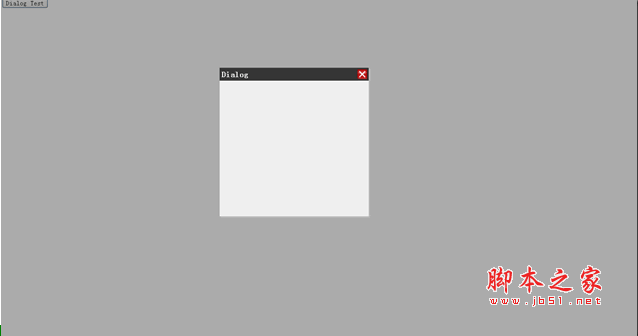
效果很不錯,灰霧般的罩子在 Dialog 彈出後蓋住了頁面上的按鈕,Dialog 在其之上。問題這時才出現:關閉 Dialog 時遮罩還在,沒有任何程式去隱藏它。
照打開時的邏輯,好像也在關閉時隱藏就好——但真的不行。打開的程式碼是頁面 button 的事件處理器,由頁面自己定義,在裡面加一行顯示遮罩合情合理;可是關閉 Dialog 用的是 Dialog 自己的邏輯,跟頁面無關。那改 Dialog 的 close 方法呢?也不行,原因有兩個:第一,Dialog 在定義時根本不知道 page cover 的存在,兩者之間沒有任何耦合關係,把隱藏遮罩的邏輯寫進 close,等於讓 Dialog 依賴 page cover,頁面上若沒有這個元素,Dialog 就會出錯;第二,Dialog 也不知道特定頁面的遮罩 id 是什麼,無從知道該去隱藏哪個 div。那在構造 Dialog 時把遮罩 id 傳進來是否可以?耦合消失了,id 也拿得到了,但如果有的頁面需要遮罩、有的不需要呢?
用事件解耦
這就是事件大顯身手的時候。修改 Dialog 物件與 openDialog:
複製代碼 代碼如下:
function Dialog(id){
    this.id=id;
    this.close_handler=null;
    var that=this;
    document.getElementById(id).children[0].onclick=function(){
      that.close();
      if(typeof that.close_handler=='function')
      {
        that.close_handler();
      }
    }
}
複製代碼 代碼如下:
function openDialog(){
    var dlg=new Dialog('dlgTest');
    document.getElementById('pageCover').style.display='block';

    dlg.close_handler=function(){
      document.getElementById('pageCover').style.display='none';
    }
    dlg.show();
    }
在 Dialog 內部掛一個句柄,關閉鈕的 click 處理器在呼叫 close 之後判斷該句柄是否為 function,是就執行。openDialog 裡建立 Dialog 之後把句柄指派為「隱藏遮罩」的方法,關閉時遮罩就消失了,而且兩個元件之間完全沒有耦合。這一整套「定義事件 → 綁定事件處理器 → 觸發事件」的流程,跟 button 的 click 本質上是同一回事。
更完整的自訂事件機制
上面的小例子很簡單,跟 DOM 原生事件比起來粗糙得多,缺點有三:
一、沒有通用性。再寫一個新元件時,得重複敲一遍類似結構。
二、綁定具排他性。只能掛一個 close 處理器,掛新的會覆蓋舊的。
三、封裝不夠。使用者若不知道有 close_handler 這個句柄,就無法綁定事件,只能去翻原始碼。
逐項來解:第一項用繼承解決;第二項提供一個容器(陣列)統一管理同類型的所有處理器;第三項則要和第一項結合,在自訂的事件管理物件上提供一組公開介面,用來新增/移除/觸發事件。
複製代碼 代碼如下:
function EventTarget(){
    this.handlers={};
    }

    EventTarget.prototype={
    constructor:EventTarget,
    addHandler:function(type,handler){
      if(typeof this.handlers[type]=='undefined'){
        this.handlers[type]=new Array();
        }
      this.handlers[type].push(handler);
      },
    removeHandler:function(type,handler){
      if(this.handlers[type] instanceof Array){
        var handlers=this.handlers[type];
        for(var i=0,len=handlers.length;i<len;i++){
          if(handler[i]==handler){
            handlers.splice(i,1);
            break;
            }
          }
        }
      },
    trigger:function(event){
      if(!event.target){
        event.target=this;
        }
      if(this.handlers[event.type] instanceof Array){
        var handlers=this.handlers[event.type];
        for(var i=0,len=handlers.length;i<len;i++){
          handlers[i](event);
          }
        }
      }
    }
addHandler 負責註冊,removeHandler 負責移除,所有處理器都集中在 handlers 屬性裡管理。呼叫 trigger 觸發事件,傳入一個至少含 type 屬性的物件,方法會去 handlers 中找出對應 type 的處理器逐一執行。寫段程式測一下:
複製代碼 代碼如下:
function onClose(event){
    alert('message:'+event.message);
    }

    var target=new EventTarget();
    target.addHandler('close',onClose);

    //浏覽器不能幫我們創建事件對象了,自己創建一個
    var event={
    type:'close',
    message:'Page Cover closed!'
    };

    target.trigger(event);
第二、三個缺點至此解決。再用繼承處理第一個,以下是寄生式組合繼承的核心程式碼,也是目前公認較佳的 JavaScript 繼承方式:
複製代碼 代碼如下:
function extend(subType,superType){
    var prototype=Object(superType.prototype);
    prototype.constructor=subType;
    subType.prototype=prototype;
    }
最後寫成的完整版本如下:
複製代碼 代碼如下:
<!DOCTYPE html>
<html>
  <head>
    <title>Test</title>
    <style type="text/css" >
      html,body
      {
        height:100%;
        width:100%;
        padding:0;
        margin:0;
      }

      .dialog
      {
        position:fixed;
        width:300px;
        height:300px;
        top:50%;
        left:50%;
        margin-top:-200px;
        margin-left:-200px;
        box-shadow:2px 2px 4px #ccc;
        background-color:#f1f1f1;
        z-index:30;
        display:none;
      }

      .dialog .title
      {
        font-size:16px;
        font-weight:bold;
        color:#fff;
        padding:4px;
        background-color:#404040;
      }

      .dialog .close
      {
        width:20px;
        height:20px;
        margin:3px;
        float:right;
        cursor:pointer;
      }

      .pageCover
      {
        width:100%;
        height:100%;
        position:absolute;
        z-index:10;
        background-color:#666;
        opacity:0.5;
        display:none;
      }
    </style>
  </head>
  <body>
  <div id="pageCover" class="pageCover"></div>

  <input type="button" value="Dialog Test" onclick="openDialog();"/>

  <div id="dlgTest" class="dialog">
    <img class="close" alt="" src="images/close.png">
    <div class="title">Dialog</div>
    <div class="content">

    </div>
  </div>

  <script type="text/javascript">
    function EventTarget(){
      this.handlers={};
    }

    EventTarget.prototype={
    constructor:EventTarget,
    addHandler:function(type,handler){
      if(typeof this.handlers[type]=='undefined'){
        this.handlers[type]=new Array();
        }
      this.handlers[type].push(handler);
      },
    removeHandler:function(type,handler){
      if(this.handlers[type] instanceof Array){
        var handlers=this.handlers[type];
        for(var i=0,len=handlers.length;i<len;i++){
          if(handler[i]==handler){
            handlers.splice(i,1);
            break;
            }
          }
        }
      },
    trigger:function(event){
      if(!event.target){
        event.target=this;
        }
      if(this.handlers[event.type] instanceof Array){
        var handlers=this.handlers[event.type];
        for(var i=0,len=handlers.length;i<len;i++){
          handlers[i](event);
          }
        }
      }
    }
  </script>

  <script type="text/javascript">
    function extend(subType,superType){
      var prototype=Object(superType.prototype);
      prototype.constructor=subType;
      subType.prototype=prototype;
      }
  </script>

  <script type="text/javascript">
    function Dialog(id){
      EventTarget.call(this)
      this.id=id;
      var that=this;
      document.getElementById(id).children[0].onclick=function(){
        that.close();
      }
    }

    extend(Dialog,EventTarget);


    Dialog.prototype.show=function(){
      var dlg=document.getElementById(this.id);
      dlg.style.display='block';
      dlg=null;
    }

    Dialog.prototype.close=function(){
      var dlg=document.getElementById(this.id);
      dlg.style.display='none';
      dlg=null;
      this.trigger({type:'close'});
    }
  </script>

  <script type="text/javascript">
    function openDialog(){
      var dlg=new Dialog('dlgTest');

      dlg.addHandler('close',function(){
        document.getElementById('pageCover').style.display='none';
      });

      document.getElementById('pageCover').style.display='block';
      dlg.show();
    }
  </script>
  </body>
<html>
注意 Dialog 的 close 裡只剩一句 this.trigger({type:'close'}),它對遮罩一無所知;想知道關閉何時發生的人,自己 addHandler 掛上去就好,掛幾個、掛什麼都行。同一個 Dialog 也能同時被「隱藏遮罩」、「停止計時器」、「記錄日誌」等任意數量的需求訂閱,彼此不互相干擾。
最後
這樣幾個缺點都解決了,看起來完美多了——其實連「打開時顯示遮罩」也可以改成同樣的事件形式,讓 Dialog 自己發送 open 事件,頁面訂閱後決定要不要顯示遮罩,耦合會更低。
當程式中有多個部分需要在特定時刻互相溝通時,自訂事件就非常有用。如果每個物件都持有其他物件的參照,整份程式碼會高度耦合,改一處動一處,維護成本極高。自訂事件讓物件之間解耦、職責隔離,整體反而更容易內聚——這也正是現代前端框架(React 的 props/事件、Vue 的 emit、Node.js 的 EventEmitter)背後共同的核心概念。