仿百度有啊通欄展示效果:多卡片層疊輪播實現
編輯:關於JavaScript
這個效果的特點是若干張卡片以「扇形層疊」的方式排開,中間那張最大最清晰,鼠標移到左右兩側或下方的指示點上,整組卡片會依次向左或向右「輪轉」一個位置。實現它需要三個部件:一個絕對定位的容器、一份描述每個位置狀態的配置數組、一個通用的運動框架。
效果預覽
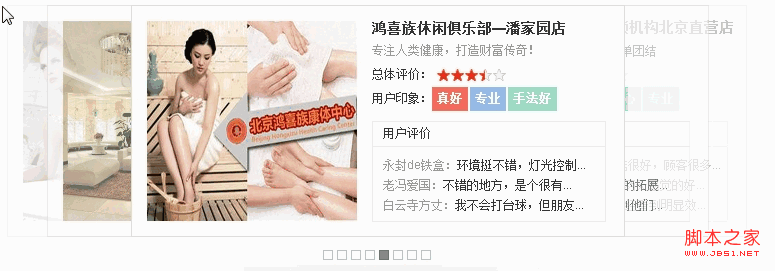
核心思路
- 所有卡片都
position:absolute疊在同一容器內。 - 用一個
oData數組描述「第 n 個位置」的 left、zIndex、opacity,共有 6 個位置,最後一個用於存放即將移出視口的卡片。 - 維護一個
aSort數組表示「當前哪張卡片在第幾位」,輪播就是對這個數組做unshift(pop())或push(shift())。 - 每次順序變化後重新遍歷,把每張卡片運動到它新位置對應的樣式。
樣式
<style type="text/css">
body,div,dl,dt,dd,ul,li,h3 { margin:0; padding:0; }
body { color:#333; font:12px/1.5 arial; }
li { list-style:none; }
a:link,a:visited,a:active { color:#333; text-decoration:none; }
a:hover { color:#F30; }
img { border:none; }

#box { width:740px; margin:10px auto; }
#container { position:relative; height:232px; background:#FCFCFC; }

#container .item {
    position:absolute; top:0; left:0;
    width:492px; height:230px; overflow:hidden;
    background:#FAFAFA; border:1px solid #ddd;
    z-index:1; opacity:1;
}
#container .item .pic { float:left; width:210px; height:200px; display:inline; margin:15px; }
#container .item .pic img { width:210px; height:200px; vertical-align:top; }
#container .item .txt { float:left; width:250px; margin-top:12px; }
#container .item .txt dt { font-size:14px; font-weight:700; }
#container .item .txt .info { color:#999; }
#container .item .txt dd { height:24px; line-height:24px; }
#container .item .txt dd span { float:left; }
#container .item .txt .star {
    position:relative; float:left; height:12px; width:69px; margin:6px 0 0 5px;
}
#container .item .txt .star .star_red {
    position:absolute; top:0; left:0; height:12px; width:69px; z-index:2;
    background:url(https://js.fgm.cc/learn/lesson10/img/youa/star.png) repeat-x scroll left top transparent;
}
#container .item .txt .star .star_grey {
    background:url(https://js.fgm.cc/learn/lesson10/img/youa/star.png) repeat-x scroll left -15px transparent;
    height:12px; width:69px;
}
#container .item .txt .pink, .blue, .green {
    color:#FFF; font-weight:700; margin-right:2px; background:#F66B5B; padding:0 5px;
}
#container .item .txt .blue  { background:#96BAE7; }
#container .item .txt .green { background:#9CDBC3; }
#container .item .txt .comment {
    width:232px; height:99px; margin-top:10px; background:#FFF; border:1px solid #EAEAEA;
}
#container .item .txt .comment h3 {
    font-size:12px; font-weight:400; height:24px; line-height:24px;
    border-bottom:1px solid #E9E9E9; padding:0 10px;
}
#container .item .txt .comment .comment_list {
    width:220px; height:60px; overflow:hidden; margin:8px 0 0 10px;
}
#container .item .txt .comment .comment_list ul li {
    height:20px; line-height:20px; white-space:nowrap;
}
#container .item .txt .comment .comment_list ul li b { color:#999; font-weight:400; }

#control { height:37px; text-align:center; background:url(https://js.fgm.cc/learn/lesson10/img/youa/bg.png) no-repeat; }
#control span {
    width:8px; height:8px; font-size:0; line-height:0; cursor:pointer;
    display:inline-block; background-color:#FEFEFE; border:1px solid #BCC1C5; margin:13px 2px 2px;
}
#control span.active { background-color:#848484; border:1px solid #6E6E6E; }
</style>
結構(每張卡片結構相同,此處示兩張)
<div id="box">
<div id="container">

    <div class="item">
        <div class="pic"><a href="javascript:;"><img src="https://js.fgm.cc/learn/lesson10/img/youa/1.jpg" /></a></div>
        <div class="txt">
            <dl>
                <dt><a href="javascript:;">必圖拳館</a></dt>
                <dd class="info">不要把自己困住 你需要釋放!</dd>
                <dd><span>總體評價:</span>
                    <div class="star">
                        <div style="width:48px;" class="star_red"></div>
                        <div class="star_grey"></div>
                    </div>
                </dd>
                <dd><span>用戶印象:</span>
                    <span class="pink">過瘾</span>
                    <span class="blue">帶勁</span>
                    <span class="green">有活力</span>
                </dd>
            </dl>
            <div class="comment">
                <h3>用戶評價</h3>
                <div class="comment_list">
                    <ul>
                        <li><b>thaifight:</b>是一個非常好的一個拳...</li>
                        <li><b>快樂小友:</b>散打課的實戰機會挺多...</li>
                        <li><b>愛情賽車:</b>白天人很少,喜歡安靜...</li>
                    </ul>
                </div>
            </div>
        </div>
    </div>

    <div class="item">
        <div class="pic"><a href="javascript:;"><img src="https://js.fgm.cc/learn/lesson10/img/youa/2.jpg"></a></div>
        <div class="txt">
            <dl>
                <dt><a href="javascript:;">北京「七田陽光」全腦教育培訓中心</a></dt>
                <dd class="info">點亮孩子智慧人生</dd>
                <dd><span>總體評價:</span>
                    <div class="star">
                        <div style="width:48px;" class="star_red"></div>
                        <div class="star_grey"></div>
                    </div>
                </dd>
                <dd><span>用戶印象:</span>
                    <span class="pink">親切</span>
                    <span class="blue">耐心</span>
                    <span class="green">干淨</span>
                </dd>
            </dl>
            <div class="comment">
                <h3>用戶評價</h3>
                <div class="comment_list">
                    <ul>
                        <li><b>Jcenter:</b>如此誠懇的教育機構 ...</li>
                        <li><b>citaslin:</b>孩子的進步很大</li>
                        <li><b>甲魚愛媛媛:</b>七田陽光很注重品質,...</li>
                    </ul>
                </div>
            </div>
        </div>
    </div>

    <!-- 其餘卡片(慕紗瑩雪婚紗、金三優裝飾、鴻喜族休閒俱樂部、
         心拓城拓展培訓、韓醫生祛痘、羅曼卡婚紗攝影)結構完全相同 -->

</div>
<div id="control"></div>
</div>
腳本實現
function Youa(obj) {
    this.obj = $(obj);
    this.container = $("container");
    this.control = $("control");
    this.items = $$$("item", this.container);
    this.iCenter = 2;        // 中間位置的索引
    this.aSort = [];         // 當前排序
    this.timer = null;
    // 每個位置的樣式配置
    this.oData = [
        { left: 0,   zIndex: 2, opacity: 30 },
        { left: 40,  zIndex: 3, opacity: 60 },
        { left: 124, zIndex: 4, opacity: 100 },   // 中間,最清晰
        { left: 208, zIndex: 3, opacity: 60 },
        { left: 246, zIndex: 2, opacity: 30 },
        { left: 40,  zIndex: 0, opacity: 0 }       // 移出視口的緩衝位
    ];
    this.__create__();
}

Youa.prototype.__create__ = function () {
    var that = this;
    var oSpan = null;
    var i = 0;

    // 建立排序數組與指示點
    for (i = 0; i < that.items.length; i++) {
        that.items[i].number = i;
        that.aSort[i] = that.items[i];
        oSpan = document.createElement("span");
        oSpan.number = i;
        that.control.appendChild(oSpan);
    }

    // 把最後一張移到最前,讓初始狀態與視覺一致
    for (i = 0; i < 2; i++) this.aSort.unshift(this.aSort.pop());

    that.aSpan = $$("span", that.control);

    // 點擊指示點:把對應卡片轉到中間
    that.control.onmouseover = function (ev) {
        var oEv = ev || event;
        var oTarget = oEv.target || oEv.srcElement;
        if (oTarget.tagName.toUpperCase() != "SPAN") return;

        that.aSort.sort(function (a, b) { return a.number - b.number; });

        if (oTarget.number < that.iCenter) {
            for (i = 0; i < that.iCenter - oTarget.number; i++) that.aSort.unshift(that.aSort.pop());
            that.__set__();
            return false;
        } else if (oTarget.number > that.iCenter) {
            for (i = 0; i < oTarget.number - that.iCenter; i++) that.aSort.push(that.aSort.shift());
            that.__set__();
            return false;
        } else {
            that.__set__();
        }
    };

    this.__set__();
    this.__switch__();
    this.__autoPlay__();
};

// 依 aSort 順序重新排版
Youa.prototype.__set__ = function () {
    var i = 0;
    for (i = 0; i < this.aSort.length; i++) this.container.appendChild(this.aSort[i]);
    for (i = 0; i < this.aSpan.length; i++) this.aSpan[i].className = "";
    this.aSpan[this.aSort[this.iCenter].number].className = "active";

    for (i = 0; i < this.aSort.length; i++) {
        this.aSort[i].index = i;
        if (i < 5) {
            new Animate(this.aSort[i], this.oData[i]);
        } else {
            new Animate(this.aSort[i], this.oData[this.oData.length - 1]);
        }
    }
};

// 點擊卡片本身也能把它轉到中間
Youa.prototype.__switch__ = function () {
    var i = 0;
    var that = this;

    this.container.onclick = function (ev) {
        var oEv = ev || event;
        var oTarget = oEv.target || oEv.srcElement;
        var index = findItem(oTarget);

        if (index < that.iCenter) {
            for (i = 0; i < that.iCenter - index; i++) that.aSort.unshift(that.aSort.pop());
            that.__set__();
            return false;
        } else if (index > that.iCenter) {
            for (i = 0; i < index - that.iCenter; i++) that.aSort.push(that.aSort.shift());
            that.__set__();
            return false;
        }

        function findItem(element) {
            return element.className == "item" ? element.index
                                               : arguments.callee(element.parentNode);
        }
    };
};

// 自動播放,鼠標移入暫停
Youa.prototype.__autoPlay__ = function () {
    var that = this;
    that.timer = setInterval(function () {
        that.aSort[3].click();
    }, 3000);

    that.obj.onmouseover = function () { clearInterval(that.timer); };
    that.obj.onmouseout = function () {
        that.timer = setInterval(function () { that.aSort[3].click(); }, 3000);
    };
};
工具函數與運動框架
function $(id) {
    return typeof id === "string" ? document.getElementById(id) : id;
}

function $$(tagName, oParent) {
    return (oParent || document).getElementsByTagName(tagName);
}

function $$$(className, element, tagName) {
    var i = 0, aClass = [];
    var reClass = new RegExp("(^|\\s)" + className + "(\\s|$)");
    var aElement = $$(tagName || "*", element || document);
    for (i = 0; i < aElement.length; i++) {
        reClass.test(aElement[i].className) && aClass.push(aElement[i]);
    }
    return aClass;
}

// 樣式讀寫:兩參數為讀(或批量設置對象),三參數為寫單值
function css(element, attr, value) {
    if (arguments.length == 2) {
        if (typeof arguments[1] === "string") {
            return element.currentStyle ? element.currentStyle[attr]
                                        : getComputedStyle(element, null)[attr];
        } else {
            for (var property in attr) {
                property == "opacity"
                    ? (element.style.filter = "alpha(opacity=" + attr[property] + ")",
                       element.style.opacity = attr[property] / 100)
                    : element.style[property] = attr[property];
            }
        }
    } else if (arguments.length == 3) {
        switch (attr) {
            case "width": case "height":
            case "top": case "left": case "right": case "bottom":
                element.style[attr] = value + "px";
                break;
            case "opacity":
                element.style.filter = "alpha(opacity=" + value + ")";
                element.style.opacity = value / 100;
                break;
            default:
                element.style[attr] = value;
                break;
        }
    }
    return element;
}

// 通用運動框架:速度取距離的五分之一,逐幀逼近
function Animate(element, options, fnCallBack) {
    this.obj = $(element);
    this.options = options;
    this.__onEnd__ = fnCallBack;
    this.__startMove__();
}

Animate.prototype.__startMove__ = function () {
    var that = this;
    clearInterval(that.obj.timer);
    that.obj.timer = setInterval(function () { that.__doMove__(); }, 30);
};

Animate.prototype.__doMove__ = function () {
    var complete = true;
    var property = null;

    for (property in this.options) {
        var iCur = parseFloat(css(this.obj, property));
        property == "opacity" && (iCur = parseInt(iCur.toFixed(2) * 100));

        var iSpeed = (this.options[property] - iCur) / 5;
        iSpeed = iSpeed > 0 ? Math.ceil(iSpeed) : Math.floor(iSpeed);

        this.options[property] == iCur ||
            (complete = false, css(this.obj, property, iSpeed + iCur));
    }

    complete && (clearInterval(this.obj.timer),
                    this.__onEnd__ && this.__onEnd__.apply(this.obj));
};

window.onload = function () {
    new Youa("box");
};
幾點經驗
- 位置配置與排序邏輯分離是這個效果的關鍵。想改成 5 個或 7 個可視位置,只需增減
oData並調整iCenter。 - 運動框架用「距離除以 5」作為速度並配合
Math.ceil/floor取整,能保證最後一定精確落點,不會因為小數殘差產生抖動。 opacity需要同時寫filter與opacity才能兼容舊 IE,讀取時也要還原成 0~100 的整數。- 自動播放用
setInterval3 秒一次,鼠標移入即清除,移出恢復;切換到requestAnimationFrame會更省資源。 - 卡片較多時,注意 z-index 必須隨位置同步更新,否則層疊順序會錯亂。
- 上一篇文章: 動態修改 div 任意屬性名稱與值的原生 JS 與 jQuery 寫法
- 下一篇文章: 兼容 IE 與 Firefox 的圖片上傳前預覽