客製化檔案上傳按鈕:把原生 file 控制項藏起來的技巧
編輯:關於JavaScript
原生 <input type="file"> 的外觀幾乎無法用 CSS 改造,各瀏覽器長相又不一致。常見解法是「一層自製按鈕 + 一層透明檔案輸入框疊在上面」,讓使用者以為自己點的是自訂按鈕,實際觸發的是原生檔案選擇器。
完整程式碼
<!DOCTYPE html PUBLIC "-//W3C//DTD HTML 4.01 Transitional//EN"
        "https://www.w3.org/TR/html4/loose.dtd">
<html>
<head>
<title>添加附件</title>
<script type="text/javascript" src="jquery-1.8.0.js"></script>
<script type="text/javascript">
function fclick(obj) {
    style.posTop = event.srcElement.offsetTop;
    style.posLeft = event.x - offsetWidth / 2;
}

$(function () {
    $("#addFile").click(function () {
        var br = $("<br>");
        var input1 = $("<input id='inputrecievedocument' type='text'/>");
        var input2 = $("<input type='button'
            style='margin-left:5px;background-color:blue'
            id='btnrecievedocument' onmouseover='fclick(t_file)' value='瀏覽'/>");
        var input3 = $("<input name='upfile' type='file'
            style='position:absolute;filter:alpha(opacity=0);width:70px;'
            id='t_file'
            onchange='inputrecievedocument.value=this.value' hidefocus/>");
        var button = $("<input type='button' value='刪除'
            style='margin-left:5px;background-color:blue'/>");

        $("#file").append(br).append(input1).append(input3).append(input2).append(button);

        button.click(function () {
            br.remove();
            input1.remove();
            input2.remove();
            input3.remove();
            button.remove();
        });
    });
});
</script>
</head>
<body class="body">
<form method="post" action="" enctype="multipart/form-data">
<input type="button" value="添加附件" class="btn_fujian"
       id="addFile" style="margin-left:20px;margin-top:2px;" />
<div id="file"></div>
</form>
</body>
</html>
IE9 下的執行結果如下:
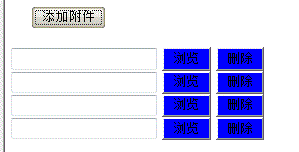
三個關鍵細節
透明度歸零、位置絕對。filter:alpha(opacity=0) 加上 position:absolute,讓真正的 file 輸入框變成看不見的透明層,蓋在自製的「瀏覽」按鈕上方。使用者點到的其實是它,瀏覽器檔案選擇器便正常開啟。注意 filter: alpha 是 IE 私有語法,現代瀏覽器請改用 opacity: 0。
onchange 把路徑寫回文字框。選好檔案後,透過 inputrecievedocument.value = this.value 把檔名顯示在旁邊的 read-only 文字欄,讓使用者看得到自己選了什麼。
form 別忘了 enctype。要上傳檔案,enctype="multipart/form-data" 是必要條件,少了它伺服器收不到檔案內容。
更現代的寫法建議
如果把 <input type="file"> 直接標籤在 HTML 裡,再用 <label for="fileInput"> 包住自製按鈕樣式,就能省掉透明度與座標計算那一整套 hack,程式碼短很多,也不必依賴已不推薦的 event.srcElement。若需要多檔上傳或拖放,加上 multiple 屬性並搭配 HTML5 的 File API 會更合適。
- 上一篇文章: JS 表單驗證:確保失效時間不早於生效時間
- 下一篇文章: JavaScript 隨機顏色七種寫法:從遞迴閉包到位運算