SOSO 地圖 API 實作(一):在地圖上畫圓的思路與程式碼
編輯:關於JavaScript
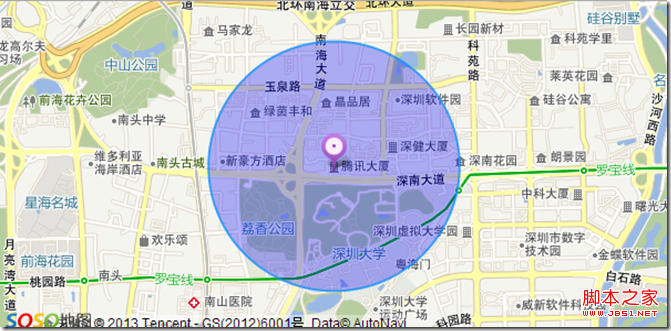
最近在開發 SOSO 地圖相關的功能,遇到畫圓的需求,趁記憶猶新記錄一下整個流程。整體步驟並不複雜:引入 API、準備容器、初始化地圖、建立圓形物件,最後再補上一個中心標記讓視覺更完整。
1. 引入 SOSO 地圖 API
<script charset="utf-8" src="https://api.map.soso.com/v1.0/main.js"></script>
2. 建立地圖容器
<div style="width:603px;height:300px" id="container"></div>
容器必須有明確的寬高,否則地圖不會顯示。
3. 初始化地圖
var center=new soso.maps.LatLng(22.540551,113.934593);
var map=new soso.maps.Map(document.getElementById("container"),{
center:center,
zoomLevel:14
});
4. 建立圓形物件
var circle=new soso.maps.Circle({
map:map,
center:center,
radius:1000,
fillColor:"#00f",
fillOpacity:0.3,
strokeWeight:2
});
這裡半徑的單位是公尺,填色透明度設為 0.3 是為了讓底圖仍可透視。
5. 加上中心標記
var marker = new soso.maps.Marker({
position: center,
map: map
});
var anchor = new soso.maps.Point(0, 0),
size = new soso.maps.Size(27, 35),
icon = new soso.maps.MarkerImage('https://s.map.soso.com/themes/default/img/centermarker.png'
, size//指定使用圖片部分的大小
, anchor//用來指定圖標的錨點,預設為圖標中心的位置
, new soso.maps.Point(0, 0)//指定使用圖片的哪一部分,相對圖片左上角的像素座標
, new soso.maps.Size(27, 35)//指定圖片的原始大小
, new soso.maps.Size(-12, -30));//向左偏 12px,向上偏 30px
marker.setIcon(icon);
var decor = new soso.maps.MarkerDecoration({
content: '',
margin: new soso.maps.Size(0, -4),
align: soso.maps.ALIGN.CENTER,
marker: marker
});
這段程式碼之所以看起來繁瑣,是因為 MarkerImage 需要明確交代圖片的尺寸、錨點與偏移量。其中最後一個參數是偏移量:圖片的左上角預設會對齊座標點,箭頭圖標若不做修正,尖端就會落在圓心右下方而非圓心上,因此要往左偏 12px、往上偏 30px 來補回來。
6. 完成後的效果
7. 完整程式碼
<!DOCTYPE html>
<html xmlns="https://www.w3.org/1999/xhtml">
<head>
<meta http-equiv="Content-Type" content="text/html; charset=utf-8" />
<title>SOSOMap</title>
<style type="text/css">
*{
margin:0px;
padding:0px;
}
body, button, input, select, textarea {
font: 12px/16px Verdana, Helvetica, Arial, sans-serif;
}
#info{
width:603px;
padding-top:3px;
overflow:hidden;
}
.btn{
width:190px;
}
</style>
<script charset="utf-8" src="https://api.map.soso.com/v1.0/main.js"></script>
<script type="text/javascript">
function init(){
var center=new soso.maps.LatLng(22.540551,113.934593);
var map=new soso.maps.Map(document.getElementById("container"),{
center:center,
zoomLevel:14
});
var circle=new soso.maps.Circle({
map:map,
center:center,
radius:1000,
fillColor:"#00f",
fillOpacity:0.3,
strokeWeight:2
});
var marker = new soso.maps.Marker({
position: center,
map: map
});
var anchor = new soso.maps.Point(0, 0),
size = new soso.maps.Size(27, 35),
icon = new soso.maps.MarkerImage('https://s.map.soso.com/themes/default/img/centermarker.png'
, size//指定使用圖片部分的大小
, anchor//用來指定圖標的錨點,預設為圖標中心的位置
, new soso.maps.Point(0, 0)//指定使用圖片的哪一部分,相對圖片左上角的像素座標
, new soso.maps.Size(27, 35)//指定圖片的原始大小
, new soso.maps.Size(-12, -30));//向左偏 12px,向上偏 30px
marker.setIcon(icon);
var decor = new soso.maps.MarkerDecoration({
content: '',
margin: new soso.maps.Size(0, -4),
align: soso.maps.ALIGN.CENTER,
marker: marker
});
var path1=[
center
];
var polyline = new soso.maps.Polyline({
path: path1,
strokeColor: '#000000',
strokeWeight: 5,
strokeOpacity: 1,
editable:false,
map: map
});
/*
soso.maps.Event.addListener(map,'zoomlevel_changed',function() {
circle.setMap(null);console.log(map);
circle.setMap(map);
});
*/
}
window.onload=init;
</script>
</head>
<body onload="init()">
<div style="width:603px;height:300px" id="container"></div>
</body>
</html>
補充說明
最後那段被註解掉的 zoomlevel_changed 事件,是為了處理一個實務上常見的狀況:部分地圖 API 在縮放後不會自動重繪覆蓋物,需要先把圓從地圖上摘掉再加回去,強制觸發一次繪製。若你在實作時遇到縮放後圓形位置跑掉或不顯示,可以試著把這段註解打開。
另外提醒,SOSO 地圖服務早已停止營運,這份程式碼如今僅具歷史參考價值。若要製作類似功能,建議改用開源的 Leaflet 搭配 OpenStreetMap,或是各家現行仍支援的地圖服務,其 Circle、Marker 與偏移量的概念與此處幾乎一致,理解一次即可通用。
- 上一篇文章: 用 jQuery 的 $.extend 讓函式參數更靈活
- 下一篇文章: script 的 async 屬性:以非阻塞模式載入外部腳本